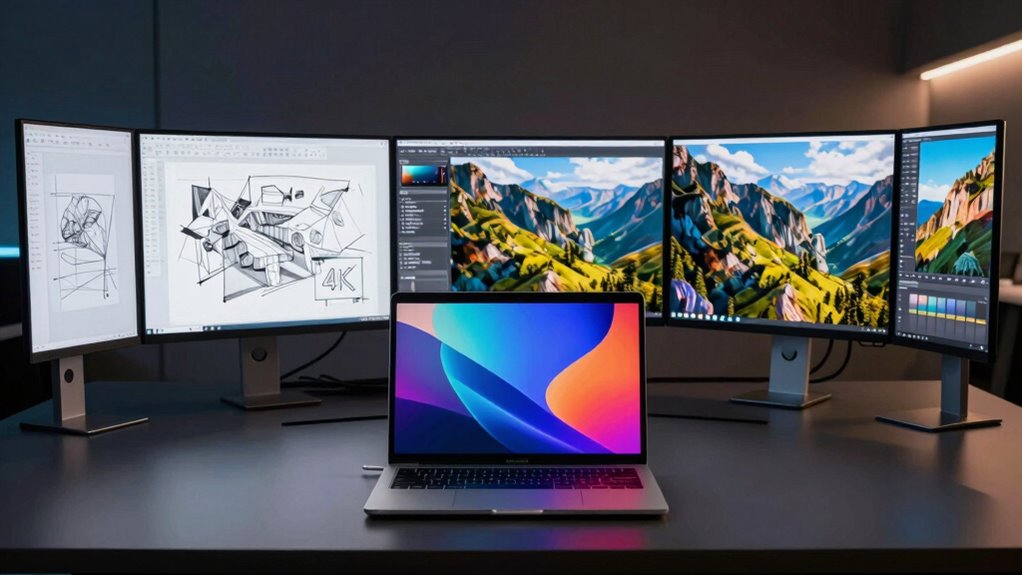

For MacBook designers aiming for stunning 4K visuals via USB-C, choosing the right monitor is essential. The best options offer high color accuracy, seamless connectivity, and reliable performance. The BenQ PD2706U stands out as the overall top pick thanks to its professional features, while the LG 27UN850-W offers excellent value with vibrant displays and USB-C. Tradeoffs typically involve balancing color precision, refresh rates, and price, making the decision more nuanced. Keep reading for a detailed breakdown to help you find the perfect fit for your creative workflow.

Get business pricing on monitors, keyboards and dev gear
- Business-only prices and quantity discounts
- Tax-exempt purchasing
- Multiple users, one account, clear invoices
Key Takeaways
- Color accuracy and wide gamuts like P3 are critical for professional design work.
- USB-C ports with power delivery simplify setup by reducing cable clutter.
- Higher refresh rates (120Hz) can benefit animation or video editing, but may add cost.
- Build quality and ergonomic features like height adjustment are key for long-term comfort.
- Premium monitors often include HDR support, but not all HDR standards are equal for design purposes.
| BenQ PD2706U 27″ 4K UHD Monitor with USB-C, KVM, and HDR |  | Best Overall for Professional Creatives | Screen Size: 27 inches | Resolution: 4K UHD | Color Coverage: 95% P3, 99% sRGB | VIEW ON AMAZON | See Our Full Breakdown |
| INNOCN 27-Inch 4K 120Hz HDR500 USB-C Monitor for MacBook and Mac mini |  | Best for Creators and Gamers Seeking Versatility | Size: 27 inches | Resolution: 4K UHD | HDR: HDR500 | VIEW ON AMAZON | See Our Full Breakdown |
| LG 27U730A 27” 4K UHD IPS Monitor with HDR10 and USB-C |  | Best for Versatile Daily Use with Good Color | Display Size: 27 inches | Resolution: 3840×2160 UHD | Panel Type: IPS | VIEW ON AMAZON | See Our Full Breakdown |
| LG 27UN850-W Ultrafine 27-Inch UHD 4K IPS Monitor with VESA DisplayHDR 400, AMD FreeSync, USB-C |  | Best for Creative and Gaming Balance | Display Size: 27 inches | Resolution: 3840×2160 UHD | Color Gamut: 99% sRGB | VIEW ON AMAZON | See Our Full Breakdown |
| INNOCN 32-Inch 4K 120Hz HDR400 USB-C Monitor for MacBook/Mac Mini |  | Best for Large Studio-Grade Creative Work | Size: 32 inches | Resolution: 4K UHD | Refresh Rate: 120Hz | VIEW ON AMAZON | See Our Full Breakdown |
| ASUS ProArt PA279CV 27-Inch 4K UHD USB-C Professional Monitor |  | Best Overall for Color Accuracy and Versatility | Display Size: 27 inches | Resolution: 4K UHD (3840 x 2160) | Panel Type: IPS | VIEW ON AMAZON | See Our Full Breakdown |
| ASUS ProArt PA279CRV 27-Inch 4K UHD HDR Professional Monitor for Mac |  | Best for HDR Content Creation and Ergonomics | Display Size: 27 inches | Resolution: 4K UHD (3840 x 2160) | Display Technology: LCD LED | VIEW ON AMAZON | See Our Full Breakdown |
| BenQ MA270U 27” 4K Monitor for MacBook with USB-C, P3 Color Gamut, Adjustable Stand | 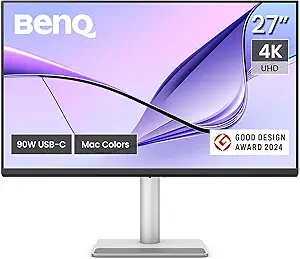 | Best for Seamless MacBook Integration and Ergonomics | Display Size: 27 inches | Resolution: 4K UHD (3840 x 2160) | Color Gamut: P3 | VIEW ON AMAZON | See Our Full Breakdown |
| usb c 4k monitor for macbook designer | Resolution | HDR | Display Size | Connectivity |
|---|---|---|---|---|
| BenQ PD2706U 27" 4K UHD Monito | 4K UHD | DisplayHDR 400 | — | — |
| INNOCN 27-Inch 4K 120Hz HDR500 | 4K UHD | HDR500 | — | — |
| LG 27U730A 27” 4K UHD IPS Moni | 3840×2160 UHD | HDR10 | 27 inches | — |
| LG 27UN850-W Ultrafine 27-Inch | 3840×2160 UHD | DisplayHDR 400 | 27 inches | USB-C, HDMI |
| INNOCN 32-Inch 4K 120Hz HDR400 | 4K UHD | HDR400 | — | USB-C, HDMI 2.1, DP1.4 |
| ASUS ProArt PA279CV 27-Inch 4K | 4K UHD (3840 x 2160) | — | 27 inches | USB-C with 65W Power Delivery, DisplayPort, HDMI, USB 3.1 |
| ASUS ProArt PA279CRV 27-Inch 4 | 4K UHD (3840 x 2160) | — | 27 inches | USB-C with 96W Power Delivery |
| BenQ MA270U 27” 4K Monitor for | 4K UHD (3840 x 2160) | — | 27 inches | USB-C with 90W Power Delivery |
More Details on Our Top Picks
BenQ PD2706U 27″ 4K UHD Monitor with USB-C, KVM, and HDR
The BenQ PD2706U stands out for its exceptional color accuracy, with 95% P3 and 99% sRGB coverage, making it ideal for professional designers working on color-critical projects. Compared with the LG 27U730A, it offers more comprehensive factory calibration, ensuring consistent output straight out of the box. Its 90W USB-C Power Delivery and KVM switch streamline multi-device workflows, reducing clutter and boosting efficiency. The ergonomic design supports long hours of work with comfort, but the premium price tag may be a barrier for casual users or hobbyists. This monitor is best suited for creative professionals who prioritize color fidelity and connectivity features over affordability.
Pros:- High color accuracy with wide P3 and sRGB coverage
- Seamless connectivity with 90W USB-C and KVM switch
- Ergonomic design for extended comfort
Cons:- Premium price may be high for casual or entry-level users
- Limited to professional and creative workflows, lacking gaming features
Best for: Professional designers and creative studios needing precise color calibration and seamless multi-device management
Not ideal for: Casual users or students on a tight budget who don’t require high color accuracy or advanced features
- Screen Size:27 inches
- Resolution:4K UHD
- Color Coverage:95% P3, 99% sRGB
- Panel Type:IPS
- HDR:DisplayHDR 400
- USB-C Power Delivery:90W
Our verdict“This monitor is a top pick for professionals who need precise color and reliable multi-device connectivity.”
INNOCN 27-Inch 4K 120Hz HDR500 USB-C Monitor for MacBook and Mac mini
The INNOCN 27-Inch 4K 120Hz HDR500 offers a rare blend of high resolution, excellent color accuracy (DeltaE <1), and high refresh rates—ideal for users who need precise visuals and smooth motion. Unlike the LG 27UN850-W, which focuses more on standard color accuracy, this model emphasizes fast refresh rates and HDR support, making it suitable for both detailed design work and casual gaming. Its single USB-C connection delivers 90W power, simplifying cable management, but the stock stand’s limited adjustability may be a drawback for ergonomic setups. This monitor makes the most sense for creatives who also want to enjoy media or gaming without sacrificing color fidelity.
Pros:- Excellent color accuracy with DeltaE <1 and HDR500 support
- Single USB-C cable for video, data, and charging
- High refresh rate options for smooth motion
Cons:- Stock stand may limit ergonomic flexibility
- Premium price for feature-rich performance
Best for: Creative professionals who also value gaming or multimedia performance in their workspace
Not ideal for: Users strictly focused on color-critical work requiring extensive ergonomic adjustments, or those on a limited budget
- Size:27 inches
- Resolution:4K UHD
- HDR:HDR500
- Color Accuracy:DeltaE <1
- Refresh Rate:120Hz / 240Hz
- Input Options:USB-C, HDMI 2.1, DisplayPort 1.4
Our verdict“Designed for creators who want a versatile display that balances color precision with fast refresh rates and multimedia capabilities.”
LG 27U730A 27” 4K UHD IPS Monitor with HDR10 and USB-C
The LG 27U730A offers vibrant visuals with 90% DCI-P3 and HDR10 support, making it suitable for creative work that benefits from accurate color reproduction. Its fully adjustable stand, including height, tilt, and swivel, provides tailored comfort for long working hours, setting it apart from less flexible models like the INNOCN 27-Inch 4K. While it supports 90W USB-C charging, comparable to others in the lineup, its high price may deter budget-conscious buyers. It lacks detailed info about built-in speakers or extra ports, which could limit convenience. This monitor is ideal for professionals who want a reliable, adjustable display without the extra gaming features found in some competitors.
Pros:- Vivid 4K resolution with DCI-P3 90% coverage
- Fully adjustable stand for ergonomic comfort
- USB-C with 90W power delivery
Cons:- Limited details on built-in audio or extra ports
- Potentially high price for some users
Best for: Designers and professionals seeking a versatile, adjustable 4K display with reliable color accuracy
Not ideal for: Gamers or users needing extensive connectivity options beyond USB-C and HDR support
- Display Size:27 inches
- Resolution:3840×2160 UHD
- Panel Type:IPS
- Color Coverage:DCI-P3 90%
- HDR:HDR10
- USB-C Power Delivery:90W
Our verdict“A solid choice for users who prioritize flexibility and color fidelity in a dependable workspace monitor.”
LG 27UN850-W Ultrafine 27-Inch UHD 4K IPS Monitor with VESA DisplayHDR 400, AMD FreeSync, USB-C
The LG 27UN850-W combines 99% sRGB coverage and HDR400 support, making it appealing for both creative professionals and gamers. Its 60Hz refresh rate limits fast-paced gaming but is sufficient for most design work. Compared with the INNOCN 27-Inch 4K 120Hz, it offers a more standard refresh rate but includes AMD FreeSync, which can reduce screen tearing during casual gaming. The USB-C port delivers 60W charging, which is slightly less than some competitors, but still practical for most MacBook setups. The glossy finish and minimalist design may not suit all environments. This monitor suits users who need a balanced display for both creative tasks and occasional gaming, prioritizing color accuracy and connectivity over high refresh rates.
Pros:- High-resolution 4K display with 99% sRGB coverage
- HDR 400 support for improved visuals
- USB-C with 60W charging
Cons:- Limited refresh rate for fast gaming
- Glossy finish may cause glare
Best for: Creatives who want a reliable, color-accurate display that also supports casual gaming
Not ideal for: Hardcore gamers or users needing ultra-high refresh rates and maximum connectivity options
- Display Size:27 inches
- Resolution:3840×2160 UHD
- Color Gamut:99% sRGB
- HDR:DisplayHDR 400
- Refresh Rate:60 Hz
- Connectivity:USB-C, HDMI
Our verdict“A well-rounded monitor for creative work and light gaming, perfect for users needing reliable color accuracy and decent connectivity.”
INNOCN 32-Inch 4K 120Hz HDR400 USB-C Monitor for MacBook/Mac Mini
The INNOCN 32-Inch 4K 120Hz HDR400 offers an expansive 32-inch display with professional-grade color accuracy, covering 100% sRGB and 98% DCI-P3, making it ideal for detailed creative projects. Its 120Hz refresh rate ensures smooth visuals, especially when working with motion or video editing. Unlike smaller 27-inch models, this large screen provides ample workspace, but its size and bulk might be impractical for small desks or portable setups. The extensive connectivity options, including HDMI 2.1 and DP1.4, ensure future-proof compatibility. This monitor suits creative professionals needing a large, accurate display with high refresh rates for video editing, animation, or detailed design work.
Pros:- Large 32-inch 4K display with studio-grade color accuracy
- 120Hz refresh rate for smooth motion
- Multiple versatile connectivity options including HDMI 2.1 and DP1.4
Cons:- Bulky for small or cluttered workspaces
- Higher price point due to size and features
Best for: Creative professionals requiring large, color-accurate displays for detailed work or multimedia editing
Not ideal for: Users with limited desk space or those who prefer more portable or space-efficient monitors
- Size:32 inches
- Resolution:4K UHD
- Refresh Rate:120Hz
- HDR:HDR400
- Color Coverage:100% sRGB, 98% DCI-P3
- Connectivity:USB-C, HDMI 2.1, DP1.4
Our verdict“This large, high-precision monitor is tailored for professionals who need expansive workspace and top-tier color fidelity.”
ASUS ProArt PA279CV 27-Inch 4K UHD USB-C Professional Monitor
The ASUS ProArt PA279CV stands out for its exceptional color accuracy, factory-calibrated to Delta E < 2, making it ideal for detailed design work. Compared with the BenQ MA270U, it offers slightly more precise color reproduction and a broader color gamut with 100% sRGB and Rec. 709 support. Its versatile connectivity, including USB-C with 65W Power Delivery, makes it a flexible choice for MacBook users who need reliable performance across various devices. The 5-year warranty and included Adobe Creative Cloud subscription further enhance its value. However, the mention of a 23.8-inch display in the description appears to be a typo, which could cause confusion. While priced competitively for professional-grade monitors, the absence of specific pricing and customer ratings limits immediate assessment.
Pros:- High color accuracy with factory calibration and wide color gamut
- Versatile connectivity options including USB-C with Power Delivery
- Extended 5-year warranty plus a free Adobe Creative Cloud subscription
Cons:- Inconsistent mention of display size (23.8-inch vs. 27-inch), which could be confusing
- Lack of price information limits value comparison
Best for: Professional content creators and designers who prioritize color fidelity and versatile connectivity.
Not ideal for: Casual users or those seeking a budget-friendly option, as this monitor’s professional features come at a premium and the conflicting display size info can be confusing.
- Display Size:27 inches
- Resolution:4K UHD (3840 x 2160)
- Panel Type:IPS
- Color Gamut:100% sRGB, 100% Rec. 709
- Response Time:5.0 ms
- Connectivity:USB-C with 65W Power Delivery, DisplayPort, HDMI, USB 3.1
Our verdict“This monitor is perfect for professionals who need precise color and reliable connectivity, but beware of potential confusion regarding its size.”
ASUS ProArt PA279CRV 27-Inch 4K UHD HDR Professional Monitor for Mac
The ASUS ProArt PA279CRV is tailored for professionals working with HDR content, boasting 99% DCI-P3 and Adobe RGB coverage, which surpasses the standard sRGB gamut of the ASUS ProArt PA279CV. Its factory calibration ensures Delta E < 2, providing highly accurate colors out of the box, crucial for color-sensitive work. The monitor’s USB-C with 96W Power Delivery supports fast charging and data, making it ideal for MacBook users who need a seamless, clutter-free setup. Its ergonomic stand with multiple adjustments and support for daisy-chaining enhances productivity. The main drawback is its higher price, which may not appeal to budget-conscious buyers, and its 60Hz refresh rate limits fast-paced gaming. Heavyweight and large, it may also require a sturdy desk setup.
Pros:- Excellent HDR support with 99% DCI-P3 and Adobe RGB coverage
- Factory calibration with Delta E < 2 for precise colors
- Ergonomic stand with height, tilt, swivel, and pivot adjustments
Cons:- Higher price point compared to non-HDR monitors
- Limited to 60Hz refresh rate, less ideal for fast-paced gaming
Best for: Professional designers and video editors needing HDR support and extensive color coverage with ergonomic flexibility.
Not ideal for: Casual users or gamers seeking higher refresh rates, as the 60Hz refresh rate may feel limiting for fast motion content.
- Display Size:27 inches
- Resolution:4K UHD (3840 x 2160)
- Display Technology:LCD LED
- Color Gamut:99% DCI-P3, 99% Adobe RGB
- Brightness:400 cd/m²
- Connectivity:USB-C with 96W Power Delivery
Our verdict“This monitor excels for HDR professionals needing accurate, wide-gamut colors with ergonomic setup options, but at a higher cost and lower refresh rate.”
BenQ MA270U 27” 4K Monitor for MacBook with USB-C, P3 Color Gamut, Adjustable Stand
The BenQ MA270U offers a compelling balance of vibrant P3 wide color coverage and ergonomic flexibility, making it a strong choice for MacBook users who favor a single-cable setup. Compared with the ASUS models, its 90W USB-C Power Delivery provides slightly less charging power but still supports most MacBook models efficiently. Its adjustable stand—height, tilt, swivel, and pivot—ensures comfort across long work sessions. The monitor’s focus on user-friendly controls for brightness and volume adds to its appeal. However, its compatibility is primarily optimized for MacBook, which might limit use with other systems. The absence of built-in speakers could be a drawback for those seeking an all-in-one solution. Price-wise, it’s positioned at a premium, reflecting its high-quality build and features.
Pros:- Vibrant P3 wide color gamut for accurate Mac colors
- Single USB-C connection for display and power (90W) simplifies setup
- Adjustable stand providing ergonomic flexibility
Cons:- Limited to MacBook compatibility, restricting multi-device use
- No mention of built-in speakers or HDR support
Best for: MacBook users who prioritize easy setup, vibrant colors, and ergonomic comfort without needing HDR support.
Not ideal for: Users seeking HDR or high-fidelity color beyond P3, or those on a tighter budget, as it carries a premium price tag.
- Display Size:27 inches
- Resolution:4K UHD (3840 x 2160)
- Color Gamut:P3
- Connectivity:USB-C with 90W Power Delivery
- Stand Adjustments:Height, tilt, swivel, pivot
- Display Technology:LCD LED
Our verdict“This monitor is ideal for MacBook users who want seamless integration and vibrant display quality, with a focus on ergonomics and simplicity.”

How We Picked
These monitors were evaluated based on a combination of performance, build quality, connectivity, and value. Priority was given to color accuracy, with features like P3 or Adobe RGB coverage, essential for MacBook designers working with precise visuals. The availability of USB-C with power delivery was a key factor, ensuring a clean, single-cable setup. We also considered ergonomic features, display size, and overall user experience, aiming to recommend models that suit both professional workflows and budget-conscious buyers. The ranking reflects a balance between professional-grade features and practical usability for MacBook users.| usb c 4k monitor for macbook designer | HDR | Connectivity |
|---|---|---|
| BenQ PD2706U 27" 4K UHD Monito | DisplayHDR 400 | — |
| INNOCN 27-Inch 4K 120Hz HDR500 | HDR500 | — |
| LG 27U730A 27” 4K UHD IPS Moni | HDR10 | — |
| LG 27UN850-W Ultrafine 27-Inch | DisplayHDR 400 | USB-C, HDMI |
| INNOCN 32-Inch 4K 120Hz HDR400 | HDR400 | USB-C, HDMI 2.1, DP1.4 |
| ASUS ProArt PA279CV 27-Inch 4K | — | USB-C with 65W Power Delivery, DisplayPort, HDMI, USB 3.1 |
| ASUS ProArt PA279CRV 27-Inch 4 | — | USB-C with 96W Power Delivery |
| BenQ MA270U 27” 4K Monitor for | — | USB-C with 90W Power Delivery |
Factors to Consider When Choosing Usb C 4k Monitor For Macbook Designers
Choosing a USB-C 4K monitor for MacBook design work involves considering several factors beyond just resolution. Understanding these can help you avoid common pitfalls, such as sacrificing color accuracy for lower price or neglecting ergonomic comfort. Here are the key considerations to keep in mind:Color Accuracy and Gamut Coverage
For design professionals, color fidelity is non-negotiable. Look for monitors that support wide color gamuts like P3 or Adobe RGB, which provide richer, more accurate colors. Calibration capabilities are also important for maintaining color consistency over time. A display with high color accuracy ensures your work looks the same across different devices and print outputs, making it a vital factor in your choice.
Connectivity and Power Delivery
Since MacBook users rely heavily on USB-C, ensure the monitor has a robust USB-C port supporting power delivery (PD) to charge your laptop while connected. This simplifies your workspace by reducing cable clutter. Check the wattage supported; most MacBooks need at least 60W, but higher wattage can benefit future-proofing and other peripherals. Multiple USB-C ports can also add flexibility for connecting additional devices.
Display Size and Resolution
4K resolution is standard, but the physical size impacts usability. Larger screens (27 inches and above) provide more workspace, which is helpful for detailed design work. However, larger displays demand higher GPU performance and can be more costly. Balance your space constraints with the need for ample screen real estate, especially if you work with multiple windows or detailed graphics.
Ergonomics and Build Quality
Extended hours at your desk mean ergonomic comfort should be a priority. Look for monitors with height adjustment, tilt, and swivel options to reduce strain. Build quality affects durability and long-term usability; a sturdy stand and quality materials justify higher prices. These features contribute to a more comfortable and productive working environment, especially during long design sessions.
HDR and Additional Features
While HDR is attractive, not all HDR formats serve design workflows equally. HDR10 and DisplayHDR 400/600 differ in quality and impact. For MacBook designers, accurate color representation often outweighs HDR benefits, but some high-end models include HDR for media editing. Consider whether these extra features align with your primary use—professional design or multimedia work—and whether the added cost is justified.
Frequently Asked Questions
Do I need a monitor with 120Hz refresh rate for MacBook design work?
For static design work, a high refresh rate offers little advantage, as 60Hz or 75Hz are sufficient. However, if you also use your monitor for video editing, animation, or gaming, a 120Hz display can provide smoother motion and more precise editing. Consider your primary use case—most MacBook designers will find 60Hz perfectly adequate, but a higher refresh rate can add flexibility if you work with multimedia content.
Is HDR important for a professional MacBook monitor?
HDR can enhance media viewing, but for color-accurate design work, it’s less critical than wide color gamuts and calibration. Many HDR standards prioritize contrast and brightness over color precision, which may not benefit professional workflows. If your focus is on detailed, color-critical tasks like photo editing or branding, look for monitors with excellent color coverage rather than HDR support.
Can I use a standard 4K monitor with my MacBook without issues?
Many standard 4K monitors work perfectly with MacBooks via USB-C, but compatibility isn’t guaranteed for all features. Ensure the monitor supports USB-C with power delivery and is compatible with macOS for optimal performance. Some cheaper models may lack calibration options or have color inaccuracies, so verify specifications carefully to avoid surprises.
What’s more important: higher resolution or better color accuracy?
For MacBook designers, color accuracy typically outweighs resolution beyond 4K. A 4K display with poor color reproduction won’t serve your needs well, whereas a slightly lower resolution but highly accurate display can produce better results. Prioritize monitors with wide color gamuts and calibration support to ensure your work looks consistent across devices.
Should I invest in a professional-grade monitor or a more affordable one?
The decision depends on your work demands and budget. Professional-grade monitors with wide color gamuts, calibration features, and robust build quality are better suited for serious design work but come at a higher cost. More affordable models can suffice for casual or hobbyist use, but they might lack the precision and durability required for professional projects. Weigh your accuracy needs against your budget to make the best choice.
Conclusion
For those seeking the best overall experience, the BenQ PD2706U offers professional features, reliable color accuracy, and seamless connectivity. Budget-conscious buyers will find great value in the LG 27UN850-W, which balances performance and affordability. For premium setups, the ASUS ProArt PA279CV provides exceptional calibration and build quality. Beginners or casual users might prefer simpler models like the BenQ MA270U, which still delivers solid 4K visuals without overwhelming complexity. Ultimately, your choice should reflect your specific workflow, budget, and the importance you place on color fidelity and ergonomic comfort.”
Halloween Picks
halloween
As an affiliate, we earn on qualifying purchases.