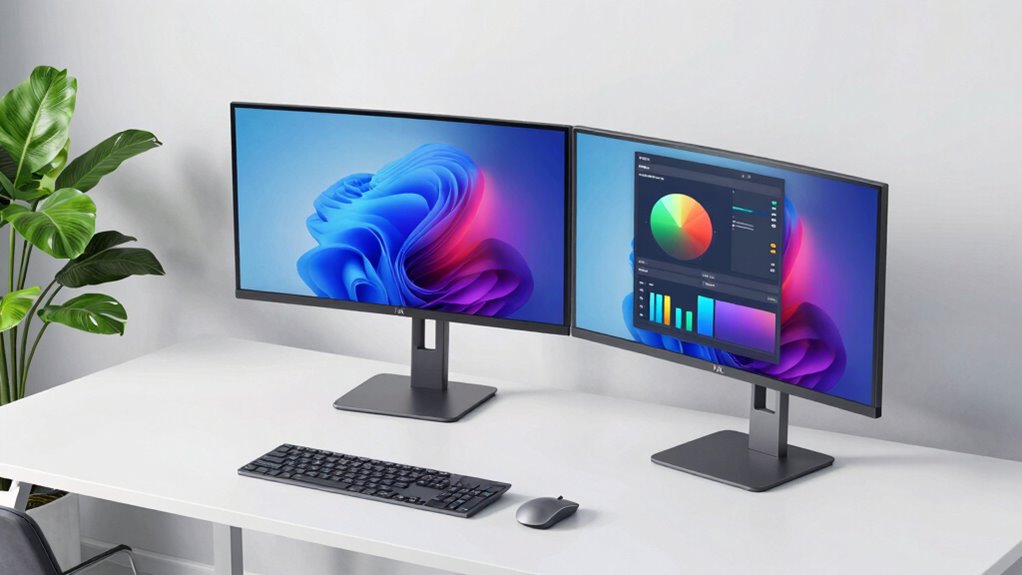
Choosing a 4K monitor for office work isn’t just about resolution; it’s also about comfort, flexibility, and connectivity. The LG Smart Monitor Swing 32U889SA-W stands out for its fully adjustable stand and touchscreen capabilities, perfect for versatile work environments. Meanwhile, the Samsung ViewFinity S8 offers exquisite color accuracy and ergonomic features suited for long hours. The LG 27UP650K-W balances affordability with excellent ergonomics and HDR support, ideal for professionals who want a lot for less. Each option has distinct strengths and tradeoffs, making the right choice dependent on your specific needs.

Get business pricing on monitors, keyboards and dev gear
- Business-only prices and quantity discounts
- Tax-exempt purchasing
- Multiple users, one account, clear invoices
Key Takeaways
- The LG Smart Monitor Swing excels in versatility with its touchscreen and mobility features, but comes at a higher price.
- Samsung‘s ViewFinity S8 provides superb color accuracy and ergonomic adjustments, making it suitable for detailed visual tasks.
- The LG 27UP650K-W offers a good mix of ergonomic flexibility and affordability for office professionals.
- Premium features like built-in OS and high-end connectivity come with higher costs and complexity.
- Size and refresh rate are important tradeoffs; larger screens and higher refresh rates often mean higher investment and space requirements.
| LG Smart Monitor Swing 32U889SA-W 32-Inch 4K UHD IPS Touchscreen Monitor with Adjustable Stand and webOS |  | Best Overall for Versatility and Touchscreen Functionality | Size: 32 inches | Resolution: 3840×2160 (4K UHD) | Display Type: IPS touchscreen | VIEW ON AMAZON | See Our Full Breakdown |
| LG 32UR550K-B 32-inch 4K UHD HDR Computer Monitor |  | Best for Color and HDR Quality | Screen Size: 32 inches | Resolution: 3840 x 2160 (4K UHD) | HDR: HDR10 | VIEW ON AMAZON | See Our Full Breakdown |
| Samsung 32″ ViewFinity S8 (S80UH) High-Resolution Monitor |  | Best for Color Accuracy and Ergonomics | Size: 32 inches | Resolution: 3840×2160 (4K UHD) | USB-C Power Delivery: 90W | VIEW ON AMAZON | See Our Full Breakdown |
| Dell 27 Monitor S2725QS 4K UHD IPS, 120Hz, FreeSync Premium |  | Best for Smooth Visuals and Versatility | Size: 27 inches | Resolution: 3840×2160 (4K UHD) | Refresh Rate: 120Hz | VIEW ON AMAZON | See Our Full Breakdown |
| LG 27UP650K-W 27-inch 4K UHD IPS Computer Monitor with HDR400 |  | Best Budget-Friendly Ergonomic 4K Monitor | Display Size: 27 inches | Resolution: 3840×2160 (4K UHD) | HDR: DisplayHDR 400 | VIEW ON AMAZON | See Our Full Breakdown |
| 4k monitor with ergonomic stand for office | Resolution | HDR | Size | Refresh Rate |
|---|---|---|---|---|
| LG Smart Monitor Swing 32U889S | 3840×2160 (4K UHD) | — | 32 inches | — |
| LG 32UR550K-B 32-inch 4K UHD H | 3840 x 2160 (4K UHD) | HDR10 | — | 60Hz |
| Samsung 32" ViewFinity S8 | 3840×2160 (4K UHD) | HDR10+ | 32 inches | — |
| Dell 27 Monitor S2725QS 4K UHD | 3840×2160 (4K UHD) | HDR ready | 27 inches | 120Hz |
| LG 27UP650K-W 27-inch 4K UHD I | 3840×2160 (4K UHD) | DisplayHDR 400 | — | 60Hz |
More Details on Our Top Picks
LG Smart Monitor Swing 32U889SA-W 32-Inch 4K UHD IPS Touchscreen Monitor with Adjustable Stand and webOS
This monitor stands out for its fully adjustable wheeled stand and 32-inch touchscreen, making it a versatile choice for those who want a device that adapts to various tasks. Its high-resolution 4K IPS display delivers vibrant colors and sharp images, perfect for multimedia, multitasking, and even light gaming. The built-in webOS provides streaming and productivity apps without needing a separate PC, adding convenience. Compared with other options, its mobility and touchscreen are unique benefits, but its premium price and slightly variable touchscreen responsiveness might be drawbacks for some users.
Pros:- Flexible, fully adjustable stand with rolling base
- High-resolution 4K touchscreen with vibrant color reproduction
- Multiple ports including USB-C and HDMI
- Built-in webOS for streaming and productivity
Cons:- Premium price point
- Touchscreen responsiveness can vary
- Limited to 32 inches, which might be small for some multitaskers
Best for: Office workers who want an all-in-one display with mobility and touch features
Not ideal for: Users seeking a dedicated, high-refresh-rate gaming monitor or those on a tight budget
- Size:32 inches
- Resolution:3840×2160 (4K UHD)
- Display Type:IPS touchscreen
- Brightness:350 nits
- Color Gamut:up to 95% DCI-P3
- Ports:3 USB-C, 2 HDMI
- Power Delivery:up to 65W
- Stand:Fully adjustable with tilt, swivel, height, and pivot
- Built-in OS:webOS
Our verdict“A flexible, feature-rich monitor ideal for users who value mobility, touchscreen capability, and all-in-one functionality but at a higher cost.”
LG 32UR550K-B 32-inch 4K UHD HDR Computer Monitor
This model is well-suited for users who prioritize image quality and ergonomic adjustments. Its 32-inch 4K UHD display supports HDR10, delivering vivid visuals for editing or media consumption. The adjustable stand supports tilt, height, and pivot, enhancing comfort during long work sessions. However, its 60Hz refresh rate limits its appeal for high-end gaming, and it lacks some connectivity options like USB-C, which could be a drawback for those with modern devices. Compared to touchscreen models, its focus on visual fidelity makes it more suitable for detailed creative work.
Pros:- Vivid 4K UHD HDR display with rich colors
- Adjustable stand for personalized comfort
- HDR10 support for enhanced visuals
- Good size for multitasking
Cons:- Limited to 60Hz refresh rate
- No built-in speakers
- Lacks USB-C or advanced ports
Best for: Content creators or professionals needing accurate colors and HDR support
Not ideal for: Gamers requiring high refresh rates or users wanting built-in smart features
- Screen Size:32 inches
- Resolution:3840 x 2160 (4K UHD)
- HDR:HDR10
- Refresh Rate:60Hz
- Connectivity:HDMI, DisplayPort
- Stand Adjustments:Tilt, Height, Pivot
Our verdict“A strong choice for creative professionals who need vibrant visuals and ergonomic flexibility, but not for high-refresh gaming or smart integrations.”
Samsung 32″ ViewFinity S8 (S80UH) High-Resolution Monitor
The Samsung ViewFinity S8 combines high pixel density with excellent ergonomic features. Its USB-C port delivers 90W charging, reducing cable clutter, while the built-in LAN port and KVM switch support streamline multitasking. The monitor supports HDR10+ and offers tilt, swivel, and height adjustments, making it highly adaptable for prolonged use. Its complex feature set may be overwhelming for casual users, and its size may demand ample desk space. Nonetheless, it excels in delivering detailed visuals and ergonomic comfort.
Pros:- High-resolution 4K UHD display with accurate colors
- USB-C with 90W charging and LAN port
- Ergonomic tilt, swivel, and height adjustments
- Eye saver mode for reducing eye strain
Cons:- Higher price point
- Large size requires ample desk space
- Feature-rich interface may have a learning curve
Best for: Professionals needing high accuracy and multiple connectivity options in a large display
Not ideal for: Budget-conscious buyers or users with limited desk space
- Size:32 inches
- Resolution:3840×2160 (4K UHD)
- USB-C Power Delivery:90W
- HDR:HDR10+
- Connectivity:USB-C, LAN port
- Features:KVM switch, PIP, PBP, ergonomic stand
Our verdict“An excellent choice for professionals who need precise visuals and flexible connectivity, though its complexity and cost may deter casual users.”
Dell 27 Monitor S2725QS 4K UHD IPS, 120Hz, FreeSync Premium
The Dell S2725QS offers a compelling mix of 4K clarity and high refresh rate, making it suitable for both work and entertainment. Its IPS panel ensures accurate color reproduction, while the 120Hz refresh rate provides smoother motion, beneficial for multimedia editing or casual gaming. The ultra-thin bezel design creates a sleek workspace, and ComfortView Plus reduces blue light emissions. However, its 27-inch size might be too small for users needing expansive multitasking space, and it lacks built-in speakers, requiring external audio options.
Pros:- Vivid 4K visuals with accurate color
- High 120Hz refresh rate for smooth motion
- Blue light reduction for extended use
- Sleek ultra-thin bezel design
Cons:- Limited to 27 inches, smaller workspace
- No built-in speakers
- Price premium for high refresh rate and features
Best for: Users who want a versatile monitor for both productivity and media, with an emphasis on smooth visuals
Not ideal for: High-end gamers seeking ultra-high refresh rates or those requiring built-in speakers
- Size:27 inches
- Resolution:3840×2160 (4K UHD)
- Refresh Rate:120Hz
- Panel Type:IPS
- Color Coverage:99% sRGB
- HDR:HDR ready
- Response Time:5ms
Our verdict“A solid pick for office users who value visual quality and smoothness, but its size and lack of speakers limit its use for some multimedia tasks.”
LG 27UP650K-W 27-inch 4K UHD IPS Computer Monitor with HDR400
This monitor offers a compelling blend of affordability and ergonomic features, making it suitable for budget-conscious office users. Its 27-inch IPS panel supports HDR400, providing vibrant visuals suitable for streaming and professional work. The adjustable stand with height, tilt, and pivot ensures comfortable viewing angles, and the multiple connectivity options add flexibility. The main tradeoff is its 60Hz refresh rate, which might not satisfy gamers or those needing ultra-smooth motion, but for typical office tasks, it delivers excellent value.
Pros:- Vivid 4K UHD display with wide color gamut
- HDR400 support for enhanced visuals
- Ergonomic stand with height, tilt, and pivot
- Multiple connectivity options including HDMI and DisplayPort
Cons:- Limited to 60Hz refresh rate
- Response time of 5ms may be insufficient for competitive gaming
- No built-in speakers
Best for: Budget-conscious professionals needing ergonomic adjustments and decent visual quality
Not ideal for: High-end gaming or users requiring ultra-high refresh rates or advanced features
- Display Size:27 inches
- Resolution:3840×2160 (4K UHD)
- HDR:DisplayHDR 400
- Refresh Rate:60Hz
- Panel Type:IPS
- Color Gamut:95% DCI-P3
- Stand Adjustments:Height, tilt, pivot
Our verdict“A budget-friendly, ergonomic 4K monitor that balances cost and features well suited for everyday office work.”

How We Picked
Our selection process focused on monitors that combine 4K resolution with ergonomic stands suitable for office environments. We prioritized adjustable stands offering tilt, swivel, height, and pivot adjustments, ensuring comfort during long work sessions. Connectivity options like USB-C, HDMI, and DisplayPort were key, along with features that enhance productivity, such as color accuracy, HDR support, and built-in OS or smart features. We balanced performance, flexibility, and price to identify models that cater to different user needs while maintaining a focus on ergonomic design and overall usability.
| 4k monitor with ergonomic stand for office | HDR |
|---|---|
| LG Smart Monitor Swing 32U889S | — |
| LG 32UR550K-B 32-inch 4K UHD H | HDR10 |
| Samsung 32" ViewFinity S8 | HDR10+ |
| Dell 27 Monitor S2725QS 4K UHD | HDR ready |
| LG 27UP650K-W 27-inch 4K UHD I | DisplayHDR 400 |
Factors to Consider When Choosing 4k Monitor With Ergonomic Stand For Office
When selecting a 4K monitor for office use, the key factors extend beyond resolution. Ergonomic stand adjustments—such as tilt, swivel, height, and pivot—are vital for long-term comfort. Connectivity options like USB-C, HDMI, and DisplayPort influence compatibility with your devices. Size matters: larger screens improve multitasking but require more desk space. Features like HDR support, color accuracy, and high refresh rates can enhance your experience, especially if your work involves detailed visuals or multimedia. A balanced approach ensures you find a monitor that boosts productivity without sacrificing comfort or breaking the bank.
Size and Ergonomics
Choosing the right screen size depends on your workspace and multitasking needs. 27- to 32-inch monitors offer ample real estate for office tasks, with adjustable stands that help position the display for optimal comfort. Tilt, swivel, height, and pivot adjustments reduce neck and eye strain, especially during long hours. Larger screens like 32 inches are better for detailed work, while smaller options can save desk space. Prioritize models with ergonomic stands to maintain comfort throughout your workday.
Connectivity and Compatibility
Look for monitors with versatile ports such as USB-C, HDMI, and DisplayPort. USB-C is increasingly important for modern laptops, offering both video and charging capabilities through a single cable. HDMI and DisplayPort ensure compatibility with a wide range of devices, including desktops and docks. Consider your current setup and future needs—more ports can reduce cable clutter and improve workflow flexibility. Monitors with built-in features like KVM switches can further simplify multitasking across multiple devices.
Display Quality and Features
Resolution alone isn’t enough; color accuracy, HDR support, and refresh rate significantly impact usability. For detailed work, look for wide color gamuts like DCI-P3 or Adobe RGB. HDR support enhances visual richness, especially for media consumption. Refresh rates of 60Hz are standard for office tasks, but higher rates like 120Hz benefit multimedia editing and casual gaming. Response times matter less for typical office use, but a good IPS panel guarantees consistent color and wide viewing angles. Balance these features according to your workflow priorities.
Frequently Asked Questions
Why is ergonomic stand adjustment important for office monitors?
Ergonomic stand adjustments are vital because they allow you to position the monitor at the optimal height, tilt, and angle, reducing neck, shoulder, and eye strain. Proper ergonomics can significantly improve comfort during extended work sessions and help prevent repetitive strain injuries. Monitors with adjustable stands support a healthier posture and enable you to customize your workspace for maximum productivity and comfort.
Is a 27-inch monitor enough for multitasking in an office setting?
Yes, a 27-inch monitor generally provides sufficient screen real estate for multitasking, especially if it has high resolution and adjustable ergonomics. It strikes a balance between workspace and desk space, making it popular for office use. However, some users may prefer larger screens or dual monitor setups for extensive multitasking, depending on their specific workflow and available space.
Should I prioritize a touchscreen monitor for office work?
Touchscreens can be useful for interactive tasks, presentations, or quick annotations, but they are not essential for most office work. They tend to come at a premium and may introduce additional reflections or fingerprints. If your tasks involve frequent touch interactions, then a touchscreen monitor makes sense; otherwise, a standard adjustable monitor will typically suffice and be more cost-effective.
How important is color accuracy and HDR support in an office monitor?
Color accuracy and HDR support are especially important for creative professionals involved in editing photos, videos, or graphics. For general office tasks, these features enhance visual clarity and reduce eye strain but are not strictly necessary. If your work involves visual precision or media consumption, prioritizing these features can improve your overall experience and output quality.
What is the main tradeoff when choosing a larger monitor with ergonomic features?
While larger monitors with ergonomic stands improve comfort and multitasking, they often come with higher costs and require more desk space. Additionally, larger screens might be heavier and less portable, making them less suitable for flexible or small workspaces. Balancing size, budget, and available space is key to selecting the right monitor that meets your ergonomic and workspace needs.
Conclusion
For office workers prioritizing maximum flexibility and multimedia features, the LG Smart Monitor Swing is an excellent choice despite its premium price. Creative professionals needing precise visuals should consider the Samsung ViewFinity S8, while budget-conscious users seeking ergonomic adjustments will find the LG 27UP650K-W delivers solid value. Those who want a high-refresh-rate display for casual multimedia or multitasking might prefer the Dell S2725QS. Each option caters to different needs, so weigh your priorities around workspace comfort, visual fidelity, and connectivity.
Halloween Picks
halloween
As an affiliate, we earn on qualifying purchases.