
📊 Full opportunity report: One markdown file, publish-ready for every platform on IdeaNavigator AI — validation score, market gap, and execution plan.

Get business pricing on monitors, keyboards and dev gear
- Business-only prices and quantity discounts
- Tax-exempt purchasing
- Multiple users, one account, clear invoices
TL;DR
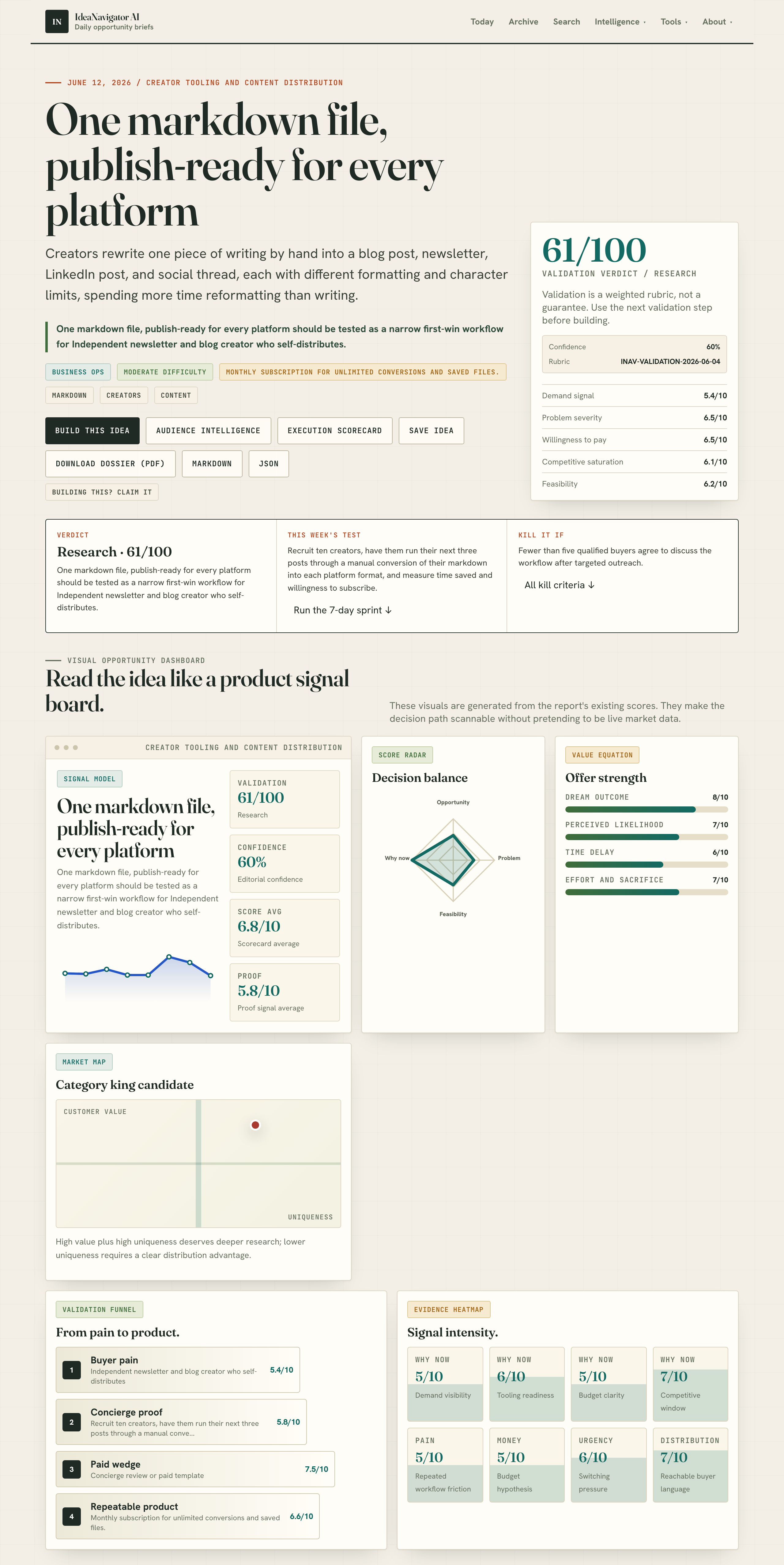
A new web tool allows creators to paste one markdown file and instantly generate formatted versions for blogs, newsletters, and social media. This reduces manual reformatting, saving time and effort. The service is launching with a subscription model and aims to serve the creator economy.
A new web-based tool has been launched that enables creators to convert a single markdown file into multiple formats suitable for blogs, newsletters, and social media platforms, simplifying content distribution and reducing manual reformatting efforts.
The tool, developed by IdeaNavigator AI, allows users to paste one markdown document and receive automatically generated versions optimized for different platforms, including HTML for blogs, plain text for newsletters, and character-limited snippets for social media posts like LinkedIn. This addresses a key challenge faced by independent creators, who often spend significant time reformatting content for each platform.
According to the developers, the MVP aims to streamline workflows for creators who self-distribute their content across multiple channels, reducing the repetitive work involved. The service will operate on a subscription basis, offering unlimited conversions and saved files for a monthly fee. Validation plans include recruiting ten creators to test the tool by converting their upcoming posts and measuring time savings and willingness to subscribe.
Streamlining Content Distribution for Independent Creators
This development could significantly reduce the manual workload for independent newsletter and blog creators, enabling them to publish more efficiently across multiple platforms. By automating the formatting process, creators can focus more on content quality rather than technical adjustments, potentially increasing output and engagement. The tool also addresses the fragmentation of the creator economy, where content must be tailored for various channels, often with inconsistent formatting. If successful, this approach could influence the broader creator tooling market, encouraging more automated solutions and easing the technical barriers for self-publishing.Popular right now

Vitamix Propel Series 750 Professional-Grade Blender, 4 Programs, Black

Dyson Cyclone V10 Origin Cordless Vacuum

Ninja DualZone Smart Air Fryer, 10 Qt, 6-in-1, DZ950
As an affiliate, we earn on qualifying purchases.
Addressing Manual Reformatting Challenges in the Creator Economy
The creator economy has seen rapid growth, with many independent creators managing multiple distribution channels such as blogs, newsletters, LinkedIn, and short-form social media. Currently, they often manually reformat content for each platform, which is time-consuming and prone to inconsistency. Existing tools require separate workflows, leading to duplicated effort. The new tool by IdeaNavigator AI aims to consolidate this process, offering a single input (a markdown file) and multiple outputs tailored for different channels. This approach reflects ongoing efforts to develop integrated content management solutions for creators, with validation through early testing planned to measure efficiency gains.“Reducing manual reformatting can free up significant time for creators, allowing them to produce more content or improve quality.”
— an anonymous researcher
Unclear Aspects of the Tool’s Adoption and Effectiveness
It is not yet clear how widely the tool will be adopted among creators or how well it will perform across diverse content types and formatting complexities. The effectiveness of the conversions in preserving formatting fidelity and the user experience during testing remain to be seen. Additionally, the long-term sustainability of the subscription model and potential competition are still uncertain.
Next Steps for Validation and Market Adoption
IdeaNavigator AI plans to recruit ten creators for beta testing, where they will use the tool for their upcoming posts, providing feedback on time savings and usability. Based on this, further development and refinement will follow. The company also intends to monitor user adoption and gather data to evaluate the tool’s impact on workflow efficiency. If successful, a wider launch and possible integrations with existing content management platforms are expected.
Key Questions
How does the tool convert markdown into platform-specific formats?
The tool automatically processes the markdown file to generate HTML for blogs, plain text for newsletters, and character-limited snippets for social media, while preserving heading hierarchy and basic formatting.
Is this tool suitable for all types of content?
The tool is designed for general markdown content but may face limitations with highly complex or media-rich posts. Its effectiveness will be evaluated during beta testing.
What is the pricing model for the service?
The service will operate on a monthly subscription basis, offering unlimited conversions and saved files for a fixed fee.
When will the tool be publicly available?
The beta testing phase is ongoing, with wider release planned after initial validation. Exact launch dates have not been announced.
Will the tool support additional platforms in the future?
Future updates may include support for other social media formats and integration with content management systems, depending on user feedback and demand.
Source: IdeaNavigator AI