🔍 Read the full analysis: 10 Graphics Cards That Balance Gaming And Professional Use In 2027 on ThorstenMeyerAI.com

Get business pricing on monitors, keyboards and dev gear
- Business-only prices and quantity discounts
- Tax-exempt purchasing
- Multiple users, one account, clear invoices
TL;DR
A ThorstenMeyerAI.com guide compares 10 graphics cards for gaming and professional workloads, ranging from current high-end models to older display-focused cards. The guide discusses workload, budget, VRAM, cooling, power requirements and software support; it does not provide benchmark results or prices.
ThorstenMeyerAI.com has published a guide to 10 graphics cards for gaming and professional workloads, including the ASUS ROG Astral GeForce RTX 5080 and older cards such as the RX 550. The guide discusses differences in performance, features and intended use, but does not provide benchmark results or prices.
The guide names the RTX 5080 as its overall pick, citing ray-tracing capability, cooling and overclocking headroom. It also highlights the ASUS Dual RTX 5060 Ti series as a mid-range option, and says its 16GB of GDDR7 memory may suit buyers seeking more capacity for games and creative work. Those are the source’s assessments; it does not include standardized benchmarks, pricing comparisons or independent test results to substantiate a performance ranking. Readers can also review what to look for in a graphics card when comparing options.
For AMD, the guide presents the Radeon RX 9070 XT as an alternative for workloads that emphasize traditional rasterized graphics. It also includes older cards, including the RX 580, RX 550 and GeForce GT 730, for narrower needs such as legacy systems or multi-display output. The source cautions that low-end models are not appropriate choices for modern gaming, while the RX 580 may lack support for new games. For more options focused on AI workloads, see graphics cards for AI processing.
The 10 products named in the source are the ASUS ROG Astral GeForce RTX 5080, PNY RTX 5080, ASUS Dual GeForce RTX 5060 Ti, Radeon RX 9070 XT, RTX 3060, VisionTek RX 580, RX 550 and GT 730, along with RX 9070 and RX 9070 XT-class options described in its comparison. The source does not provide a fully itemized ranked list that clearly identifies all 10 distinct card models or their individual test results, so readers should verify exact model names and specifications before buying.
The 10 picks
- 1
 ASUS ROG Astral GeForce RTX 5080 OC Edition 16GB GDDR7 Graphics CardView on Amazon →
- 2
 PNY NVIDIA GeForce RTX 5080 OC Triple-Fan Graphics CardView on Amazon →
- 3
 ASUS Prime Radeon RX 9070 XT 16GB GDDR6 OC Edition Gaming Graphics CardView on Amazon →
- 4
 ASUS Prime Radeon RX 9070 EVO 16GB GDDR6 OC Gaming Graphics CardView on Amazon →
- 5
 ASUS Dual GeForce RTX 5060 Ti 16GB GDDR7 White OC Edition Graphics CardView on Amazon →
- 6
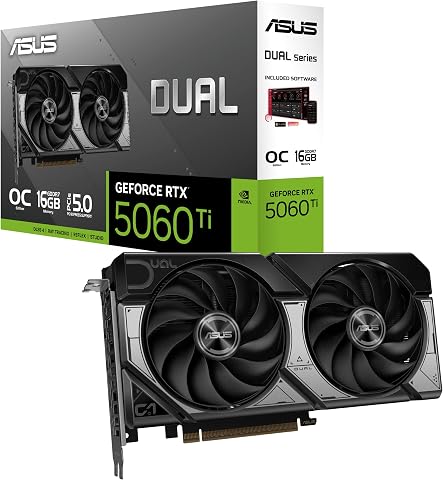 ASUS Dual GeForce RTX 5060 Ti 16GB GDDR7 OC Edition Gaming Graphics CardView on Amazon →
- 7
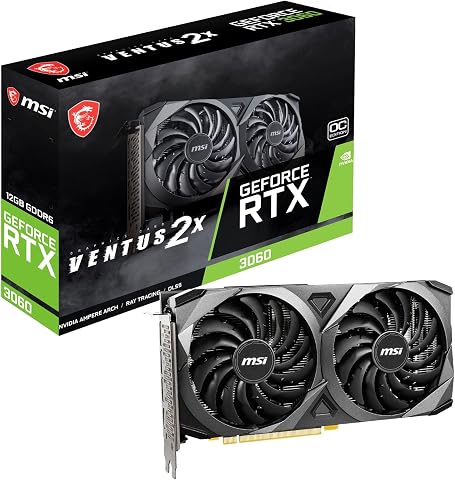 MSI GeForce RTX 3060 Ventus 2X 12G OC V1 Graphics CardView on Amazon →
- 8
 VisionTek AMD Radeon RX 580 8GB Graphics Card with 6 Mini DisplayPort OutputsView on Amazon →
- 9
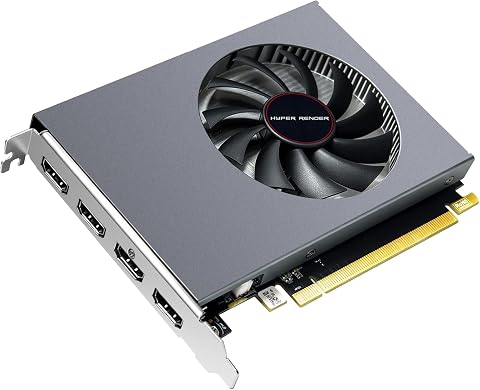 RX 550 4GB GDDR5 Graphics Card 4 HDMI GPU Tarjeta Gráfica 4 Port Video cardView on Amazon →
- 10
 Vandossy GeForce GT 730 4GB GDDR5 Graphics Card with 4 HDMI PortsView on Amazon →
Matching GPU Features to Workloads
The guide compares cards for gaming and professional workloads, which can have different hardware requirements. Ray tracing, AI-assisted rendering and current game features depend on newer hardware, while editing, 3D rendering and other professional tasks can hinge on application-specific acceleration and memory. A card’s suitability therefore depends on the workload and software involved.
The guide also discusses system requirements beyond the purchase price. High-end cards can require a larger case, stronger cooling and a suitable power supply; a compact mid-range card may fit more systems but run hotter or louder under sustained load. Buyers should check clearances, connectors and recommended PSU capacity before installation.
Popular right now

Ninja CREAMi 7-in-1 Ice Cream Maker, NC299AMZ

Dyson Airwrap Co-anda2x Multi-Styler and Dryer for Curly and Coily Hair, Ceramic Pink/Rose Gold (2025)

Vitamix 62827 Vita-Prep Blender, Black, 32 oz
As an affiliate, we earn on qualifying purchases.
How the Guide Compares Cards
The source says it judged cards using architecture generation, memory bandwidth and thermal efficiency, with build quality, connectivity and form factor also considered. It favors newer architectures such as NVIDIA’s RTX 50-series and AMD’s RX 9000-series, and says it prioritized at least 8GB of VRAM for gaming models. These are the guide’s selection criteria, not a published test methodology with measured scores.
Its broader buying advice focuses on matching hardware to software. The article points to NVIDIA CUDA and NVENC as relevant to some creative workflows, while noting AMD’s gaming features and FSR. It advises users of tools such as Adobe Premiere, Blender and DaVinci Resolve to check application support. The guide does not compare performance across those programs or provide driver-support timelines, so those details need separate verification.
“The main tradeoff lies between paying for cutting-edge architecture and accepting older technology for cost savings.”
— ThorstenMeyerAI.com guide
Missing Prices and Test Results
The source provides no prices, benchmark figures, test system details or publication date. Its descriptions of thermal performance, overclocking headroom and relative value are presented as editorial judgments, not as results tied to a disclosed testing process. It also does not clearly enumerate 10 distinct models in a complete ranked table, despite promising a 10-card comparison.
Availability and specifications can vary by manufacturer and region, and the guide does not establish whether each product remains on sale or receives current drivers. Its claims about VRAM needs and professional software support should be checked against the games, applications and card variants a buyer actually intends to use.
Verify Models Before Buying
Readers considering a card should confirm its exact model, current price, memory configuration, physical dimensions, power connectors and manufacturer support. They should also compare independent benchmarks for the specific games and creative applications they use, since the source does not publish measured results.
A future revision could include a dated price snapshot, a complete list of all 10 distinct cards and comparable tests across gaming and professional workloads. In its current form, the guide does not provide those details.
Key Questions
Which card does the guide recommend overall?
It names the ASUS ROG Astral GeForce RTX 5080 as its overall premium choice, citing cooling, ray tracing and overclocking headroom. The source does not provide benchmark data to independently verify that ranking.
What does the guide recommend for a mid-range buyer?
It points to the ASUS Dual GeForce RTX 5060 Ti series and highlights a 16GB memory configuration. Buyers should confirm the specific card variant and check current pricing and application performance.
Are the RX 550 and GT 730 suitable for modern games?
The guide describes these as display-output and light-task cards, not suitable choices for modern gaming. Their intended uses are basic tasks, legacy systems or display output.
Does the article prove which GPU is best for professional software?
No. It discusses differences such as CUDA, NVENC and AMD software features, but does not publish application benchmarks or a detailed compatibility comparison. Check support for the specific programs in your workflow.
Source: ThorstenMeyerAI.com