🔍 Read the full analysis: Need A More Capable Desk? Compare These 6 Thunderbolt Docks on ThorstenMeyerAI.com

Get business pricing on monitors, keyboards and dev gear
- Business-only prices and quantity discounts
- Tax-exempt purchasing
- Multiple users, one account, clear invoices
TL;DR
A buying guide from ThorstenMeyerAI.com compares six Thunderbolt docks, ranking Anker’s Prime 14-in-1 Thunderbolt 5 Dock first for buyers seeking newer-generation bandwidth and a broad selection of connections. The other options include four Thunderbolt 4 models, with differences in charging, display support and fit for particular computers; the guide cautions that a dock’s advertised ports do not guarantee the same results on every host.
ThorstenMeyerAI.com has compared six Thunderbolt docking stations, ranking the Anker Prime 14-in-1 Thunderbolt 5 Dock as its best overall pick and outlining five Thunderbolt 4 alternatives. The original analysis highlights a practical choice for buyers upgrading a desk: newer bandwidth and more connections may be useful, but the right dock still depends on a computer’s display limits, operating system and charging requirements.
The guide places Anker’s Thunderbolt 5 dock first for buyers who want newer-generation bandwidth and a broad set of connections, as discussed in this overview of Thunderbolt docks. It recommends the Plugable TBT-UDM as a fit for Thunderbolt 4 setups and describes the Dell Pro SD25TB4 as an option for buyers seeking a current Dell dock. Those rankings are the source’s assessments, not independent test results supplied in the material.
The remaining choices are the Plugable 100W Thunderbolt 4 dock and Dell’s WD19TB and WD19TBS, among the Thunderbolt dock picks for 2027. The guide says the Plugable model centers on 100-watt charging and dual-monitor use. For the WD19TB, it identifies a listed 180-watt power adapter and 130-watt Power Delivery as configuration details buyers should check against laptop needs. It does not provide equivalent detailed specifications for every model.
The comparison says its rankings reflect connection generation, host compatibility, charging, display support, port variety and the clarity of each dock’s intended use. It also warns that port count alone is not a reliable measure of compatibility: the computer and operating system can limit which screens work and at what settings. The source does not include benchmark results or a standardized test protocol in the supplied material.
The 6 picks
- 1
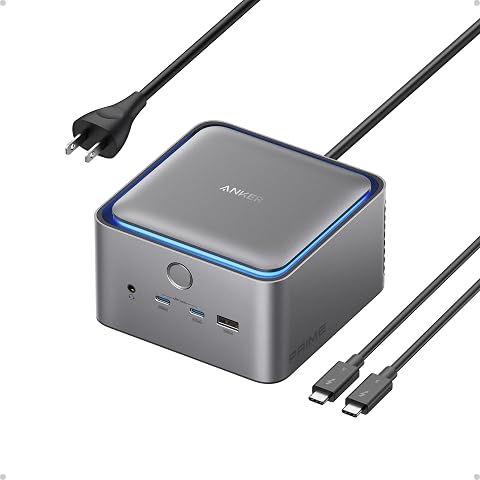 Anker Prime 14-in-1 Thunderbolt 5 Docking StationView on Amazon →
- 2
 Dell Pro Thunderbolt 4 Smart Dock SD25TB4 – USB-C Station 130W, 4 Displays 4K…View on Amazon →
- 3
 Plugable Thunderbolt 4 Dock with 100W Charging, Dual MonitorView on Amazon →
- 4
 Plugable Thunderbolt 4 Dock (TBT-UDM) for Mac and WindowsView on Amazon →
- 5
 Dell WD19TB Thunderbolt Docking Station with 180W AC AdapterView on Amazon →
- 6
 Dell Thunderbolt Dock WD19TBS with 130W Power DeliveryView on Amazon →
Match the Dock to Your Computer
A dock can simplify a desk by connecting displays and peripherals through one device, but a mismatch can leave buyers paying for features their computer cannot use. A Thunderbolt 5 model may offer more bandwidth headroom than a Thunderbolt 4 dock, yet the host must support the relevant connection for that advantage to matter. Buyers with Thunderbolt 4 laptops and routine office needs may find a Thunderbolt 4 option adequate.
Display and power decisions can be just as consequential as the connection generation. A dock’s advertised number of display outputs does not establish that a particular laptop can drive every monitor at its preferred resolution or refresh rate. Likewise, a power adapter’s rating and the power delivered to a laptop are not necessarily the same figure. Checking the host’s specifications before purchase can help avoid a dock that fails to meet a real desk requirement.
Popular right now

Vitamix 5-Speed Immersion Blender, 625-Watt, Stainless Steel/Black

Ninja Foodi Smart 6-in-1 Indoor Grill and Air Fryer, 4 Qt, FG551

Ninja Crispi Microwave and Air Fryer with FusionCrisp, Silver, MW101
As an affiliate, we earn on qualifying purchases.
How the Six Models Differ
The comparison groups one Thunderbolt 5 dock with five Thunderbolt 4 choices. Its ranking favors Anker for buyers who want newer-generation capacity, while the Plugable TBT-UDM and Dell Pro SD25TB4 serve different Thunderbolt 4 priorities. The two Dell WD19 models may make sense for buyers matching an existing Dell setup, but their power configurations should not be treated as interchangeable.
The source’s buying advice is to begin with the laptop and the devices that will remain connected. Buyers are urged to check the computer’s exact port specification, operating-system support, the monitors’ resolution and inputs, and whether the dock’s charging output meets the laptop’s needs. It also recommends counting the ports that will be used at the same time, rather than choosing solely by the number printed in a product name or listing.
“A dock’s port count alone does not guarantee that every screen or peripheral will work as expected.”
— ThorstenMeyerAI.com comparison
Compatibility Depends on the Host
The supplied comparison does not give a publication date, full specifications for all six docks, current prices, warranty details or a model-by-model test record. It also does not establish that every advertised display configuration will work across all computers. The exact result can depend on laptop model, operating system, connection type and monitor settings, so buyers should verify those details with the computer and dock specifications before relying on a particular setup.
The source mentions the WD19TB’s 180-watt adapter and 130-watt Power Delivery, but does not fully explain how those figures apply across laptop models or compare every dock’s delivered charging power. Its rankings should be read as editorial recommendations rather than universal compatibility findings.
Check Specifications Before Buying
The comparison does not announce a later test, product launch or follow-up date. For readers choosing among the six models, the next step is to confirm their computer’s Thunderbolt or USB-C capabilities, required charging power and supported external-display setup. They should also match each monitor and peripheral to the dock’s available connection types, including any adapters the setup would require.
Before replacing a laptop charger, buyers should compare the laptop maker’s power recommendation with the dock’s stated charging output. Those who need two or more screens should confirm the exact supported configuration for their computer and operating system. The guide’s rankings provide a starting point, but the source leaves the final compatibility check to the specific desk setup.
Key Questions
Which dock does the comparison rank first?
ThorstenMeyerAI.com ranks the Anker Prime 14-in-1 Thunderbolt 5 Dock first, citing its newer-generation bandwidth positioning and broad connection set. That is the guide’s editorial ranking, not a finding from test results included in the supplied material.
Are all six docks Thunderbolt 5 models?
No. The comparison covers one Thunderbolt 5 dock from Anker and five Thunderbolt 4 options: two from Plugable and three from Dell.
Does a dock with multiple display ports support every monitor setup?
No. The source says display support depends on the computer, operating system, monitor settings and connection type. Check the exact supported display configuration for the laptop and dock before buying.
What should buyers check about charging?
Compare the laptop maker’s power requirement with the dock’s charging output, and do not assume an adapter’s wattage rating is the same as power delivered to the laptop. The guide calls out the WD19TB’s listed 180-watt adapter and 130-watt Power Delivery as figures to assess against the computer’s needs.
Source: ThorstenMeyerAI.com