
🔍 Read the full analysis: Need Storage On The Go? 13 Best Portable SSDs For 2027 on ThorstenMeyerAI.com

Get business pricing on monitors, keyboards and dev gear
- Business-only prices and quantity discounts
- Tax-exempt purchasing
- Multiple users, one account, clear invoices
TL;DR
A buyer’s guide from ThorstenMeyerAI.com compares 13 portable SSD options, highlighting the Samsung T7 1TB as a balanced everyday choice and the Samsung T9 and SanDisk Extreme models for larger files or heavier workloads. The guide cautions that advertised maximum speeds depend on the host device, port, cable and workload; some product listings also show differing speed claims that buyers should verify.
ThorstenMeyerAI.com has published a buyer’s guide to 13 portable SSD options for 2027, recommending the Samsung T7 1TB as a balanced starting point while pointing buyers with larger files or heavier workloads toward the Samsung T9 and SanDisk Extreme lines. The guide stresses that speed figures are advertised maximums, not guaranteed transfer results, and depend on compatible hardware.
The guide ranks drives around advertised speed, capacity, connection requirements and portability, rather than treating the highest speed figure or largest capacity as the best choice for everyone. It describes the T7’s USB 3.2 Gen 2 connection as a practical fit for routine transfers that does not require a USB 3.2 Gen 2×2 port.
Samsung’s T9 options in 1TB, 2TB and 4TB are listed with advertised speeds of up to 2,000 MB/s. The guide says reaching that performance requires a compatible USB 3.2 Gen 2×2 host connection and suitable cable. It also notes that large transfers and many small-file workloads can fall short of published maximums.
SanDisk’s choices span standard Portable SSD models and the more rugged-style Extreme family. The guide points to 500GB for lighter carry needs and larger 2TB or 4TB options for growing media and project libraries. It warns that some SanDisk Extreme listings with similar names and capacities show different advertised speed claims, so shoppers should check the exact model specifications.
The 13 picks
- 1
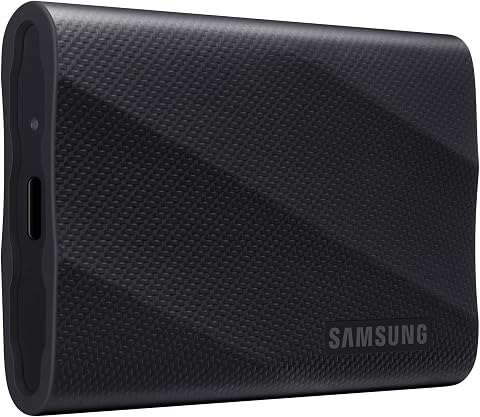 Samsung T9 Portable SSD 4TB, USB 3.2 Gen 2×2 External Solid State DriveView on Amazon →
- 2
 SanDisk Extreme Portable SSD, 4TB, Up to 2000MB/sView on Amazon →
- 3Samsung T9 Portable SSD 2TB, USB 3.2 Gen 2×2, Up to 2,000 MB/sView on Amazon →
- 4SanDisk Extreme Portable SSD, 2TB, Up to 2000MB/sView on Amazon →
- 5
 SanDisk Extreme 2TB Portable SSDView on Amazon →
- 6
 SanDisk 2TB Portable SSD, Up to 1000 MB/s Read Speed, BlackView on Amazon →
- 7Samsung T9 Portable SSD 1TB, USB 3.2 Gen 2×2, Up to 2,000 MB/sView on Amazon →
- 8SanDisk Extreme Portable SSD, 1TB, Up to 2000MB/sView on Amazon →
- 9
 Samsung T7 Portable SSD 1TB Titan Gray, USB 3.2 Gen 2, Up to 1,050MB/sView on Amazon →
- 10SanDisk 1TB Extreme Portable SSD, Up to 1050MB/sView on Amazon →
- 11SanDisk 1TB Portable SSD, Up to 1000MB/s Read Speed, BlackView on Amazon →
- 12SanDisk 500GB Portable SSD, Up to 1000MB/s Read Speed, BlackView on Amazon →
- 13
 SSK Portable SSD 500GB External Solid State Drive USB-C/USB-AView on Amazon →
Match SSD Speed to Your Devices
The practical buying decision is not simply which drive has the biggest speed number. A USB-C connector does not guarantee USB 3.2 Gen 2×2 performance, and a computer without that standard may not benefit from a premium drive’s advertised maximum. Checking the host port and cable before buying can help avoid paying for speed the setup cannot use.
Capacity and design also affect cost and everyday use. A smaller drive can be easier to carry for documents and current projects, while 2TB or 4TB models offer more room for large media collections. A rugged-style design may suit mobile work, but it does not remove the need for a separate copy of important files.
Popular right now

Ninja Foodi DZ401 DualZone XL Air Fryer, 10 Qt, 6-in-1, Grey

Ninja Air Fryer XL, 6.5 Qt, 6-in-1, MaxCrisp, Dark Grey (AF181)

Dyson V8 Cordless Vacuum
As an affiliate, we earn on qualifying purchases.
How the Guide Compares 13 Drives
The source describes its ordering as a comparison of speed, capacity, portability and workload fit, with balanced use favored over headline performance alone. Capacity variants are assessed for different buyers rather than assumed to be interchangeable, and standard SanDisk Portable SSD models are separated from the Extreme family.
The guide also advises checking formatting and device support when moving a drive between computers, tablets or phones. Reformatting can address some compatibility issues, but erases the drive; files should be copied elsewhere first. The supplied source material does not identify the other individual products in the 13-drive lineup, so their names and specifications cannot be independently detailed here.
“The Samsung T7 is the balanced starting point.”
— ThorstenMeyerAI.com buyer’s guide
Specifications Buyers Should Verify
The supplied material does not give a complete list of all 13 model names, prices, test results or availability. It presents published speed figures as maximum claims and does not provide controlled, side-by-side benchmark results. The guide also flags differing speed claims on some SanDisk Extreme listings without resolving which listing applies to every configuration.
Specific protection ratings for individual rugged-style models are not included in the source material. Buyers should confirm the exact product’s specifications rather than assume all models in a family have the same resistance to water, dust or impacts. The guide’s recommendation is a buying judgment, not evidence that one drive performs best in every setup.
Check Models Before You Buy
Shoppers can use the guide’s comparisons as a starting point, then check the exact model number, capacity and speed specification on the seller or manufacturer listing. They should confirm their device’s USB standard, cable compatibility and file-system needs before choosing a premium speed tier.
Because the source does not provide a dated test procedure or a full set of prices, buyers should verify current listings and availability at the time of purchase. The relevant next step is a match between the drive and the user’s own hardware and workload, not a promise that the top advertised speed will be reached.
Key Questions
Which portable SSD does the guide recommend for most buyers?
The guide names the Samsung T7 1TB as its balanced starting point, citing its USB 3.2 Gen 2 connection and everyday use case.
Can every computer reach the Samsung T9’s advertised speed?
No. The guide says the T9’s advertised maximum of up to 2,000 MB/s depends on a compatible USB 3.2 Gen 2×2 host connection and cable. Actual transfers can also vary by workload.
How much capacity should I choose?
The guide associates 500GB with lighter carry needs and larger 2TB or 4TB drives with growing media collections and project libraries. The right choice depends on the files you expect to keep on the drive.
Are SanDisk Extreme drives suitable for travel?
The guide describes the Extreme family as a more rugged-style option for mobile work, but advises checking the exact model’s documented protection details. A rugged design does not eliminate the risk of data loss.
Does the source provide a full list of all 13 drives?
The supplied source material describes the comparison and names several model families and capacities, but it does not identify every drive in the 13-product lineup.
Source: ThorstenMeyerAI.com