For most developers, I’d start with the ASUS ZenScreen MB229CF: its 21.5-inch Full HD screen offers more room for code than typical travel-size panels. The Lenovo ThinkVision M15 is a more conventional 15.6-inch choice, while the UPERFECT 18.5-Inch 120Hz suits people who want a larger workspace and smoother motion. The main tradeoffs are screen area versus portability, and a simple single display versus a bulkier laptop extender with multiple panels. I’ve compared the 15 options by developer-focused usability, connection needs, and how well each fits different work setups. Read on for the full breakdown and a guide to choosing the right screen for your coding routine.

Get business pricing on monitors, keyboards and dev gear
- Business-only prices and quantity discounts
- Tax-exempt purchasing
- Multiple users, one account, clear invoices
Key Takeaways
- The ASUS ZenScreen MB229CF leads for a larger single-screen workspace: its 21.5-inch Full HD format gives code, terminals, and documentation more room than the 15.6-inch travel models, at the cost of extra bulk.
- Most of the lineup centers on 15.6-inch Full HD panels: the ASUS MB16AC, MB16AHV, MB16ACV, MB169CK, Lenovo ThinkVision M15, MNN, KYY, and InnoView are closer substitutes than their different branding may suggest.
- Screen extenders solve a different problem from portable monitors: Vixtan, AetherSpark, and Wixzet add panels around a laptop, but their extra workspace brings more setup, mounting, and compatibility demands.
- Large-format options trade easy packing for desk comfort: the Acer PM191Q and UPERFECT 18.5-inch monitor offer more physical screen area than standard travel panels, while being less suited to frequent carry.
- For coding, connection and stand details can matter more than refresh rate: a dependable video connection, usable positioning, and a suitable power plan affect daily work more directly than a high refresh rate unless the monitor also serves gaming or animation.
| ASUS ZenScreen MB229CF 21.5-Inch Full HD 100Hz Portable Monitor |  | Best for a Spacious, Flexible Desk Setup | Screen size: 21.5 inches | Resolution: 1920 × 1080 (Full HD) | Panel: IPS, matte finish | VIEW LATEST PRICE | See Our Full Breakdown |
| ASUS ZenScreen MB16AC 15.6-Inch Full HD Portable Monitor |  | Best for Lightweight Office Travel | Screen size: 15.6 inches | Resolution: 1920 × 1080 | Panel: IPS LCD, glossy | VIEW LATEST PRICE | See Our Full Breakdown |
| MNN 15.6-Inch 1080p Portable IPS Monitor |  | Best Value for Matte-Screen Multitasking | Screen size: 15.6 inches | Resolution: 1920 × 1080 (Full HD) | Panel: IPS LCD, matte | VIEW LATEST PRICE | See Our Full Breakdown |
| Vixtan 14-Inch Triple Laptop Screen Extender, FHD IPS Portable Monitor |  | Best for a Laptop-Attached Second Screen | Screen size: 14 inches | Resolution: 1920 × 1080 (FHD) | Panel: IPS LCD, anti-glare | VIEW LATEST PRICE | See Our Full Breakdown |
| KYY 15.6-Inch Portable FHD Monitor with Smart Cover | 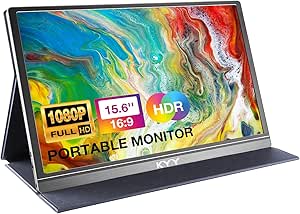 | Best for Simple, Cable-Flexible Setup | Screen size: 15.6 inches | Resolution: 1920 × 1080 | Panel: IPS LCD, matte | VIEW LATEST PRICE | See Our Full Breakdown |
| Lenovo ThinkVision M15 15.6-Inch Full HD Portable LCD Monitor, Raven Black |  | Best for Power-Pass-Through Simplicity | Screen size: 15.6 inches | Resolution: 1920 × 1080 (Full HD) | Panel and finish: LCD, glossy | VIEW LATEST PRICE | See Our Full Breakdown |
| AetherSpark 16-Inch Triple Laptop Monitor Extender, 1920 × 1200 IPS Displays |  | Best for Maximum Multitasking | Display configuration: Two 16-inch IPS displays | Resolution: 1920 × 1200 pixels | Aspect ratio: 16:10 | VIEW LATEST PRICE | See Our Full Breakdown |
| Wixzet 15.6-Inch Detachable Laptop Screen Extender |  | Best for Flexible Screen Arrangements | Screen size: 15.6 inches | Resolution: 1920 × 1080 (Full HD) | Display technology: IPS LCD | VIEW LATEST PRICE | See Our Full Breakdown |
| Acer PM191Q 18.5-Inch Full HD Portable Monitor |  | Best for a Larger Single Screen | Screen size: 18.5 inches | Resolution: 1920 × 1080 (Full HD) | Panel and finish: IPS LCD, matte | VIEW LATEST PRICE | See Our Full Breakdown |
| ASUS ZenScreen MB16AHV 15.6-Inch 1080p Portable Monitor |  | Best for Flexible, Low-Glare Desk Setups | Screen size: 15.6 inches | Resolution: 1920 × 1080 | Panel and finish: IPS, matte | VIEW LATEST PRICE | See Our Full Breakdown |
| ASUS ZenScreen MB16ACV 15.6-Inch Full HD Portable Monitor |  | Best for Flexible Desk and Portrait Work | Screen size: 15.6 inches | Resolution: 1920 × 1080 | Panel and finish: IPS, anti-glare | VIEW LATEST PRICE | See Our Full Breakdown |
| 14.2-Inch FHD Laptop Screen Extender, 1080p IPS, 1.87 lb |  | Best for Laptop-Mounted Multitasking | Screen size: 14.2 inches | Resolution: 1920 × 1080 | Panel: IPS LCD | VIEW LATEST PRICE | See Our Full Breakdown |
| InnoView 15.6-Inch Portable FHD Monitor with HDMI, USB-C, and Protective Cover |  | Best for Flexible Cable Compatibility | Screen size: 15.6 inches | Resolution: 1920 × 1080 | Panel and finish: IPS, matte | VIEW LATEST PRICE | See Our Full Breakdown |
| ASUS ZenScreen MB169CK 15.6-Inch 1080p Portable Monitor | 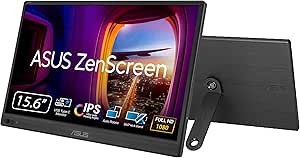 | Best for Versatile Mounting | Screen size: 15.6 inches | Resolution: 1920 × 1080 | Panel and finish: IPS, matte anti-glare | VIEW LATEST PRICE | See Our Full Breakdown |
| UPERFECT 18.5-Inch 120Hz Portable Monitor |  | Best for a Large, High-Refresh Workspace | Screen size: 18.5 inches | Resolution: 1920 × 1080 | Panel: IPS | VIEW LATEST PRICE | See Our Full Breakdown |
| portable monitors for developer | Resolution | Screen size | Refresh rate | Brightness |
|---|---|---|---|---|
| ASUS ZenScreen MB229CF 21.5-In | 1920 × 1080 (Full HD) | 21.5 inches | 100 Hz | 250 cd/m² |
| ASUS ZenScreen MB16AC 15.6-Inc | 1920 × 1080 | 15.6 inches | 60 Hz | 220 cd/m² |
| MNN 15.6-Inch 1080p Portable I | 1920 × 1080 (Full HD) | 15.6 inches | — | 300 |
| Vixtan 14-Inch Triple Laptop S | 1920 × 1080 (FHD) | 14 inches | 60 Hz | 300 nits |
| KYY 15.6-Inch Portable FHD Mon | 1920 × 1080 | 15.6 inches | 60 Hz | 300 cd |
| Lenovo ThinkVision M15 15.6-In | 1920 × 1080 (Full HD) | 15.6 inches | 60 Hz | 250 cd/m² |
| AetherSpark 16-Inch Triple Lap | 1920 × 1200 pixels | — | 60 Hz | 350 nits |
| Wixzet 15.6-Inch Detachable La | 1920 × 1080 (Full HD) | 15.6 inches | 60 Hz | 300 nits |
| Acer PM191Q 18.5-Inch Full HD | 1920 × 1080 (Full HD) | 18.5 inches | 100 Hz | — |
| ASUS ZenScreen MB16AHV 15.6-In | 1920 × 1080 | 15.6 inches | 60 Hz | 250 (unit not specified) |
| ASUS ZenScreen MB16ACV 15.6-In | 1920 × 1080 | 15.6 inches | 60 Hz | — |
| 14.2-Inch FHD Laptop Screen Ex | 1920 × 1080 | 14.2 inches | — | 300 nits |
| InnoView 15.6-Inch Portable FH | 1920 × 1080 | 15.6 inches | 60 Hz | 250 cd/m² |
| ASUS ZenScreen MB169CK 15.6-In | 1920 × 1080 | 15.6 inches | 60 Hz | 300 nits |
| UPERFECT 18.5-Inch 120Hz Porta | 1920 × 1080 | 18.5 inches | 120 Hz | 250 cd/m² |
More Details on Our Top Picks
ASUS ZenScreen MB229CF 21.5-Inch Full HD 100Hz Portable Monitor
For developers who want more room for code without committing to a fixed desk monitor, the ASUS ZenScreen MB229CF offers a much larger workspace than the 15.6-inch ASUS ZenScreen MB16AC. Its 21.5-inch matte IPS screen makes side-by-side editor and documentation windows easier to read, while the 100Hz refresh rate keeps scrolling and cursor movement smoother than on the 60Hz options here. USB-C with up to 60W power delivery can reduce cable clutter when paired with a compatible laptop, and HDMI gives you another connection path.
The flexibility comes with a portability cost: at 2.2 kg, it is better for moving between rooms than for daily backpack carry. Its Full HD resolution is less sharp at this size than a higher-resolution panel, and 250 cd/m² brightness may struggle in very bright spaces. The C-clamp, kickstand, and partition hook make it the strongest choice for varied desk setups, not the lightest travel pick.
Pros:- 21.5-inch display gives code, terminals, and documentation more room than the 15.6-inch models.
- 100Hz refresh rate makes scrolling and general interface movement smoother than the 60Hz ASUS ZenScreen MB16AC.
- USB-C supports up to 60W power delivery, alongside HDMI and an earphone jack.
- Kickstand, adjustable C-clamp, partition hook, and VESA mounting support varied workspaces.
Cons:- At 2.2 kg, it is less convenient to carry regularly than the 1.5-pound MNN 15.6-inch monitor.
- Full HD resolution on a 21.5-inch panel provides less detail per inch than smaller Full HD options.
- 250 cd/m² brightness may be limiting in bright rooms.
Best for: Developers who work across home, office, or shared desks and want a large secondary screen with several mounting options.
Not ideal for: Commuters who carry a monitor every day, or developers who need high pixel density or a screen suited to bright outdoor use.
- Screen size:21.5 inches
- Resolution:1920 × 1080 (Full HD)
- Panel:IPS, matte finish
- Refresh rate:100 Hz
- Brightness:250 cd/m²
- Connectivity:USB-C with 60W power delivery, HDMI, earphone jack
- Weight:2.2 kg
- Mounting:Kickstand, height-adjustable C-clamp, partition hook, VESA 100 × 100
Our verdict“Choose the MB229CF if a roomy, adaptable workspace matters more than keeping your everyday carry light.”
ASUS ZenScreen MB16AC 15.6-Inch Full HD Portable Monitor
The ASUS ZenScreen MB16AC is the straightforward travel companion in this group: its 15.6-inch IPS screen gives a laptop a familiar second display, while the 1.7-pound body is easier to pack than the larger ASUS ZenScreen MB229CF. The included smart case supports landscape and portrait positions, and auto-rotation helps when a developer wants a tall view for logs, long files, or documentation. Flicker-free backlighting and a blue light filter add useful adjustments for extended work sessions.
Its 60Hz Full HD panel is suited to coding and office work, not a smoother-motion upgrade like the MB229CF’s 100Hz screen. The glossy finish and 220 cd/m² brightness also make reflections and bright rooms more challenging than with matte alternatives such as the MNN 15.6-inch monitor. USB-C is convenient with a compatible laptop, but USB-A requires a DisplayLink driver, adding setup friction. I’d choose this ASUS for portability and orientation flexibility, not for a glare-prone workspace or driver-free USB-A connection.
Pros:- Light 1.7-pound design suits regular travel better than the larger ASUS ZenScreen MB229CF.
- Smart case supports landscape and portrait orientations, with auto-rotation.
- IPS panel offers 178° horizontal and vertical viewing angles.
- Flicker-free backlighting and a blue light filter provide display comfort adjustments.
Cons:- USB-A use requires a DisplayLink driver, unlike the MNN’s direct HDMI option.
- Glossy finish can reflect overhead lighting more than matte alternatives.
- 220 cd/m² brightness is modest for bright rooms.
Best for: Developers who carry a second screen between offices and want a lightweight display that can switch between portrait and landscape.
Not ideal for: People working under strong overhead light, or teams that need a simple USB-A connection without installing a DisplayLink driver.
- Screen size:15.6 inches
- Resolution:1920 × 1080
- Panel:IPS LCD, glossy
- Refresh rate:60 Hz
- Brightness:220 cd/m²
- Connectivity:USB-C; USB-A via DisplayLink driver
- Weight:1.7 pounds
- Eye care:Flicker-free backlighting and blue light filter
Our verdict“Pick the MB16AC for a light, portrait-capable travel screen if your laptop’s USB-C connection or a DisplayLink setup fits your workflow.”
MNN 15.6-Inch 1080p Portable IPS Monitor
The MNN 15.6-inch monitor fits developers who want a practical second screen without paying for elaborate mounting hardware. Its matte Full HD IPS panel helps limit distracting reflections, and the listed 300 brightness gives it an advantage over the dimmer ASUS ZenScreen MB16AC for typical indoor work. Two full-feature USB-C ports and HDMI let you choose a direct connection that suits your laptop; with compatible USB-C video output, one cable can carry display and power. Portrait mode is useful for documentation, logs, and long code files.
Compared with the magnetic-cover KYY 15.6-inch monitor, MNN lists similar core screen features but adds HDR support and multiple display modes. The tradeoff is less certainty around portability: the listed dimensions are unusually large at 20 × 2 × 22 inches, so check the measurements against your bag before buying. Its USB-C one-cable setup also depends on Thunderbolt 3 or USB 3.1 Type-C DP Alt Mode. This is a sensible functional pick, not a choice for buyers who need guaranteed plug-and-play USB-C video from any device.
Pros:- Matte Full HD IPS panel is less reflective than the glossy ASUS ZenScreen MB16AC.
- Two full-feature USB-C ports plus HDMI offer flexible connection choices.
- Supports portrait, extended, mirrored, and other listed display modes.
- Cover protects the panel and doubles as a stand.
Cons:- Single-cable USB-C video requires Thunderbolt 3 or USB 3.1 Type-C DP Alt Mode.
- Listed dimensions of 20 × 2 × 22 inches could make packing awkward; verify fit before purchase.
- HDR support is listed, but no HDR brightness or performance detail is provided.
Best for: Developers seeking a matte 15.6-inch second screen for indoor work, especially those who use portrait mode and have compatible USB-C video output.
Not ideal for: Frequent travelers whose bags have limited space, or users whose laptop lacks USB-C DisplayPort Alt Mode and who want a one-cable setup.
- Screen size:15.6 inches
- Resolution:1920 × 1080 (Full HD)
- Panel:IPS LCD, matte
- Brightness:300
- Ports:2 full-feature USB-C, 1 HDMI
- Weight:1.5 pounds
- Display modes:Copy, extended, second screen, portrait
- Dimensions:20 × 2 × 22 inches (listed)
Our verdict“Choose the MNN for a matte, feature-flexible work screen if your laptop supports its USB-C video mode and its listed dimensions suit your bag.”
Vixtan 14-Inch Triple Laptop Screen Extender, FHD IPS Portable Monitor
The Vixtan 14-inch extender is the specialist pick for developers who want the extra display attached to their laptop rather than standing separately on a desk. Its adjustable stand and 180° horizontal rotation help position the screen around laptops from 13 to 17.3 inches, while the 14-inch Full HD anti-glare IPS panel keeps the setup smaller than the standalone ASUS ZenScreen MB16AC. A stated 100% sRGB gamut is a useful advantage for people who also review interface colors or design assets, though it does not replace a dedicated color-critical display.
Unlike the MNN or KYY, which work as separate portable monitors, this design depends on fitting and connecting to a laptop. It supports Windows, macOS, ChromeOS, Android, and Linux, but MacBook M1, M2, and M3 models support only one screen without a DisplayLink adapter for dual-screen use. At 3 pounds, it is not especially light, and the listed need for a separate power adapter in some situations can complicate travel. Pick it for an attached workspace, not universal Mac dual-display use.
Pros:- Laptop-attached design keeps the extra screen close to the main display, unlike standalone options such as the MNN.
- Height adjustment and 180° horizontal rotation allow more positioning choices.
- Anti-glare Full HD IPS panel lists 100% sRGB color gamut.
- Plug-and-play connections and multiple included cables support a range of devices.
Cons:- MacBook M1, M2, and M3 models need a DisplayLink adapter for dual-screen use.
- At 3 pounds, it is heavier than the 1.5-pound MNN 15.6-inch monitor.
- A separate 5V/3A or higher power adapter may be needed if flickering or low brightness occurs.
Best for: Developers with a compatible 13–17.3-inch laptop who want an adjustable, laptop-attached display for coding and reference material.
Not ideal for: MacBook M1, M2, or M3 owners seeking a second extended screen without a DisplayLink adapter, and travelers prioritizing the lightest setup.
- Screen size:14 inches
- Resolution:1920 × 1080 (FHD)
- Panel:IPS LCD, anti-glare
- Brightness:300 nits
- Color gamut:100% sRGB
- Refresh rate:60 Hz
- Weight:3.0 pounds
- Supported laptop sizes:13–17.3 inches
- Connectivity:USB-C, USB 3.0 Type-C, HDMI
Our verdict“Choose the Vixtan when an adjustable screen attached to a compatible laptop matters more than broad Mac compatibility or minimum carry weight.”
KYY 15.6-Inch Portable FHD Monitor with Smart Cover
The KYY 15.6-inch portable monitor is a compact standalone option for developers who want a familiar Full HD workspace and a cover that doubles as a stand. Its matte IPS display avoids the reflections that can affect the glossy ASUS ZenScreen MB16AC, while USB-C and Mini-HDMI give you alternatives when a laptop’s USB-C port does not support video. The magnetic PU leather cover protects the screen in a bag, and built-in speakers plus a 3.5 mm audio input cover basic audio needs without requiring a separate setup.
Compared with the MNN, KYY offers clearly specified dimensions and a lightweight 1.7-pound build, but the cover stand has only two viewing-angle grooves. The 60Hz Full HD display is aimed at coding and general productivity rather than fast-motion work, and one-cable USB-C use depends on device compatibility. Its 300 cd brightness is a useful indoor spec, though no promise of strong performance in direct sunlight follows from that figure. This is the simpler travel choice if fixed stand positions work for you.
Pros:- Matte 15.6-inch IPS screen limits glare compared with the glossy ASUS ZenScreen MB16AC.
- USB-C and Mini-HDMI provide more connection options than USB-C-only setups.
- Light 1.7-pound design and magnetic cover suit travel.
- Built-in stereo speakers and a 3.5 mm audio input provide basic audio flexibility.
Cons:- Cover stand offers only two viewing-angle positions.
- Single-cable USB-C use requires a compatible device.
- 60Hz refresh rate does not match the smoother motion offered by the 100Hz ASUS ZenScreen MB229CF.
Best for: Developers who want a lightweight standalone monitor with both USB-C and Mini-HDMI, plus a protective cover for commuting.
Not ideal for: Users who need finely adjustable screen positioning, higher refresh rates, or a USB-C connection guaranteed to carry video from any laptop.
- Screen size:15.6 inches
- Resolution:1920 × 1080
- Panel:IPS LCD, matte
- Refresh rate:60 Hz
- Brightness:300 cd
- Ports:2 full-function USB-C, Mini-HDMI, 3.5 mm audio input
- Weight:1.7 pounds
- Dimensions:8.85 × 14.48 × 0.35 inches
- Audio:2 built-in stereo speakers
Our verdict“Pick the KYY for a light, matte standalone screen with flexible inputs if its two-position cover stand is enough for your desk.”
Lenovo ThinkVision M15 15.6-Inch Full HD Portable LCD Monitor, Raven Black
The ThinkVision M15 suits developers who want a straightforward second screen without adding a bulky extender to their bag. Its two USB-C ports with power pass-through let a compatible laptop connect to the monitor while receiving power through the setup, a practical advantage over the ASUS ZenScreen MB16AHV, which offers USB-C and mini HDMI but no listed pass-through. The 15.6-inch Full HD panel gives code, documentation, or a terminal a familiar widescreen workspace, and the 860 g listed weight keeps the screen relatively portable. There are limits: 250 cd/m² brightness and a glossy finish make it less suitable for bright cafés or window-side desks. Developers wanting more screen area should look at the Acer PM191Q, while this Lenovo favors a simple, compact connection setup.
Pros:- Two USB-C ports support power pass-through for compatible setups.
- 15.6-inch Full HD resolution provides useful room for code and reference material.
- Slim, lightweight design is easier to pack than a multi-screen extender.
- VESA mounting compatibility offers another setup option at a fixed workstation.
Cons:- Glossy finish can reflect overhead lights and windows.
- 250 cd/m² brightness may be limiting in bright environments.
- A 60 Hz refresh rate offers less smooth motion than the Acer PM191Q’s 100 Hz panel.
Best for: Developers with a USB-C laptop who want one portable Full HD screen and power pass-through for a tidier mobile desk.
Not ideal for: Developers who regularly work outdoors or near bright windows, since the glossy screen and 250 cd/m² brightness can make reflections harder to manage.
- Screen size:15.6 inches
- Resolution:1920 × 1080 (Full HD)
- Panel and finish:LCD, glossy
- Brightness:250 cd/m²
- Refresh rate:60 Hz
- Connectivity:2 USB Type-C ports with power pass-through
- Power consumption:9.5 W
- Weight:860 g (also listed as 4.7 lb)
Our verdict“Choose the ThinkVision M15 if power pass-through and a simple single-screen setup matter more than high brightness or extra screen area.”
AetherSpark 16-Inch Triple Laptop Monitor Extender, 1920 × 1200 IPS Displays
For developers who want separate panes for an IDE, browser, and terminal, the AetherSpark adds two 16-inch displays rather than the single extra panel offered by the Lenovo ThinkVision M15. Its 1920 × 1200, 16:10 screens provide more vertical workspace than standard Full HD, which can reduce scrolling through code or long logs. The 350-nit specification also gives it more brightness headroom than the Lenovo’s 250 cd/m² rating. This flexibility comes with a clear travel cost: the extender weighs 4.4 pounds, and its two-cable setup depends on device compatibility. Developers who need only one portable screen will carry less with the Acer PM191Q or ASUS ZenScreen MB16AHV. The AetherSpark makes the most sense when extra simultaneous workspace outweighs packing simplicity.
Pros:- Two 16-inch panels create substantially more workspace than a single portable monitor.
- 1920 × 1200 resolution and a 16:10 aspect ratio add vertical room for code and documents.
- Mirror, extend, and presentation modes with 180° rotation support different work arrangements.
- 350-nit brightness is higher than the listed brightness of several single-screen options in this group.
Cons:- At 4.4 pounds, it adds noticeable weight to a travel setup.
- Two-cable plug-and-play operation is limited to compatible devices.
- The glossy finish may reflect ambient light.
Best for: Developers who regularly work across an IDE, terminal, and reference material and have a compatible 12- to 17-inch laptop.
Not ideal for: Frequent travelers seeking a light, single-screen add-on, or buyers whose laptop cannot support the extender’s connection requirements.
- Display configuration:Two 16-inch IPS displays
- Resolution:1920 × 1200 pixels
- Aspect ratio:16:10
- Brightness:350 nits
- Refresh rate:60 Hz
- Connectivity:USB-C and HDMI
- Compatible laptop size:12–17 inches
- Weight:4.4 lb
Our verdict“Pick the AetherSpark if you need two extra laptop displays for parallel developer workflows and accept the added weight and connection constraints.”
Wixzet 15.6-Inch Detachable Laptop Screen Extender
The Wixzet stands apart from fixed portable monitors by making its 15.6-inch screen detachable and usable on its own. That gives developers more ways to arrange a mobile workspace than the Lenovo ThinkVision M15, which is a conventional single-panel monitor, though it also introduces more setup decisions. Its 11-plus configurations, folding design, and 90° rotation can help when a laptop display needs a companion screen positioned to the side or above. The Full HD IPS panel and 300-nit brightness are suitable for everyday coding, while HDMI and USB-C provide options across devices. Cable needs deserve attention: HDMI requires a separate USB-A-to-USB-C power cable, and a two-USB-C connection needs two full-featured ports. At 5 pounds overall, it is less appealing for a light travel kit than the Acer PM191Q.
Pros:- Detachable display supports standalone use and multiple workspace configurations.
- Full HD IPS panel lists 300-nit brightness and 120% sRGB color gamut.
- USB-C and HDMI support a range of computers and other devices.
- Compatibility includes Windows, macOS, ChromeOS, Linux, Android, and DeX.
Cons:- The complete unit weighs 5 pounds, making it heavier than the single-screen Acer PM191Q.
- HDMI connection requires an additional USB-A-to-USB-C cable for power.
- Using two USB-C cables requires two full-featured USB-C ports.
Best for: Developers using 13- to 17.3-inch laptops who want a detachable screen that can also serve as a standalone monitor.
Not ideal for: Minimalist travelers or developers with limited laptop ports who want a light setup with a single uncomplicated cable.
- Screen size:15.6 inches
- Resolution:1920 × 1080 (Full HD)
- Display technology:IPS LCD
- Brightness:300 nits
- Refresh rate:60 Hz
- Color gamut:120% sRGB
- Connectivity:HDMI, USB-A, USB-C, and Thunderbolt
- Weight:5 lb overall; detachable screen listed at 1.5 lb each
Our verdict“Choose the Wixzet if flexible placement and standalone screen use are more valuable than a lighter, simpler travel monitor.”
Acer PM191Q 18.5-Inch Full HD Portable Monitor
The Acer PM191Q gives developers more physical screen area than the 15.6-inch Lenovo ThinkVision M15 without moving to a dual-screen extender. Its 18.5-inch IPS display can make side-by-side code and documentation easier to read, while the matte finish is a practical choice under office lights. The 100 Hz refresh rate and Adaptive-Sync are more relevant to smooth scrolling and general motion than to compiling, but they give it a fluid feel compared with the Lenovo’s 60 Hz panel. At 2.49 pounds and 0.54 inches thick, it remains relatively easy to carry for its size. USB-C single-cable operation depends on the connected device, and the single HDMI port limits wired display options. Developers who need a smaller footprint may prefer the ASUS ZenScreen MB16AHV.
Pros:- 18.5-inch screen provides more physical workspace than 15.6-inch options such as the Lenovo ThinkVision M15.
- Matte IPS panel is better suited to reducing reflections than glossy alternatives.
- 100 Hz refresh rate and Adaptive-Sync support smoother motion.
- USB-C and HDMI 1.4 give two connection paths, with a single-cable USB-C setup on compatible devices.
Cons:- The larger 18.5-inch body takes up more desk and bag space than 15.6-inch monitors.
- USB-C single-cable functionality depends on device compatibility.
- Only one HDMI port is listed.
Best for: Developers who want a larger-than-typical portable workspace for code and documentation without carrying a multi-screen extender.
Not ideal for: Developers prioritizing a compact 15.6-inch travel setup, or those who need USB-C single-cable operation with a device that lacks compatible video output.
- Screen size:18.5 inches
- Resolution:1920 × 1080 (Full HD)
- Panel and finish:IPS LCD, matte
- Refresh rate:100 Hz
- Contrast ratio:2000:1
- Connectivity:USB-C and HDMI 1.4
- Adaptive-Sync:Supported
- Weight and thickness:2.49 lb; 0.54 inches
Our verdict“Choose the Acer PM191Q if you want a roomy single portable screen and can accommodate its larger footprint.”
ASUS ZenScreen MB16AHV 15.6-Inch 1080p Portable Monitor
The ASUS ZenScreen MB16AHV is a sensible pick for developers who shift between hotel desks, shared offices, and home workspaces. Its matte Full HD IPS screen cuts down on reflections compared with the glossy Lenovo ThinkVision M15, while USB-C and mini HDMI make it less dependent on a single connection type. A fold-out kickstand and tripod socket give it more positioning flexibility than a monitor that relies on a separate stand, and flicker-free and low blue light features add comfort options for long coding sessions. The tradeoff is a 60 Hz panel with a listed brightness of 250 but no unit specified, so it lacks the Acer PM191Q’s stated 100 Hz refresh rate and larger screen. The listed weight also differs between product information and description, making exact packing weight uncertain.
Pros:- Matte Full HD IPS display helps limit reflections in varied work environments.
- USB-C and mini HDMI support more than one connection type.
- Fold-out kickstand and tripod socket allow flexible positioning.
- Flicker-free and low blue light features support extended viewing sessions.
Cons:- Brightness is listed as 250 without a unit.
- Weight differs between the product information and description.
- Its 60 Hz refresh rate is lower than the Acer PM191Q’s 100 Hz.
Best for: Developers who move between work surfaces and want a matte portable screen with both USB-C and mini HDMI connections.
Not ideal for: Buyers who need a verified brightness figure, higher refresh rate, or exact weight information before planning a tightly controlled travel kit.
- Screen size:15.6 inches
- Resolution:1920 × 1080
- Panel and finish:IPS, matte
- Refresh rate:60 Hz
- Brightness:250 (unit not specified)
- Connectivity:USB Type-C and mini HDMI
- Positioning:Fold-out kickstand and tripod socket
- Weight:Listed as 2 pounds and 0.9 kg
Our verdict“Pick the ZenScreen MB16AHV for a glare-conscious 15.6-inch screen with flexible positioning, but choose the Acer PM191Q for a larger, faster display.”
ASUS ZenScreen MB16ACV 15.6-Inch Full HD Portable Monitor
I’d choose the ZenScreen MB16ACV when a coding setup needs a second screen that can shift between landscape documentation and portrait code or log views. Its built-in kickstand handles both orientations without a separate cover acting as a stand, while the anti-glare IPS panel and flicker-free and low blue light features suit long sessions in changing workspaces. USB-C carries power and video over one cable with a compatible device; USB Type-A support offers another connection route. Compared with the ASUS ZenScreen MB169CK, this model has a simpler built-in stand rather than a 360-degree kickstand and tripod socket. The tradeoff is a standard 60 Hz refresh rate and dependence on a compatible host connection, so it’s a practical coding companion, not a high-refresh display.
Pros:- Built-in kickstand supports portrait and landscape placement
- USB-C can carry video and power through one connection on compatible devices
- Matte anti-glare IPS screen is suited to varied workspace lighting
- Flicker-free and low blue light features support extended viewing
Cons:- 60 Hz refresh rate is less suited to users prioritizing fluid motion
- Connection depends on a compatible USB-C or USB Type-A host
- Does not offer the 360-degree stand and tripod socket found on the ASUS ZenScreen MB169CK
Best for: Developers who move between home, office, and client sites and want an easy-to-position screen for portrait code review or landscape documentation.
Not ideal for: Developers seeking smoother-than-60-Hz motion or anyone whose laptop lacks a compatible USB-C or USB Type-A connection.
- Screen size:15.6 inches
- Resolution:1920 × 1080
- Panel and finish:IPS, anti-glare
- Refresh rate:60 Hz
- Connectivity:USB-C, USB Type-A
- Stand:Built-in kickstand; portrait or landscape
- Eye-care features:Flicker-free, low blue light
- Warranty:3 years
Our verdict“Choose this ASUS for a straightforward, orientation-flexible coding screen; skip it if you need a higher refresh rate or broader positioning hardware.”
14.2-Inch FHD Laptop Screen Extender, 1080p IPS, 1.87 lb
For developers who want more workspace attached directly to a laptop, this 14.2-inch screen extender can extend, mirror, or rotate its display to portrait. That makes it a different kind of tool from the freestanding ASUS ZenScreen MB16ACV: the extender prioritizes an integrated laptop workflow, while the ASUS is easier to place independently on a desk. At 1.87 pounds and 0.27 inches thick, it keeps the travel load relatively modest, and its matte 300-nit IPS panel gives a useful balance of portability and visibility. Driver-free USB-C or HDMI and USB-A connections support several operating systems. The key catch is host compatibility: single-cable USB-C needs a full-function port; otherwise, HDMI plus USB-A is required. Its 14.2-inch workspace is also smaller than the standalone 15.6-inch options.
Pros:- Extend, mirror, and portrait modes accommodate different coding workflows
- Lightweight 1.87-pound build is suited to commuting
- 300-nit, 1080p matte IPS display offers a practical portable workspace
- Driver-free connections support Windows, macOS, ChromeOS, Linux, and Android
Cons:- Single-cable USB-C operation requires a full-function USB-C port
- Without that port, setup requires both HDMI and USB-A connections
- Smaller 14.2-inch display gives less standalone workspace than 15.6-inch monitors
Best for: Laptop-based developers with a 14–17.3-inch computer who want an attached auxiliary screen for editors, terminals, or reference material.
Not ideal for: Owners of laptops outside the stated size range, or developers who prefer a standalone monitor they can position independently of the laptop.
- Screen size:14.2 inches
- Resolution:1920 × 1080
- Panel:IPS LCD
- Brightness:300 nits
- Weight and thickness:1.87 lb; 0.27 inches
- Connectivity:USB-C, HDMI, USB-A
- Adjustable angle:0–226 degrees
- Laptop compatibility:14–17.3-inch laptops
Our verdict“Pick this extender if you want a lightweight screen attached to a compatible laptop, but choose a freestanding model for more flexible placement.”
InnoView 15.6-Inch Portable FHD Monitor with HDMI, USB-C, and Protective Cover
The InnoView makes sense for developers who need both USB-C and HDMI options in a conventional 15.6-inch portable display. Its matte Full HD IPS screen supports wide viewing angles, and the PU leather cover doubles as a stand, with grooves for adjustable viewing positions. That gives it a more self-contained travel setup than the laptop-mounted 14.2-inch extender, though the InnoView needs its own space beside the computer. It can also work in portrait orientation, useful for long files or terminal output. There are conditions to plan around: USB-C video needs Thunderbolt 3/4 or USB-C DisplayPort Alt Mode, and HDMI may require a separate power cable that is not included. At 2.7 pounds, it is also heavier than the lighter extender, and insufficient power can cause flicker or restarts.
Pros:- USB-C and HDMI provide connection choices across compatible devices
- 15.6-inch matte IPS display has 178-degree viewing angles
- Protective cover doubles as an adjustable stand
- Supports portrait and landscape use
Cons:- USB-C video requires Thunderbolt 3/4 or USB-C DisplayPort Alt Mode
- HDMI use may need a separate power cable that is not included
- Can flicker or restart if the connected device supplies insufficient power
Best for: Developers who switch between USB-C laptops and HDMI-equipped devices and want a freestanding 15.6-inch screen with a protective stand cover.
Not ideal for: Frequent travelers prioritizing a low carry weight, or users who cannot supply separate power when connecting through HDMI.
- Screen size:15.6 inches
- Resolution:1920 × 1080
- Panel and finish:IPS, matte
- Refresh rate:60 Hz
- Connectivity:2 full-function USB-C ports, 1 HDMI port
- Brightness:250 cd/m²
- Weight:2.7 pounds
- Cover:Scratch-resistant PU leather cover and stand
Our verdict“Choose the InnoView for its mix of HDMI and USB-C input options, provided you can accommodate its weight and power requirements.”
ASUS ZenScreen MB169CK 15.6-Inch 1080p Portable Monitor
I’d put the ZenScreen MB169CK ahead of simpler portable screens when positioning flexibility matters: its 360-degree kickstand and tripod socket offer more placement choices than the built-in kickstand on the ASUS ZenScreen MB16ACV. Auto-rotate, portrait support, and a matte 300-nit IPS display also suit developers who switch among code, documentation, and shared viewing. USB-C can carry power and video in one cable, but only with a laptop that supports DisplayPort Alt Mode; mini-HDMI provides an alternative connection. Its flicker-free and low blue light features add useful eye-care options for long work sessions. This is not a high-refresh upgrade over the other 15.6-inch choices: the panel runs at 60 Hz. The listed weight is inconsistent—0.78 kg and 960 g—so I would not rely on either figure when planning a tight travel setup.
Pros:- 360-degree kickstand and tripod socket allow varied placement
- Auto-rotate supports switching between portrait and landscape
- Matte, anti-glare 300-nit IPS panel suits portable workspaces
- USB-C and mini-HDMI offer two connection routes
Cons:- USB-C single-cable operation requires DisplayPort Alt Mode support
- Listed weight conflicts between 0.78 kg and 960 g
- 60 Hz refresh rate does not provide the smoother motion of the 120 Hz UPERFECT
Best for: Developers who need a 15.6-inch display that can be repositioned on a desk, mounted on a tripod, or rotated between portrait and landscape.
Not ideal for: Buyers who need predictable carry weight or single-cable USB-C operation from a laptop without DisplayPort Alt Mode.
- Screen size:15.6 inches
- Resolution:1920 × 1080
- Panel and finish:IPS, matte anti-glare
- Refresh rate:60 Hz
- Brightness:300 nits
- Connectivity:Dual USB-C, mini-HDMI
- Stand and mounting:360-degree kickstand, tripod socket
- Weight:Conflicting listings: 0.78 kg and 960 g
Our verdict“Pick this ZenScreen for flexible stand and tripod positioning, but verify the weight and your laptop’s USB-C video support before buying.”
UPERFECT 18.5-Inch 120Hz Portable Monitor
For developers who value a roomier second screen over a compact travel footprint, the 18.5-inch UPERFECT is the standout here. Its 120 Hz refresh rate and 1 ms response time make scrolling and other motion look smoother than on the 60 Hz ASUS ZenScreen MB169CK, while the larger Full HD panel gives code, terminals, and reference windows more physical space. FreeSync is an added benefit for compatible devices, though gaming is not the only reason to choose it. The integrated stand adjusts up to 180 degrees, and VESA support opens up mounting options that smaller travel models may not provide. The tradeoff is portability: at 1.1 kg, it is larger than the 15.6-inch monitors. Its 250 cd/m² brightness may also fall short in bright work areas.
Pros:- 18.5-inch screen provides more physical workspace than the 15.6-inch options
- 120 Hz refresh rate and 1 ms response time support smoother motion
- Integrated 180-degree adjustable stand and VESA mounting support
- IPS panel offers 180-degree viewing angles
Cons:- Larger size and 1.1 kg weight make it less convenient for frequent travel
- 250 cd/m² brightness may be limited in bright environments
- Full HD resolution is spread across a larger panel than on the 15.6-inch models
Best for: Developers who work from multiple fixed locations and want a larger portable screen for side-by-side editor, terminal, and browser windows.
Not ideal for: Commuters who need the smallest possible bag setup, or developers who often work in brightly lit spaces and need higher brightness.
- Screen size:18.5 inches
- Resolution:1920 × 1080
- Panel:IPS
- Refresh rate:120 Hz
- Response time:1 ms
- Brightness:250 cd/m²
- Ports:1 mini HDMI, 2 USB-C
- Weight and mounting:1.1 kg; VESA support
Our verdict“Choose the UPERFECT if screen area and high refresh matter more than a compact travel kit, but favor a 15.6-inch model for regular commuting.”

How We Picked
I ranked these portable monitors for developers by how well their format, connections, and setup support practical coding work. Screen size and resolution matter because developers often keep an editor open alongside documentation, terminals, or a preview; portability matters because a monitor that is awkward to pack may stay at home. I also weighed the value of a simple single display against the added workspace of laptop extenders, plus the usefulness of covers, stands, and other positioning options.
The ranking favors useful workspace with manageable setup, not the longest feature list. The ASUS ZenScreen MB229CF ranks first for its larger single-screen format, while familiar 15.6-inch models rank well as more travel-friendly choices. Extenders and 18.5-inch monitors serve narrower needs, so they rank below versatile picks even when their layouts or size may suit a particular desk. Where specifications alone cannot confirm how a model behaves with a particular laptop, I treat compatibility as something buyers should verify rather than assume.
Factors to Consider When Choosing Portable Monitors For Developers
Choosing a developer monitor is less about finding the biggest spec sheet and more about fitting the screen into your working setup. I’d check the laptop’s display outputs, the space available in your bag, and the tasks you want to move onto the extra screen before deciding.
Match Screen Size to Your Work Pattern
A second display is most helpful when it removes repeated window switching, so think about which windows you actually want open at once. A larger panel can fit an editor and a reference window more comfortably, but it takes more desk space and can be less pleasant to carry. A 15.6-inch screen is a common middle ground for travel, though it may still feel cramped if you regularly compare code with a wide browser or design preview. Developers who mainly use the monitor for logs or chat may not need a large panel at all. Avoid choosing by diagonal measurement alone: aspect ratio and resolution also affect how much usable content fits. Check the dimensions of the panel and its stand or cover against your usual work surface.
Check Video, Power, and Laptop Compatibility
USB-C does not always mean a single-cable display connection; the laptop port must support video output for that arrangement to work. If your laptop lacks that feature, an HDMI connection may help, but the monitor may then need a separate power source. Check the exact port capabilities in your laptop specifications, including whether the port can supply enough power for the monitor. This matters especially for developers using thin laptops with limited ports or a dock already occupying the available connections. Extenders can add more compatibility variables because they may rely on specific connections, drivers, or operating-system support. Confirm the monitor’s requirements before buying, and account for any adapters or cables your setup will need.
Choose a Setup You Can Position Comfortably
Portable screens often sit lower than a laptop display, which can make a long coding session uncomfortable if the monitor cannot be positioned well. A protective cover may double as a stand, but its available angles and stability can differ from a dedicated stand. Think about whether you work at fixed desks, shared tables, or cramped café surfaces, since each calls for a different footprint. A separate stand can improve positioning, though it adds another item to carry and set up. Extenders can place screens around the laptop, but their mounting arrangement must fit the laptop lid and your preferred viewing angle. Prioritize a setup that lets you keep the code you read most often near eye level.
Decide Whether You Need One Extra Screen or Several
A single portable monitor is usually the simpler choice for adding documentation, a terminal, or a browser preview beside your editor. A laptop screen extender can provide several additional panels, which may suit workflows that keep multiple dashboards visible at once. That wider layout also adds weight, setup time, and more potential points of failure when working away from a desk. Multiple screens are not automatically more productive if you spend time turning your head or moving windows between uneven panels. Developers who work mostly in one application may get more value from a larger, well-positioned single display. Choose an extender only when you can name the tasks that will occupy its extra panels.
Treat Refresh Rate as a Secondary Coding Spec
For reading code, editing text, and viewing static dashboards, screen size, clarity, and comfortable positioning usually matter more than a high refresh rate. A higher refresh rate may be useful if the display also serves gaming, animation work, or scrolling-heavy interaction. It does not compensate for a connection that cannot support the desired display mode or a screen that is awkward to place. Check what refresh rate your laptop can output over the connection you plan to use. If the monitor is mainly a coding companion, put your attention first on workspace, resolution, and dependable connectivity. Pay extra for faster motion only when it supports a real part of your routine.
Plan for Travel, Power, and Accessories
Portability includes more than the screen’s weight: cables, adapters, a stand, and a protective sleeve all add to what you carry. A cover can protect the panel and reduce accessory clutter, but it may not provide the positioning you want. Larger monitors can be comfortable at a temporary workstation yet inconvenient on crowded transit or in a small backpack. Check whether your usual laptop can power the display or whether you will need an outlet or power bank. Developers moving between offices may value quick setup more than the smallest possible dimensions, while frequent travelers may prefer fewer parts. Before buying, picture the full kit packed together rather than judging the monitor by its bare dimensions.
Frequently Asked Questions
Can a portable monitor run from my laptop with one USB-C cable?
Sometimes, but the laptop’s USB-C port must support video output, and it must provide enough power for the display or be paired with another power source. The presence of a USB-C connector by itself does not confirm either capability. Check the laptop’s port specifications and the monitor’s connection requirements before buying. If your laptop does not output video over USB-C, you may need an HDMI connection and separate power. A dock can simplify the setup, though it adds another device and cable to your travel kit.
Is a 15.6-inch monitor enough for coding, or should I choose a larger one?
A 15.6-inch screen can work well as a travel display for documentation, a terminal, or a secondary editor window. A larger panel, such as the 21.5-inch ASUS ZenScreen MB229CF, provides more physical room for side-by-side windows but takes up more space. The right size depends on whether the monitor will be used mainly on the move or at a regular desk. Also check resolution and scaling: a larger diagonal does not by itself guarantee that more useful content will fit. If you frequently compare wide code panes or design previews, favor extra workspace over the smallest packed footprint.
Should I buy a laptop screen extender instead of a standard portable monitor?
An extender makes sense when you regularly need several additional windows visible and your laptop can support its connection requirements. It is less appealing when you want a straightforward display for occasional travel, since mounting and setup can take more effort. Extenders also add panels around the laptop, which may create a wider layout and more cable or compatibility concerns. A single screen is usually easier to position and move between machines. Before choosing an extender, verify laptop support and decide which specific tasks will use each extra panel.
Does a higher refresh rate help with programming?
For most coding work, a higher refresh rate is not the deciding factor; text clarity, comfortable screen placement, and enough room for your windows matter more. Faster refresh can make motion and scrolling feel smoother, and it may be useful if you also game or work with animation. Your laptop and cable connection must support the display mode you intend to use. If the monitor will be dedicated to code and documentation, a larger or more practical display may be a better fit than paying for motion performance you rarely use. Treat refresh rate as a bonus tied to your broader workload, not a shortcut to a better coding setup.
What should I prioritize if I work in different locations every week?
For frequent moves, consider the complete packed setup: monitor, cover, stand, cables, and any adapters or power accessories. A familiar 15.6-inch single monitor is generally easier to fit into a travel routine than an 18.5-inch panel or a multi-screen extender. A cover that also props up the screen can reduce the number of separate items, though check that its viewing angles suit you. Confirm whether your laptop can power the monitor over the connection you plan to use, since finding an outlet may not always be convenient. If you alternate between travel and a fixed desk, a larger screen may still be worthwhile if the extra workspace justifies its bulk.
Conclusion
For the best overall balance of coding space and a single-screen setup, I’d choose the ASUS ZenScreen MB229CF, provided its larger size suits your travel habits. The best value-style choice for a straightforward travel display is the MNN 15.6-Inch 1080p Portable IPS Monitor; buyers comparing it with the KYY or InnoView should check which cover and connections best fit their laptop. For a best premium-style pick focused on a larger, smoother display, the UPERFECT 18.5-Inch 120Hz is the standout, though it gives up some portability. Beginners who want a familiar single-screen format can start with the Lenovo ThinkVision M15 or an ASUS 15.6-inch ZenScreen, after checking port compatibility. For specific needs, choose a Vixtan, AetherSpark, or Wixzet extender when multiple attached panels are worth the setup, or the Acer PM191Q when screen size matters more than compact packing. The right choice comes down to how much workspace you need, how often you carry it, and what your laptop can connect and power.