For most developers, I’d start with the Samsung T7 Portable SSD: its USB 3.2 Gen 2 connection suits everyday project files and backups without the higher-speed hardware demands of premium models. The Samsung T9 is a stronger fit for large transfers when your computer supports USB 3.2 Gen 2×2, while the SanDisk Extreme Portable SSD offers a faster-rated option for demanding workloads. Choosing among portable solid state drives for developers means balancing sustained performance, capacity, durability, and compatibility—not just the headline speed. A drive can be a poor match if your computer cannot use its fastest interface or if its capacity leaves too little room for repositories, containers, and local backups. Continue reading for the full breakdown and guidance on matching a drive to your workflow.

Get business pricing on monitors, keyboards and dev gear
- Business-only prices and quantity discounts
- Tax-exempt purchasing
- Multiple users, one account, clear invoices
Key Takeaways
- The Samsung T7 is the practical all-rounder: its USB 3.2 Gen 2 interface makes it a more broadly compatible everyday choice than USB 3.2 Gen 2×2 and USB4 models.
- Interface compatibility separates headline speed from usable speed: the T9, SanDisk Extreme PRO, and Samsung P7 make the most sense when a host computer can take advantage of their faster connections.
- Ruggedness and speed are different buying priorities: the T7 Shield and SanDisk Extreme models suit buyers who value a more field-oriented design, while ordinary portable models can be simpler desk-to-bag choices.
- Capacity changes the role of a drive: the 4TB T5 EVO and Crucial X8 prioritize room for large working sets, while 500GB and 1TB options suit more selective project storage.
- More expensive-looking speed tiers are not automatically better for development: a consistent backup routine, compatible ports, and adequate free space can matter more than a maximum sequential-read figure.
| SanDisk 1TB Portable USB-C Drive, Up to 600MB/s Read Speed, Black |  | Best Compact Starter Drive | Storage: 1 TB | Maximum read speed: Up to 600 MB/s | Connectivity: USB Type-C | VIEW LATEST PRICE | See Our Full Breakdown |
| Samsung T7 Portable SSD, 1TB, Titan Gray, USB 3.2 Gen 2 | 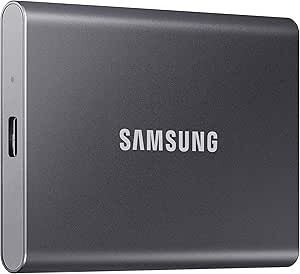 | Best Overall for Developer Workflows | Storage: 1 TB | Maximum read speed: Up to 1,050 MB/s | Maximum write speed: Up to 1,000 MB/s | VIEW LATEST PRICE | See Our Full Breakdown |
| SanDisk Extreme Portable SSD for PlayStation 5, 2TB |  | Best for Large Project Archives | Storage: 2 TB | Maximum read speed: Up to 1,000 MB/s | Interface: USB 3.2 | VIEW LATEST PRICE | See Our Full Breakdown |
| SanDisk 1TB Portable SSD, Up to 800MB/s Read Speed, Black |  | Best for On-the-Go Handling | Storage: 1 TB | Maximum read speed: Up to 800 MB/s | Interface: USB 3.2 Gen 2 | VIEW LATEST PRICE | See Our Full Breakdown |
| SanDisk Extreme Portable SSD, 1TB, Up to 2000MB/s |  | Best for Maximum Stated Read Speed | Storage: 1 TB | Maximum read speed: Up to 2,000 MB/s | Connector: USB Type-C | VIEW LATEST PRICE | See Our Full Breakdown |
| Samsung T9 Portable SSD 1TB, USB 3.2 Gen 2×2 External SSD | 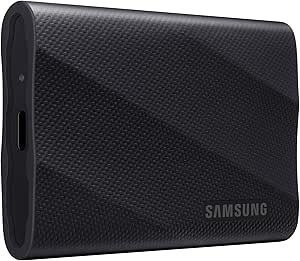 | Best for Fast, Frequent Build Transfers | Capacity: 1 TB | Interface: USB 3.2 Gen 2×2 | Maximum read speed: Up to 2,000 MB/s | VIEW LATEST PRICE | See Our Full Breakdown |
| Samsung T7 Shield Portable SSD, 1TB, USB 3.2 Gen 2 |  | Best for Rough Travel and Field Work | Capacity: 1 TB | Interface: USB 3.2 Gen 2 | Technology: PCIe NVMe | VIEW LATEST PRICE | See Our Full Breakdown |
| SSK 250GB Portable External SSD with USB-C and USB-A Cables |  | Best Compact Scratch-Disk Pick | Capacity: 250GB | Connectivity: USB 3.2 Gen 2 | Maximum read speed: Up to 1,050 MB/s | VIEW LATEST PRICE | See Our Full Breakdown |
| SanDisk Extreme PRO Portable SSD, 2TB, Up to 4000MB/s |  | Best for Large, Sustained Workloads | Capacity: 2 TB | Interface: USB 3.0 | Connector: USB Type-C | VIEW LATEST PRICE | See Our Full Breakdown |
| SanDisk 500GB Portable SSD, Up to 1000MB/s Read Speed |  | Best for Straightforward Everyday Portability | Capacity: 500GB | Maximum read speed: Up to 1,000 MB/s | Connectivity: USB-C | VIEW LATEST PRICE | See Our Full Breakdown |
| SanDisk 1TB Extreme Portable SSD |  | Best for Rugged Everyday Carry | Capacity: 1 TB | Read speed: Up to 1,050 MB/s | Write speed: Up to 1,000 MB/s | VIEW LATEST PRICE | See Our Full Breakdown |
| Samsung T5 EVO Portable SSD 4TB, USB 3.2 Gen 1, Up to 460 MB/s |  | Best for Large, Less Speed-Sensitive Project Libraries | Capacity: 4 TB | Interface: USB 3.2 Gen 1 (USB-C, 5 Gb/s) | Transfer rate: Up to 460 MB/s | VIEW LATEST PRICE | See Our Full Breakdown |
| Samsung Portable SSD P7 1TB USB4 External Solid State Drive |  | Best for USB4 Build and Dataset Transfers | Capacity: 1 TB | Interface: USB 2.0/3.0 listed; USB4 performance described | Connector: USB Type-C | VIEW LATEST PRICE | See Our Full Breakdown |
| Crucial X8 4TB Portable External SSD |  | Best High-Capacity Workhorse | Capacity: 4 TB | Read speed: Up to 1,050 MB/s | Interface: USB 3.2, up to 10 Gbps | VIEW LATEST PRICE | See Our Full Breakdown |
| Crucial X10 Pro 1TB Portable SSD, USB-C, Black |  | Best Compact High-Speed Choice | Capacity: 1 TB | Interface: USB-C | Read speed: Up to 2,100 MB/s | VIEW LATEST PRICE | See Our Full Breakdown |
| portable solid state drives for developer | Interface | Maximum read speed | Capacity | Drop protection |
|---|---|---|---|---|
| SanDisk 1TB Portable USB-C Dri | — | Up to 600 MB/s | — | Up to 2 meters |
| Samsung T7 Portable SSD | USB 3.2 Gen 2 host required for maximum speeds | Up to 1,050 MB/s | — | Up to 6 feet |
| SanDisk Extreme Portable SSD f | USB 3.2 | Up to 1,000 MB/s | — | — |
| SanDisk 1TB Portable SSD | USB 3.2 Gen 2 | Up to 800 MB/s | — | Up to 2 meters |
| SanDisk Extreme Portable SSD | — | Up to 2,000 MB/s | — | Up to 3 meters |
| Samsung T9 Portable SSD 1TB | USB 3.2 Gen 2×2 | Up to 2,000 MB/s | 1 TB | — |
| Samsung T7 Shield Portable SSD | USB 3.2 Gen 2 | Up to 1,050 MB/s | 1 TB | — |
| SSK 250GB Portable External SS | — | Up to 1,050 MB/s | 250GB | — |
| SanDisk Extreme PRO Portable S | USB 3.0 | Up to 4,000 MB/s | 2 TB | Up to 3 m |
| SanDisk 500GB Portable SSD | — | Up to 1,000 MB/s | 500GB | Up to 2 meters |
| SanDisk 1TB Extreme Portable S | USB 3.0 | — | 1 TB | — |
| Samsung T5 EVO Portable SSD 4T | USB 3.2 Gen 1 (USB-C, 5 Gb/s) | — | 4 TB | — |
| Samsung Portable SSD P7 1TB US | USB 2.0/3.0 listed; USB4 performance described | — | 1 TB | — |
| Crucial X8 4TB Portable Extern | USB 3.2, up to 10 Gbps | — | 4 TB | Up to 7.5 feet |
| Crucial X10 Pro 1TB Portable S | USB-C | — | 1 TB | Up to 7.5 feet (2 meters) |
More Details on Our Top Picks
SanDisk 1TB Portable USB-C Drive, Up to 600MB/s Read Speed, Black
For developers who want a pocketable place for source files, documents, and smaller project backups, this 1TB SanDisk keeps the setup simple. Its stated read speed of up to 600 MB/s is well below the Samsung T7’s 1,050 MB/s, so it is less suited to frequent transfers of large datasets or build artifacts. The tradeoff may be acceptable when portability and basic storage matter more than minimizing transfer time. At 1.12 ounces, it is easy to carry alongside a laptop, and its two-meter drop protection adds reassurance for commuting. The product data gives a maximum read speed but no write-speed figure, so I would not choose it on the assumption of equally fast sustained writes. It makes the most sense as a lightweight everyday drive, not a high-throughput development workspace.
Pros:- Compact dimensions and 1.12-ounce weight suit daily carry.
- USB-C connectivity works with a range of listed device types.
- Up to 600 MB/s read speed supports routine file access and transfers.
- Drop protection is rated up to two meters.
Cons:- Its stated read speed is lower than the Samsung T7 and the faster SanDisk options in this group.
- No maximum write speed is provided, limiting confidence for write-heavy workflows.
Best for: Developers who carry a laptop daily and need a light, 1TB drive for source-code copies, documents, and modest project files.
Not ideal for: Developers who regularly move large datasets, virtual machines, or build outputs and need the faster transfer rates stated for the Samsung T7.
- Storage:1 TB
- Maximum read speed:Up to 600 MB/s
- Connectivity:USB Type-C
- Drop protection:Up to 2 meters
- Weight:1.12 ounces
- Dimensions:2.95 × 1.77 × 0.39 inches
- Compatible platforms:Mac, PC
Our verdict“Choose this SanDisk if low carry weight and straightforward 1TB storage matter more than fast transfers of large development files.”
Samsung T7 Portable SSD, 1TB, Titan Gray, USB 3.2 Gen 2
The Samsung T7 is the most balanced fit here for developers who move project folders between machines: its stated up to 1,050 MB/s read and 1,000 MB/s write speeds make it a stronger choice for repeated transfers than the 600 MB/s SanDisk USB-C drive. The aluminum unibody, shock resistance, and six-foot drop protection add useful durability without making this a specialized rugged-only pick. Hardware-based 256-bit AES encryption is another advantage for carrying work files, while the included USB-C-to-C and USB-C-to-A cables ease connection to different systems. Those maximum speeds depend on a compatible USB 3.2 Gen 2 host, cables, and UASP support; older or mismatched setups can limit performance. I would pick it over the 2TB SanDisk Extreme for balanced throughput and encryption, but choose that model when capacity and stronger stated environmental protection take priority.
Pros:- Fast stated read and write speeds suit frequent project transfers.
- Hardware-based 256-bit AES encryption supports protection for work files.
- Aluminum unibody has shock resistance and drop protection up to six feet.
- Includes USB-C-to-C and USB-C-to-A cables for varied host connections.
Cons:- Maximum performance requires a compatible USB 3.2 Gen 2 host, cables, and UASP support.
- Host device and operating-system compatibility can affect performance and use.
Best for: Developers who routinely transfer repositories, test assets, and build files across compatible PCs, Macs, or Android devices and want hardware encryption.
Not ideal for: Buyers who need 2TB of capacity or IP65 water and dust resistance, or whose host devices cannot support the T7’s maximum speeds.
- Storage:1 TB
- Maximum read speed:Up to 1,050 MB/s
- Maximum write speed:Up to 1,000 MB/s
- Interface:USB 3.2 Gen 2 host required for maximum speeds
- Encryption:256-bit AES hardware encryption
- Construction:Aluminum unibody
- Drop protection:Up to 6 feet
- Included cables:USB Type-C to Type-C and USB Type-C to Type-A
Our verdict“Choose the T7 for a well-rounded developer drive with fast stated writes, hardware encryption, and broad device compatibility.”
SanDisk Extreme Portable SSD for PlayStation 5, 2TB
When a developer’s external drive needs to hold more than an active project, this 2TB SanDisk Extreme offers twice the capacity of the 1TB Samsung T7 and the other 1TB picks in this batch. Its up to 1,000 MB/s read speed is in the same general performance tier as the T7’s stated read speed, though the supplied data lists no write-speed maximum. That makes it a sensible option for archiving game assets, media, and completed builds, rather than a clearly faster choice for write-heavy work. IP65 water and dust resistance and three-meter drop protection give it a durability advantage over the T7’s stated six-foot drop rating, while its PlayStation 5 licensing is a bonus for developers who also manage console game libraries. The larger capacity and rugged protection come with a slightly heavier, wider body than the smallest SanDisk drive.
Pros:- 2TB capacity provides more room for archives than the 1TB options here.
- Up to 1,000 MB/s read speed supports brisk transfers on compatible hosts.
- IP65 water and dust resistance adds protection beyond basic drop resistance.
- Drop protection is rated up to three meters, with a five-year limited warranty.
Cons:- No maximum write speed is listed, making write-heavy performance harder to compare.
- At 2.4 ounces and nearly four inches long, it is less compact than the lightest SanDisk option.
- Actual performance can vary with the host device, interface, and usage conditions.
Best for: Game developers and media-heavy creators who need 2TB for project archives, assets, or console-related files and carry storage between locations.
Not ideal for: Developers who prioritize the smallest, lightest drive or need a published maximum write speed for frequent large writes.
- Storage:2 TB
- Maximum read speed:Up to 1,000 MB/s
- Interface:USB 3.2
- Connector:USB Type-C
- Protection:IP65 water and dust resistance; drop protection up to 3 meters
- Weight:2.4 ounces
- Dimensions:3.97 × 2.07 × 0.38 inches
- Warranty:5-year limited warranty
Our verdict“Pick this model when 2TB capacity and rugged protection matter more than the T7’s listed write-speed specification.”
SanDisk 1TB Portable SSD, Up to 800MB/s Read Speed, Black
This 1TB SanDisk Portable SSD is a practical middle ground for developers who want more speed than the 600 MB/s SanDisk USB-C drive without stepping up to the Samsung T7’s faster listed read and write figures. Its up to 800 MB/s read speed can shorten routine transfers, while USB 3.2 Gen 2 provides the connection standard for that performance. The rubber enclosure is rated for drops up to two meters, and the built-in hook lets you attach it to a belt loop or backpack—useful when the drive needs to stay with a mobile workstation. Compared with the 2TB SanDisk Extreme, this model has half the capacity and lacks stated IP65 water and dust resistance. The product data also gives no maximum write speed, so I would treat it as a portable transfer and backup drive rather than assume top-tier performance for sustained writes.
Pros:- Up to 800 MB/s read speed exceeds the 600 MB/s SanDisk USB-C model’s stated maximum.
- USB 3.2 Gen 2 connection is suited to faster transfers on compatible hosts.
- Rubber enclosure has drop protection up to two meters.
- Integrated hook makes it easier to attach the drive to a bag or belt loop.
Cons:- Maximum write speed is not provided.
- It has less stated read speed and capacity than the faster 2TB SanDisk Extreme.
- The supplied product data does not list IP-rated water or dust resistance.
Best for: Developers who work from shared spaces or travel with a laptop and want a 1TB drive that can be secured to a bag or belt loop.
Not ideal for: Developers who need 2TB, water and dust resistance, or a documented fast write rate for moving large project trees.
- Storage:1 TB
- Maximum read speed:Up to 800 MB/s
- Interface:USB 3.2 Gen 2
- Connectivity:USB Type-C
- Drop protection:Up to 2 meters
- Enclosure:Rubber
- Compatible devices:Laptops
Our verdict“Choose this SanDisk if a secure carry hook and midrange read speed are more useful than higher capacity or the T7’s listed write performance.”
SanDisk Extreme Portable SSD, 1TB, Up to 2000MB/s
For developers who want the highest stated read ceiling among these five drives, the SanDisk Extreme Portable SSD lists speeds up to 2,000 MB/s—well above the Samsung T7’s 1,050 MB/s and the 2TB SanDisk Extreme’s 1,000 MB/s. That can make it appealing for quickly reading large working sets, but the benefit depends on a compatible host, and the supplied data does not specify an interface generation that confirms every setup can reach the maximum. Capacity is limited to 1TB, and no maximum write speed is listed, so it is less compelling for developers who primarily push large builds or datasets onto the drive. Its IP65-rated protection, three-meter drop rating, and 256-bit AES password protection make it a stronger carry option than the basic SanDisk models. Encryption requires a software download and supports Windows 10+ and macOS 12+.
Pros:- Highest stated maximum read speed in this five-product batch at up to 2,000 MB/s.
- IP65-rated water and dust resistance suits travel and field use.
- Drop protection is rated up to three meters.
- 256-bit AES password protection adds a security option.
Cons:- No maximum write speed is listed, limiting comparisons for write-heavy development tasks.
- The 1TB capacity is lower than the 2TB SanDisk Extreme.
- Encryption requires a software download and is supported on Windows 10+ and macOS 12+.
Best for: Developers with compatible USB-C hosts who prioritize fast reads, carry the drive outdoors or between work sites, and want password protection for files.
Not ideal for: Developers who need more than 1TB, documented fast write performance, or encryption support on operating systems outside Windows 10+ and macOS 12+.
- Storage:1 TB
- Maximum read speed:Up to 2,000 MB/s
- Connector:USB Type-C
- Drop protection:Up to 3 meters
- Water and dust resistance:IP65-rated
- Encryption:256-bit AES password protection
- Dimensions:3.35 × 2 × 0.39 inches
- Weight:1.6 ounces
- Encryption platform support:Windows 10+ and macOS 12+
Our verdict“Choose this SanDisk for high stated read speed and rugged protection, provided your host supports the performance and 1TB is enough.”
Samsung T9 Portable SSD 1TB, USB 3.2 Gen 2×2 External SSD
The Samsung T9 is the speed-focused choice here: its stated read and write rates reach 2,000 MB/s, giving developers room to move large repositories, virtual machine images, or build artifacts faster than with the Samsung T7 Shield. Dynamic Thermal Guard is intended to manage heat during intensive work, while hardware encryption and Magician software add security and drive-health tools. The main catch is its USB 3.2 Gen 2×2 requirement: older or incompatible host ports can prevent it from reaching its advertised speeds, so the headline advantage depends on your workstation and cable. At 1TB, it also offers less working room than the 2TB SanDisk Extreme PRO. I’d choose it for compatible systems and speed-sensitive transfers, not as a capacity-first archive drive.
Pros:- Up to 2,000 MB/s read and write speeds with a compatible host
- Dynamic Thermal Guard is designed for intensive transfer sessions
- AES 256-bit hardware encryption and Magician management software
- Broad compatibility with computers, newer iPhones, and major consoles
Cons:- Reaching maximum speeds requires USB 3.2 Gen 2×2, a suitable cable, and UASP support
- Performance can vary substantially with the host device
- The supplied product data does not specify enclosure material
Best for: Developers with a USB 3.2 Gen 2×2-equipped workstation who regularly move large builds, VM images, or project datasets.
Not ideal for: Buyers using older USB ports or needing several terabytes of local project storage; its full speed depends on compatible hardware, and capacity is 1TB.
- Capacity:1 TB
- Interface:USB 3.2 Gen 2×2
- Maximum read speed:Up to 2,000 MB/s
- Maximum write speed:Up to 2,000 MB/s
- Encryption:AES 256-bit hardware encryption
- Drop resistance:Up to 9.8 feet
- Form factor:2.5-inch
- Compatible devices:PC, Mac, tablet, iPhone 15/16, Xbox Series S/X, PlayStation 4/5
Our verdict“Choose the T9 if your development machine supports USB 3.2 Gen 2×2 and transfer speed matters more than getting 2TB of space.”
Samsung T7 Shield Portable SSD, 1TB, USB 3.2 Gen 2
The Samsung T7 Shield trades the T9’s higher potential throughput for a more explicit focus on protection: its IP65 water and dust resistance and drop testing up to 9.8 feet suit developers carrying project files between offices, sites, or client locations. Read speeds reach 1,050 MB/s and writes reach 1,000 MB/s, enough for many repository, asset, and build transfers, though it falls behind the T9 when a compatible Gen 2×2 system can use that drive’s extra bandwidth. Hardware encryption and Dynamic Thermal Guard add practical safeguards, but the rugged rating does not make it immune to every spill or impact. Its 1TB capacity is also modest beside the 2TB SanDisk Extreme PRO. I’d favor the Shield when exposure to dust and water matters more than maximum speed or capacity.
Pros:- IP65-rated water and dust resistance
- Drop tested up to 9.8 feet
- Up to 1,050 MB/s read and 1,000 MB/s write speeds
- Hardware encryption and Dynamic Thermal Guard
Cons:- Slower maximum transfer rates than the Samsung T9 on compatible systems
- Maximum speeds require a compatible USB 3.2 Gen 2 host, cable, and UASP
- Protection can vary with actual conditions and does not remove the need for careful handling
Best for: Developers who carry a working project drive between job sites or travel frequently and want rated dust, water, and drop protection.
Not ideal for: Developers whose main priority is the fastest possible transfers or who need more than 1TB for datasets, images, and backups.
- Capacity:1 TB
- Interface:USB 3.2 Gen 2
- Technology:PCIe NVMe
- Maximum read speed:Up to 1,050 MB/s
- Maximum write speed:Up to 1,000 MB/s
- Water and dust resistance:IP65
- Drop resistance:Tested up to 9.8 feet (3 meters)
- Additional features:Hardware encryption, Dynamic Thermal Guard
Our verdict“Pick the T7 Shield for mobile development work where rugged protection matters more than leading transfer speed or extra capacity.”
SSK 250GB Portable External SSD with USB-C and USB-A Cables
The SSK 250GB SSD makes more sense as a compact working or scratch drive than as a developer’s only portable storage. Its stated read and write speeds—up to 1,050 MB/s and 1,000 MB/s—are comparable to the Samsung T7 Shield on paper, and the included USB-C and USB-A cables make it easier to connect across a mix of machines. SMART diagnostics and TRIM support are useful maintenance features, while the small aluminum enclosure keeps the drive light to carry. The limitation is capacity: 250GB leaves little room for large datasets, multiple virtual machines, or a long history of builds. SLC caching can also affect sustained transfers once work exceeds the cache. I’d pick it for a specific portable task, not as a substitute for the T9 or a larger project drive.
Pros:- Compact 36.6g aluminum alloy enclosure
- USB-C and USB-A cables are included
- SMART diagnostics and TRIM support
- Up to 1,050 MB/s read and 1,000 MB/s write speeds
Cons:- 250GB capacity can fill quickly with development assets and build output
- Sustained transfer speeds depend on staying within the SLC cache
- Windows may show about 232GB of usable capacity
Best for: Developers wanting a lightweight secondary drive for a small codebase, temporary build output, or moving files between USB-C and USB-A computers.
Not ideal for: Developers storing large datasets, several virtual machines, or long-term project archives; 250GB is restrictive and long transfers may exceed the SLC cache.
- Capacity:250GB
- Connectivity:USB 3.2 Gen 2
- Maximum read speed:Up to 1,050 MB/s
- Maximum write speed:Up to 1,000 MB/s
- Cache:SLC caching; 25% of available capacity allocated as cache
- Features:LED activity light, SMART diagnostics, TRIM support
- Enclosure and dimensions:Aluminum alloy; 2.6 × 1.5 × 0.5 inches
- Weight:36.6g
- Power consumption:Less than 2.4W
Our verdict“Choose the SSK for a small, lightweight secondary work drive, but skip it if your projects need ample room or long sustained writes.”
SanDisk Extreme PRO Portable SSD, 2TB, Up to 4000MB/s
For developers moving sizeable datasets or repeated build outputs, the SanDisk Extreme PRO 2TB pairs double the capacity of the Samsung T9 with a stated average sustained write speed of 3,100 MB/s. That sustained figure is more relevant to extended transfers than a peak alone, though actual results still depend on the host and connection. Its listed read and write ceilings of 4,000 and 3,800 MB/s substantially exceed the T9’s stated 2,000 MB/s, making this the performance-and-capacity pick on paper. The tradeoff is that the supplied interface description is only USB 3.0, leaving the exact path to those top speeds unclear; I would verify host and cable requirements before buying for a speed-critical workflow. IP65 protection and AES encryption help with mobile work, but encryption software must be downloaded and has stated OS requirements.
Pros:- 2TB capacity for larger project sets and datasets
- Up to 3,100 MB/s average sustained write speed as specified
- IP65 water and dust resistance with drop protection up to 3 meters
- Password protection with 256-bit AES encryption
Cons:- The listed USB 3.0 interface does not clarify the connection requirements for the stated peak speeds
- Encryption software must be downloaded and supports Windows 10+ and macOS 13+
- Real-world performance depends on the host, interface, and workload
Best for: Developers who transfer large datasets or build artifacts regularly and want 2TB capacity plus a high stated sustained-write rate.
Not ideal for: Buyers who need clearly specified host-interface requirements, or who cannot use the encryption software on Windows 10+ or macOS 13+.
- Capacity:2 TB
- Interface:USB 3.0
- Connector:USB Type-C
- Maximum read speed:Up to 4,000 MB/s
- Maximum write speed:Up to 3,800 MB/s
- Average sustained write speed:3,100 MB/s
- Water and dust resistance:IP65
- Drop protection:Up to 3 m
- Encryption:256-bit AES
Our verdict“Consider the Extreme PRO for capacity-heavy, sustained transfers, but confirm its interface requirements against your development machine first.”
SanDisk 500GB Portable SSD, Up to 1000MB/s Read Speed
The SanDisk 500GB Portable SSD is the simple carry-along option for developers who need a compact place for a working copy, handoff files, or modest project backups. USB-C plug-and-play connectivity avoids driver setup, and its stated read speed of up to 1,000 MB/s makes it a more capable choice for large-file transfers than a basic flash drive. Compared with the SSK 250GB, it offers twice the listed capacity, while the SSK provides specified write speeds, bundled USB-A and USB-C cables, and SMART and TRIM features. SanDisk’s data lists no write-speed figure, so I wouldn’t choose it for a workflow where sustained writes need to be predictable. Drop protection is specified up to 2 meters, below the T7 Shield’s 9.8-foot test rating, and the product data does not state water or dust resistance.
Pros:- Up to 1,000 MB/s stated read speed
- USB-C plug-and-play connectivity without driver setup
- Slim, lightweight design with no moving parts
- Drop protection specified up to 2 meters
Cons:- The supplied specifications do not state write speed
- 500GB may be limiting for large development datasets or archives
- No water or dust resistance rating is provided
Best for: Developers who want a low-fuss, USB-C portable drive for transferring or carrying a moderate set of project files between compatible devices.
Not ideal for: Developers who need documented write speeds, rugged water and dust protection, or storage for large datasets and multiple virtual machines.
- Capacity:500GB
- Maximum read speed:Up to 1,000 MB/s
- Connectivity:USB-C
- Drop protection:Up to 2 meters
- Design:Slim and lightweight; no moving parts
Our verdict“Choose this SanDisk for straightforward USB-C file transport, but select the T7 Shield if your drive needs a stated ruggedness rating.”
SanDisk 1TB Extreme Portable SSD
The SanDisk Extreme Portable SSD balances fast project access with practical protection for developers who carry source trees, builds, or local datasets between workspaces. Its listed read and write speeds reach 1,050 MB/s and 1,000 MB/s, well above the Samsung T5 EVO’s 460 MB/s ceiling, though real throughput depends on the host and workload. Water and dust resistance, drop protection, and a carabiner loop suit commutes and field work better than a bare desk drive. 256-bit AES hardware encryption adds a layer of protection for work files, but Mac users need to download software for password protection. The supplied data gives conflicting IP ratings and drop-height figures, so I would not treat either maximum as a guarantee. Its 1TB capacity also favors active projects over a broad archive.
Pros:- Listed read and write speeds up to 1,050 MB/s and 1,000 MB/s
- Water- and dust-resistant design with stated drop protection
- Carabiner loop makes it easy to attach to a bag
- 256-bit AES hardware encryption with password protection
Cons:- Actual performance varies with the host device and usage conditions
- Mac password protection requires a software download
- Product information gives conflicting water-resistance ratings and drop-height claims
Best for: Developers who carry a working set of projects between offices or sites and want hardware encryption plus a rugged, attachable drive.
Not ideal for: Developers keeping large source archives, virtual machine images, or media libraries on one drive; 1TB may fill quickly, and Mac password protection requires a software download.
- Capacity:1 TB
- Read speed:Up to 1,050 MB/s
- Write speed:Up to 1,000 MB/s
- Interface:USB 3.0
- Connector:USB Type-C
- Encryption:256-bit AES hardware encryption
- Weight:1.76 ounces
- Warranty:5-year limited warranty
Our verdict“Choose it for a protected, portable 1TB working drive, but pick the Crucial X8 4TB if project capacity matters more than an attachable rugged design.”
Samsung T5 EVO Portable SSD 4TB, USB 3.2 Gen 1, Up to 460 MB/s
The Samsung T5 EVO 4TB puts capacity ahead of transfer speed, making it a sensible fit for developers who need to keep several repositories, test assets, or backups together. Its 4TB capacity is four times that of the 1TB Samsung Portable SSD P7, but its listed 460 MB/s transfer rate is far slower than the P7’s claimed USB4 speeds. That gap matters when repeatedly moving large builds or virtual machine images; for a library that is mostly stored and accessed in place, capacity may matter more. AES 256-bit hardware encryption and drop resistance up to 2 meters add useful protection for travel. The tradeoff is its USB 3.2 Gen 1 connection, which limits transfer throughput, and compatibility can vary by host. I would choose it for spacious storage, not for minimizing build-transfer waits.
Pros:- 4TB capacity for large working libraries and backups
- USB-C connectivity with a listed transfer rate up to 460 MB/s
- AES 256-bit hardware encryption
- Drop resistance stated up to 2 meters
Cons:- USB 3.2 Gen 1 limits throughput compared with faster drives in this roundup
- Host-device compatibility may vary
- Its listed speed is a poor fit for frequent transfers of large build files
Best for: Developers who keep large project libraries, datasets, or backups on a portable drive and transfer them only occasionally.
Not ideal for: Developers who frequently copy large builds or need a fast external workspace; its 460 MB/s listed rate trails the Samsung Portable SSD P7 and Crucial X10 Pro.
- Capacity:4 TB
- Interface:USB 3.2 Gen 1 (USB-C, 5 Gb/s)
- Transfer rate:Up to 460 MB/s
- Hardware encryption:AES 256-bit
- Drop resistance:Up to 2 meters (6 feet)
- Compatible devices:Gaming console, Mac, PC, smartphone, and tablet
- Color:Black
Our verdict“Pick the T5 EVO when 4TB of portable storage matters more than fast transfers; choose the Crucial X8 for the same capacity with a higher listed read speed.”
Samsung Portable SSD P7 1TB USB4 External Solid State Drive
The Samsung Portable SSD P7 is the speed-first pick here for developers with a compatible USB4 setup. Its listed ceiling of 4,000 MB/s read and 3,700 MB/s write far exceeds the SanDisk Extreme Portable SSD’s 1,050/1,000 MB/s figures, which can shorten waits when moving large datasets or build artifacts. That advantage depends on having a compatible USB4 Gen 3×2 host, cable, and UASP mode; connected to a slower system, the headline speeds may be out of reach. At 1TB, it offers less room than the Crucial X8 4TB or Samsung T5 EVO 4TB, so it suits a fast active workspace better than a broad archive. Samsung Magician adds optimization and health-monitoring tools, while stated drop resistance offers some everyday protection. Drop damage is not covered by warranty, so I would not treat it as a rugged-drive substitute.
Pros:- Listed read and write speeds up to 4,000 MB/s and 3,700 MB/s
- Samsung Magician provides optimization tools and drive-health monitoring
- USB Type-C connection and compatibility with computers and mobile devices
- Stated resistance to everyday bumps, vibration, and drops up to 6.5 feet under controlled conditions
Cons:- Maximum speeds require a compatible USB4 Gen 3×2 host, cable, and UASP mode
- 1TB capacity is modest next to the Crucial X8 4TB and Samsung T5 EVO 4TB
- Drop damage is not covered under warranty
Best for: Developers with a compatible USB4 computer who regularly move large datasets, build artifacts, or other files and want drive-health tools.
Not ideal for: Developers on USB 3.x-only systems, or those who need several terabytes of storage or drop damage covered under warranty.
- Capacity:1 TB
- Interface:USB 2.0/3.0 listed; USB4 performance described
- Connector:USB Type-C
- Read speed:Up to 4,000 MB/s
- Write speed:Up to 3,700 MB/s
- Drop resistance:Up to 6.5 feet under controlled conditions
- Weight:0.1 kg
- Software:Samsung Magician for Windows, macOS, and Android
Our verdict“Choose the P7 for high-throughput work on a compatible USB4 system, but the Crucial X8 4TB is a better fit when storage space matters more.”
Crucial X8 4TB Portable External SSD
The Crucial X8 4TB suits developers who want a substantial project store without stepping down to the Samsung T5 EVO’s lower listed transfer rate. It offers 4TB of capacity and read speeds up to 1,050 MB/s, compared with the T5 EVO’s 460 MB/s; that makes the X8 the stronger choice for opening or copying larger files, though it does not approach the Samsung Portable SSD P7’s USB4 speed claims. The included USB-C cable and USB-A adapter help when switching between newer laptops and older workstation ports. Its aluminum core is designed to resist drops, temperature extremes, shock, and vibration, but the listed outer enclosure is plastic. The 3-year limited warranty is shorter than the SanDisk Extreme’s 5-year coverage. I see this as a capacious general-purpose drive, not a speed specialist or a fully metal enclosure.
Pros:- 4TB capacity for projects and local backups
- Read speeds listed up to 1,050 MB/s
- USB-C cable and USB-C-to-USB-A adapter included
- Aluminum core designed to withstand drops, temperature extremes, shock, and vibration
Cons:- Listed outer enclosure is plastic, despite the anodized aluminum core
- USB-A use depends on the included adapter
- Three-year limited warranty is shorter than the SanDisk Extreme’s five-year warranty
Best for: Developers who need several terabytes for repositories, datasets, and project backups and connect to a mix of USB-C and USB-A computers.
Not ideal for: Developers who need USB4-class throughput or prefer an all-metal exterior; its listed enclosure is plastic and its read speed is below the Samsung P7’s claim.
- Capacity:4 TB
- Read speed:Up to 1,050 MB/s
- Interface:USB 3.2, up to 10 Gbps
- Connectors:USB-C; USB-A adapter included
- Drop protection:Up to 7.5 feet
- Enclosure and core:Plastic enclosure; anodized aluminum core
- Dimensions:4.33 × 2.09 × 0.45 inches
- Warranty:3-year limited warranty
Our verdict“Choose the X8 for high-capacity project storage with useful port flexibility; select the Samsung P7 instead if compatible USB4 transfer speed is your priority.”
Crucial X10 Pro 1TB Portable SSD, USB-C, Black
The Crucial X10 Pro 1TB offers a useful middle ground for developers who want substantially faster listed transfers than mainstream portable drives without moving to the Samsung P7’s USB4-dependent speed tier. Its read and write claims reach 2,100 MB/s and 2,000 MB/s, compared with the SanDisk Extreme’s 1,050/1,000 MB/s, which can reduce waits when copying active projects or large assets on a suitable host. The 1TB capacity is better suited to a current working set than a full archive; the Crucial X8 provides 4TB if space is the priority. IP55 protection, drop protection up to 7.5 feet, and an anodized aluminum enclosure make it a more travel-ready choice than a speed-only drive. Actual performance still depends on the connected device and interface, and the product data does not specify the included cable or adapter details.
Pros:- Listed read and write speeds up to 2,100 MB/s and 2,000 MB/s
- IP55 water and dust resistance
- Drop protection stated up to 7.5 feet
- Anodized aluminum enclosure and broad device compatibility
Cons:- Maximum speeds depend on the connected device and interface
- 1TB capacity is limited for large archives compared with the Crucial X8 4TB
- Included cable and adapter details are not specified
Best for: Developers who move sizable project files frequently and want a fast, protected 1TB drive for a compatible USB-C system.
Not ideal for: Developers who need multi-terabyte project storage, lack a host capable of benefiting from its listed speeds, or require confirmed cable and adapter details before buying.
- Capacity:1 TB
- Interface:USB-C
- Read speed:Up to 2,100 MB/s
- Write speed:Up to 2,000 MB/s
- Data transfer rate:20 Gbit/s
- Water and dust resistance:IP55
- Drop protection:Up to 7.5 feet (2 meters)
- Enclosure material:Anodized aluminum
Our verdict“Pick the X10 Pro for faster transfers and travel protection in a 1TB drive; choose the Crucial X8 if you need more room for long-lived project libraries.”

How We Picked
I ranked these drives for developer use rather than treating the highest advertised speed as the winner. The main criteria were interface compatibility, stated transfer performance, capacity choices, portability, and build features that can affect daily movement between a desk and a work site. I also considered whether a model’s strengths suit common tasks such as moving repositories, keeping local project copies, storing virtual machine or container images, and carrying backups.
The order favors useful performance that a broad range of developers can access, followed by specialized speed, ruggedness, and capacity. A USB 3.2 Gen 2 drive can be a better fit than a faster USB 3.2 Gen 2×2 or USB4 model if the computer lacks the matching interface. Large-capacity and lower-speed models remain relevant for archives and bulk storage, but rank below balanced everyday choices for active development. Advertised speeds are manufacturer specifications, not guaranteed performance for every computer, workload, or sustained transfer.
| portable solid state drives for developer | Maximum read speed | Drop protection |
|---|---|---|
| SanDisk 1TB Portable USB-C Dri | Up to 600 MB/s | Up to 2 meters |
| Samsung T7 Portable SSD | Up to 1,050 MB/s | Up to 6 feet |
| SanDisk Extreme Portable SSD f | Up to 1,000 MB/s | — |
| SanDisk 1TB Portable SSD | Up to 800 MB/s | Up to 2 meters |
| SanDisk Extreme Portable SSD | Up to 2,000 MB/s | Up to 3 meters |
| Samsung T9 Portable SSD 1TB | Up to 2,000 MB/s | — |
| Samsung T7 Shield Portable SSD | Up to 1,050 MB/s | — |
| SSK 250GB Portable External SS | Up to 1,050 MB/s | — |
| SanDisk Extreme PRO Portable S | Up to 4,000 MB/s | Up to 3 m |
| SanDisk 500GB Portable SSD | Up to 1,000 MB/s | Up to 2 meters |
| SanDisk 1TB Extreme Portable S | — | — |
| Samsung T5 EVO Portable SSD 4T | — | — |
| Samsung Portable SSD P7 1TB US | — | — |
| Crucial X8 4TB Portable Extern | — | Up to 7.5 feet |
| Crucial X10 Pro 1TB Portable S | — | Up to 7.5 feet (2 meters) |
Factors to Consider When Choosing Portable Solid State Drives For Developers
Before choosing a drive, I’d start with the job it needs to do and the computer it must connect to. These factors help separate useful improvements from specifications that may not change your day-to-day workflow.
Match the interface to your computer
Check the exact ports and supported transfer modes on the computer you plan to use, not just the connector shape on the drive. USB-C describes a connector, while USB 3.2 Gen 2, USB 3.2 Gen 2×2, and USB4 describe different interface capabilities. A faster drive may still connect to a slower port, limiting transfer rates and reducing the benefit of paying for the faster model. Also check whether a cable supports the required data mode; a charge-focused or lower-spec cable can become the bottleneck. If you work across several machines, broad compatibility can be more useful than a peak speed that only one computer can reach.
Choose capacity around working sets, not just repositories
Source code alone often takes less room than the surrounding development environment. Container images, virtual machines, build artifacts, datasets, SDKs, and offline backups can quickly increase the space a drive needs. Estimate the full working set and leave room for growth rather than filling an SSD close to capacity on day one. A 500GB or 1TB model can suit focused projects and transport, while 4TB options are more appropriate for large archives or several substantial environments. Avoid treating a single portable SSD as the only copy of important work; capacity does not replace a separate backup.
Think about sustained work, not only peak read speed
Advertised maximum read speeds are useful for comparing interface tiers, but they do not describe every development task. A large sequential file copy behaves differently from repeated small-file operations, and a long transfer can perform differently from a short benchmark. For build caches, package trees, and many small files, the computer, filesystem, and workload can shape the result as much as the drive’s headline figure. If your routine involves frequent large transfers, favor a compatible higher-speed interface; for occasional project handoffs, a balanced mainstream drive may be enough. Leave time for real-world copies in your own workflow before making speed claims central to the decision.
Decide how much ruggedness your routine needs
A drive carried between offices, job sites, or client locations faces more handling risks than one that stays beside a workstation. A protective shell or rugged-oriented design can add reassurance, but it does not make a drive indestructible or protect files from accidental deletion. For mostly desk-based use, a compact standard model may be easier to pack and may better suit a simple backup role. For mobile work, weigh physical protection against bulk, cable management, and the need to keep the drive dry and secure. Pair physical care with versioned backups, since impact protection cannot prevent every kind of data loss.
Budget for the whole connection, not only the drive
Developers sometimes buy a fast external SSD and then connect it through a hub, dock, or cable that limits its performance. Check the full chain from computer port to cable to drive, especially when using a shared desk setup. A hub can be convenient, but other connected devices may compete for bandwidth depending on its design and workload. If speed matters, test a direct connection before assuming the drive is underperforming. If convenience matters more, a compatible everyday interface and a reliable cable may be a better use of your budget than paying for a faster tier your setup cannot reach.
Plan for filesystem and backup compatibility
Portable SSDs often arrive formatted for a particular mix of operating systems, and reformatting can erase existing files. Check whether your development machines need to share the drive across Windows, macOS, or Linux, then choose a filesystem that fits those needs before loading projects. Some filesystems handle permissions, large files, or cross-platform access differently, so test with noncritical data first. Encryption and repository-level version control can add protection, but neither replaces a separate backup of work that cannot be recreated. For team or client projects, also follow workplace rules on removable storage and data handling.
Frequently Asked Questions
Is a USB 3.2 Gen 2×2 drive worth choosing if my laptop has USB-C?
Not on the connector alone: USB-C does not confirm support for USB 3.2 Gen 2×2. Check your laptop specifications for the precise data standard, since a drive such as the Samsung T9 may operate below its advertised capability on a slower connection. If your current computer lacks Gen 2×2 but you plan to replace it soon, the faster drive may still suit a future setup. Otherwise, a broadly compatible Gen 2 model can be a more sensible match. The same check applies to cables and docks.
Should I keep active repositories on an external SSD or use it only for backups?
An external SSD can hold active projects when you need portability or are short on internal storage, but your setup should account for connection interruptions and backup copies. Keep critical work in version control and avoid relying on the portable drive as the only location for uncommitted changes. Large builds or container workloads may also be affected by the interface and by how your development tools access files. For a drive used mainly as a backup, capacity and a dependable routine may matter more than top transfer speeds. Separating active work from backup storage reduces the impact of loss or accidental deletion.
Should I choose 2TB or 4TB for development work?
Base the decision on the size of your complete working set, including tools, container or virtual machine images, datasets, and backup copies—not just source files. A 2TB drive can be a manageable portable workspace for many individual projects, while 4TB is more suited to larger archives or several bulky environments. Leave unused space for new work and temporary build output. If your files can be re-downloaded or rebuilt, you may need less capacity than someone keeping offline datasets or long-term project snapshots. Keeping a separate backup remains important at either size.
Do developers need a rugged portable SSD?
Ruggedness is most useful when the drive regularly travels in a backpack, moves between work sites, or may be handled in less controlled settings. For a drive that stays on a desk, a standard portable model can be a simpler choice. A protective design can reduce some physical risks, but it does not prevent loss, theft, file corruption, or every kind of damage. Consider whether added protection affects the size and convenience you want to carry. Whatever the enclosure, keep important work in another location.
Can one portable SSD serve as both my development workspace and my only backup?
I would not rely on a single portable SSD for both roles if the data matters. A failure, loss, theft, or accidental format could remove both the working copy and the backup at once. Keep a separate copy on another drive or a managed backup service, and use version control for source code. If you use the SSD as an active workspace, schedule backups that include uncommitted files and other project assets not stored in your repository. Test restoring a few files so you know the backup is usable.
Conclusion
For a balanced everyday choice, I’d pick the Samsung T7 as best overall because its USB 3.2 Gen 2 interface is a practical fit for common developer setups. The SanDisk 1TB Portable SSD rated up to 800MB/s is my best-value style pick for straightforward project storage when high-end interface speeds are unnecessary, while the Samsung P7 USB4 is the premium option for developers with compatible hardware who want to prioritize a faster connection. Beginners can start with the Samsung T7 for a simple capacity-and-compatibility balance. For specific needs, choose the T7 Shield or a SanDisk Extreme model for a more rugged-oriented mobile setup, the T5 EVO 4TB or Crucial X8 4TB for roomier storage, and the Samsung T9 or SanDisk Extreme PRO only when your host connection can make their speed tier useful. The best fit is the drive that matches your actual ports, working-set size, and backup plan.