
Searching for the best ergonomic wireless mice in 2026? The top pick, ProtoArc EM11 NL, offers a highly comfortable vertical design ideal for long hours. The Logitech M720 Triathlon stands out for multi-device flexibility, perfect for multitaskers. Buyers often face tradeoffs between comfort, precision, and price — with some models excelling in ergonomics but lacking advanced features, and others offering more tech but less comfort. Keep reading for a detailed breakdown of these options to find the best fit for your needs.

Get business pricing on monitors, keyboards and dev gear
- Business-only prices and quantity discounts
- Tax-exempt purchasing
- Multiple users, one account, clear invoices
Key Takeaways
- Vertical ergonomic design is a common theme, prioritizing wrist health over traditional shapes.
- Many top picks incorporate rechargeable batteries, reducing long-term costs and hassle.
- Price varies widely, with premium models offering more customization but not always better comfort.
- Multi-device compatibility is a key feature for users juggling multiple computers or tablets.
- Build quality and click noise levels can significantly impact daily use and office environments.
| ProtoArc EM11 NL Wireless Ergonomic Vertical Mouse, Rechargeable, Black |  | Best Overall for Ergonomic Comfort and Multi-Device Ease | Connection: Bluetooth and USB-A | Battery: 500mAh Li-Ion rechargeable | DPI Settings: 1000/1600/2400 | VIEW LATEST PRICE | See Our Full Breakdown |
| Logitech M720 Triathlon Full-Size Multi-Device Wireless Mouse – Black | 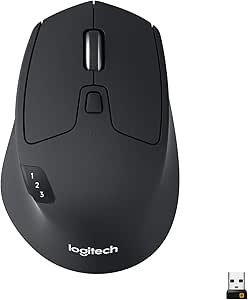 | Best for Long-Lasting Multi-Device Productivity | Battery Life: 24 months | Connectivity: Bluetooth, Logitech Unifying receiver | Compatible Devices: Computers, laptops, tablets | VIEW LATEST PRICE | See Our Full Breakdown |
| UGREEN Ergonomic Wireless Mouse, Bluetooth & 2.4G Wireless, Quiet Clicks |  | Best Budget Vertical Mouse with Quiet Operation | Design: Ergonomic vertical | Connectivity: Bluetooth & 2.4G wireless | Buttons: 5-button layout | VIEW LATEST PRICE | See Our Full Breakdown |
| Lenovo Yoga Pro Mouse, Bluetooth, USB-C Rechargeable, Dual Mode Bluetooth, 6 Buttons, Right-Handed Ergonomic Design, Programmable, 2-Way Metal Scroll Wheel, Tidal Teal |  | Best for Precision and Customization in an Ergonomic Form | Connectivity: Bluetooth 5.1, USB-C | Buttons: 6 programmable buttons | DPI: up to 4000 | VIEW LATEST PRICE | See Our Full Breakdown |
| Logitech Lift Vertical Ergonomic Wireless Mouse – Graphite |  | Best for Natural Posture and Eco-Friendly Design | Connectivity: Bluetooth Low Energy or Logi Bolt USB | Battery Life: Up to 2 years | Material: Certified post-consumer recycled plastic (Graphite: 70%) | VIEW LATEST PRICE | See Our Full Breakdown |
| Anker 2.4G Wireless Ergonomic Vertical Mouse with USB Receiver |  | Best Overall for Comfort and Precision | Connectivity: 2.4 GHz wireless via USB receiver | DPI Resolution: 800/1200/1600 DPI | Dimensions: 120*62.8*74.8 mm | VIEW LATEST PRICE | See Our Full Breakdown |
| TECKNET Ergonomic Vertical Wireless Mouse with 2.4GHz USB Receiver |  | Best for Customizable DPI and Quiet Operation | Design: Fade purple to green, fingerprint-resistant | Connectivity: Wireless 2.4GHz USB-A receiver | DPI Settings: 800/1600/2400/3200/4800 | VIEW LATEST PRICE | See Our Full Breakdown |
| Uineer Vertical Ergonomic Wireless Bluetooth Mouse with 7-Color Ambient Light |  | Best for Multi-Device Use and Stylish Design | Wireless Technology: Bluetooth 5.0/4.0, 2.4G | Device Connectivity: Up to 3 devices | DPI Settings: 800/1200/1600/2400 | VIEW LATEST PRICE | See Our Full Breakdown |
| Seenda MOU-302 Wireless Bluetooth Ergonomic Vertical Mouse with Volume Knob |  | Best for Multi-Functionality and Rechargeable Power | Connectivity: 2.4G USB, Bluetooth 1 & 2 | DPI: 1000/1600/2400 | Battery: 500mAh rechargeable | VIEW LATEST PRICE | See Our Full Breakdown |
| ergonomic wireless mice | Connectivity | Compatibility | Design |
|---|---|---|---|
| ProtoArc EM11 NL Wireless Ergo | — | Windows 8 or higher, Mac OS X 10.12 or higher, Android 4.3+ | Ergonomic vertical, suitable for hands under 7.5 inches |
| Logitech M720 Triathlon Full-S | Bluetooth, Logitech Unifying receiver | — | — |
| UGREEN Ergonomic Wireless Mous | Bluetooth & 2.4G wireless | — | Ergonomic vertical |
| Lenovo Yoga Pro Mouse | Bluetooth 5.1, USB-C | — | Right-handed, ergonomic, symmetrical |
| Logitech Lift Vertical Ergonom | Bluetooth Low Energy or Logi Bolt USB | Windows, macOS, iPadOS, Chrome OS, Linux | Vertical ergonomic shape, textured grip, thumb rest |
| Anker 2.4G Wireless Ergonomic | 2.4 GHz wireless via USB receiver | — | — |
| TECKNET Ergonomic Vertical Wir | Wireless 2.4GHz USB-A receiver | Windows 2000/XP/Vista/7/8/10/11, MacOS X 10.4+ | Fade purple to green, fingerprint-resistant |
| Uineer Vertical Ergonomic Wire | — | Windows, Mac OS X, Linux, Android, iOS 13+ | — |
| Seenda MOU-302 Wireless Blueto | 2.4G USB, Bluetooth 1 & 2 | Windows, macOS, iOS, Android, Chrome OS | — |
More Details on Our Top Picks
ProtoArc EM11 NL Wireless Ergonomic Vertical Mouse, Rechargeable, Black
The ProtoArc EM11 NL stands out for its thoughtful vertical design that significantly reduces wrist strain, making it ideal for users who spend hours at their desk. While it offers seamless Bluetooth and USB-A connectivity to up to three devices, its learning curve may be steep for newcomers unfamiliar with vertical mice. Unlike the Logitech M720, it prioritizes ergonomic posture over extensive customization, which is reflected in its simpler button layout. The rechargeable battery and silent clicks enhance focus, but the lack of programmable buttons limits personalization. Compared with other vertical options, this model balances comfort and functionality, though it may take time to adapt for those new to vertical mice.
Pros:- Reduces wrist strain through ergonomic vertical design
- Connects to up to three devices simultaneously
- Rechargeable with included Type-C cable
- Silent clicking for distraction-free work
Cons:- Steep learning curve for new vertical mouse users
- All buttons are not programmable, limiting customization
- Forward/back buttons are not compatible with Mac OS
Best for: Professionals with chronic wrist discomfort seeking a multi-device, ergonomic solution
Not ideal for: Users who prefer highly customizable mice with extensive programmable buttons or those new to vertical mice
- Connection:Bluetooth and USB-A
- Battery:500mAh Li-Ion rechargeable
- DPI Settings:1000/1600/2400
- Compatibility:Windows 8 or higher, Mac OS X 10.12 or higher, Android 4.3+
- Design:Ergonomic vertical, suitable for hands under 7.5 inches
- Color:Black
Our verdict“This model is best suited for users prioritizing ergonomic health and multi-device convenience over extensive customization.”
Logitech M720 Triathlon Full-Size Multi-Device Wireless Mouse – Black
The Logitech M720 Triathlon excels in endurance and multi-tasking, supporting up to three devices with effortless switching, making it ideal for busy professionals juggling multiple machines. Its 24-month battery life eliminates concerns about frequent charging, unlike the rechargeable options in the UGREEN or Lenovo mice. While it offers a familiar ergonomic shape for right-handed users, its bulkier design might not suit those with smaller hands. Unlike the more specialized vertical mice, this model emphasizes versatility and long-term reliability, though it requires software installation for button customization, which might be a hassle for some users.
Pros:- Impressive 24-month battery life
- Supports multi-device connectivity and quick switching
- Comfortable ergonomic design for right-handed users
- Customizable buttons for personalized workflows
Cons:- Requires software installation for button customization
- No rechargeable battery option
- Larger size may be less ideal for small hands
Best for: Power users managing multiple computers who need a reliable, long-lasting mouse
Not ideal for: Users seeking a compact or vertical ergonomic mouse, or those uncomfortable with software-based customization
- Battery Life:24 months
- Connectivity:Bluetooth, Logitech Unifying receiver
- Compatible Devices:Computers, laptops, tablets
- Operating Systems:Windows, macOS, Chrome OS, Linux, iPadOS
- Number of Buttons:6
- Color:Black
Our verdict“This mouse is best for multi-device users prioritizing durability and long battery life over compactness or vertical ergonomics.”
UGREEN Ergonomic Wireless Mouse, Bluetooth & 2.4G Wireless, Quiet Clicks
The UGREEN Ergonomic Wireless Mouse offers a vertical design that promotes natural wrist posture at a more accessible price point, making it suitable for those new to ergonomic mice or on a budget. Its quiet clicks help maintain a peaceful workspace, unlike the louder buttons on some premium models. The adjustable DPI and dual wireless connectivity support varied tasks across multiple devices, but the reliance on one AA battery and limited wireless range of 10 meters could be drawbacks for heavy or mobile users. Compared to the Lenovo Yoga Pro, it sacrifices some surface tracking precision for affordability and simplicity.
Pros:- Ergonomic vertical design reduces wrist strain
- Quiet clicks for peaceful work sessions
- Adjustable DPI for different tasks
- Dual wireless connectivity supports multiple devices
Cons:- Requires one AA battery (not included)
- Limited wireless range of 10 meters
- No rechargeable battery option
Best for: Budget-conscious users new to ergonomic mice needing multi-device support
Not ideal for: Power users requiring rechargeable batteries or longer wireless range, or those with very small hands
- Design:Ergonomic vertical
- Connectivity:Bluetooth & 2.4G wireless
- Buttons:5-button layout
- DPI Levels:1000/1600/2000/4000
- Battery:1 AA battery
- Range:Up to 10 meters
Our verdict“This mouse is ideal for budget-minded beginners seeking ergonomic comfort with basic multi-device support.”
Lenovo Yoga Pro Mouse, Bluetooth, USB-C Rechargeable, Dual Mode Bluetooth, 6 Buttons, Right-Handed Ergonomic Design, Programmable, 2-Way Metal Scroll Wheel, Tidal Teal
The Lenovo Yoga Pro Mouse combines an ergonomic, symmetrical shape with advanced features like a 2-way metal scroll wheel and programmable buttons, making it suitable for users who want both comfort and control. Its precise tracking on various surfaces and adjustable DPI up to 4000 make it a versatile choice for detailed work. While the right-handed design limits its suitability, the rechargeable battery lasting 2-3 months and the inclusion of dual Bluetooth modes provide flexibility. Compared with the Logitech Lift, it offers more customization options but may be heavier and less suitable for small hands.
Pros:- Ergonomic, symmetrical design for versatile comfort
- Programmable buttons for tailored workflows
- Long-lasting rechargeable battery (2-3 months)
- Precise tracking on multiple surfaces
Cons:- Limited to right-handed users
- Requires software for full customization
- Battery life may vary with heavy use
Best for: Creative professionals or power users who value precise control and full customization
Not ideal for: Small-handed users or those needing a left-handed or ambidextrous mouse, or who prefer a non-rechargeable model
- Connectivity:Bluetooth 5.1, USB-C
- Buttons:6 programmable buttons
- DPI:up to 4000
- Battery:Rechargeable, lasts 2-3 months
- Design:Right-handed, ergonomic, symmetrical
- Surface Tracking:Blue optical sensor
Our verdict“This mouse is best for users seeking a highly customizable, ergonomic mouse with precise tracking capabilities.”
Logitech Lift Vertical Ergonomic Wireless Mouse – Graphite
The Logitech Lift emphasizes natural wrist and forearm positioning with its vertical form and textured grip, making it ideal for prolonged use. Its long battery life of up to 2 years, combined with environmentally friendly recycled plastic, appeals to eco-conscious users. Quiet clicks and customizable buttons enhance usability, but the size may be too large for users with small hands. Unlike the Lenovo Yoga Pro, it lacks advanced adjustable DPI features but makes up for it with a focus on comfort and sustainability. Its reliance on Bluetooth Low Energy or Logi Bolt USB might be limiting for users who prefer wired options.
Pros:- Promotes natural wrist and forearm posture
- Up to 2 years of battery life
- Made with recycled plastic, environmentally friendly
- Quiet clicks and customizable buttons
Cons:- May be too large for small hands
- Limited to right-handed use
- No wired connection option
Best for: Environmentally conscious professionals needing ergonomic comfort for extended periods
Not ideal for: Small-handed users or those preferring wired mice, or who want extensive DPI customization
- Connectivity:Bluetooth Low Energy or Logi Bolt USB
- Battery Life:Up to 2 years
- Material:Certified post-consumer recycled plastic (Graphite: 70%)
- Design:Vertical ergonomic shape, textured grip, thumb rest
- Compatibility:Windows, macOS, iPadOS, Chrome OS, Linux
- Buttons:Programmable
Our verdict“This mouse suits users seeking ergonomic design with sustainability and long battery life as priorities.”
Anker 2.4G Wireless Ergonomic Vertical Mouse with USB Receiver
This option stands out for its simple yet effective ergonomic design that promotes a natural wrist position, making it ideal for long hours of work. Compared with the TECKNET Ergonomic Vertical Wireless Mouse, it offers fewer DPI options but provides adjustable DPI settings up to 1600, ensuring accurate control without complexity. The Anker mouse’s energy-efficient operation extends battery life, although it requires two AAA batteries, which might be an inconvenience. Its design is less flashy than some models, but it prioritizes comfort and reliability, making it a balanced choice for everyday users.
Pros:- Ergonomic design reduces wrist strain during long sessions
- Adjustable DPI for precise control
- Includes convenient webpage navigation buttons
- Energy-efficient with power-saving mode
Cons:- Key click sounds are unavoidable
- Requires 2 AAA batteries (not included)
Best for: Office workers who need a reliable, comfortable mouse for daily extended use
Not ideal for: Gamers or users seeking high-DPI precision or customizable lighting effects
- Connectivity:2.4 GHz wireless via USB receiver
- DPI Resolution:800/1200/1600 DPI
- Dimensions:120*62.8*74.8 mm
- Weight:3.4 oz
- Batteries:2 AAA batteries (not included)
- Warranty:18 months
Our verdict“This mouse is best suited for professionals prioritizing comfort and straightforward functionality over flashy features.”
TECKNET Ergonomic Vertical Wireless Mouse with 2.4GHz USB Receiver
Compared with the Anker model, the TECKNET mouse offers a higher maximum DPI of 4800, making it more suitable for detailed graphic work or high-precision tasks. Its quiet clicks and long battery life with auto-sleep are attractive features for quiet environments, but the side buttons don’t support Mac systems, which limits versatility for Mac users. Its sleek fade purple to green design adds visual appeal, yet beginners might need time to adjust to its additional DPI settings. Overall, this mouse balances high performance with noise reduction, making it a good fit for busy offices or shared workspaces.
Pros:- Ergonomic design reduces wrist strain
- Adjustable DPI up to 4800 for detailed work
- Quiet clicking minimizes noise
- Long battery life with auto-sleep feature
Cons:- Side buttons do not support Mac systems
- May require adjustment period for new users
Best for: Creative professionals or office users who value quiet operation and high-precision control
Not ideal for: Mac users or those who prefer a more traditional, tactile clicking experience
- Design:Fade purple to green, fingerprint-resistant
- Connectivity:Wireless 2.4GHz USB-A receiver
- DPI Settings:800/1600/2400/3200/4800
- Battery Life:Approx. 6 months
- Range:Up to 49 feet
- Compatibility:Windows 2000/XP/Vista/7/8/10/11, MacOS X 10.4+
Our verdict“Ideal for those needing high sensitivity and silent operation in a professional or shared setting.”
Uineer Vertical Ergonomic Wireless Bluetooth Mouse with 7-Color Ambient Light
Compared to the Anker and TECKNET models, the Uineer offers the unique advantage of supporting up to three devices via Bluetooth and 2.4G, making it highly versatile for users juggling work and entertainment on multiple platforms. Its 7-color ambient light adds a customizable aesthetic touch, though the side buttons are not functional on MacOS, which could be limiting for some users. Its ergonomic vertical shape reduces wrist strain, but its smaller size makes it better suited for small to medium hands rather than larger ones. This mouse is perfect for those who prioritize multi-device connectivity and style in a workspace.
Pros:- Supports multiple devices with seamless switching
- Ergonomic vertical design reduces wrist strain
- Adjustable DPI for various tasks
- Stylish 7-color ambient lighting
Cons:- Side buttons are not functional on macOS
- Ideal for small to medium hands, less suitable for larger hands
Best for: Tech-savvy users managing multiple devices who want a stylish, ergonomic mouse
Not ideal for: Large-handed users or those seeking a mouse optimized solely for gaming or high-precision tasks
- Wireless Technology:Bluetooth 5.0/4.0, 2.4G
- Device Connectivity:Up to 3 devices
- DPI Settings:800/1200/1600/2400
- Battery Life:Auto-sleep, low-battery LED
- Compatibility:Windows, Mac OS X, Linux, Android, iOS 13+
- Special Features:Ambient lighting, multi-device support
Our verdict“Best suited for multi-device users who want a colorful, ergonomic mouse with a modern look.”
Seenda MOU-302 Wireless Bluetooth Ergonomic Vertical Mouse with Volume Knob
Compared with the Anker and Uineer options, the Seenda mouse includes a built-in volume control, adding a practical feature for multitasking or media consumption. Its rechargeable 500mAh battery with USB-C charging reduces ongoing costs and clutter, although its design may feel less comfortable for users accustomed to traditional mice. The quiet clicks and adjustable DPI make it suitable for office or gaming use, but the slightly larger size may not suit users with smaller hands or those who prefer a more traditional shape. This mouse appeals to users who want multi-device support and additional functions in a single ergonomic package.
Pros:- Ergonomic vertical design reduces wrist strain
- Multi-device connectivity for seamless switching
- Quiet, precise clicks suitable for shared spaces
- Rechargeable via USB-C reduces ongoing costs
Cons:- May be less comfortable for users preferring traditional mice
- Requires Bluetooth or USB receiver for connection
- DPI settings may not suit high-precision gaming
Best for: Multitaskers and office users who also want media controls within an ergonomic form factor
Not ideal for: Users with small hands or those primarily seeking a gaming-grade high-DPI mouse
- Connectivity:2.4G USB, Bluetooth 1 & 2
- DPI:1000/1600/2400
- Battery:500mAh rechargeable
- Charging:USB-C
- Compatibility:Windows, macOS, iOS, Android, Chrome OS
- Special Features:Volume control, multi-device support
Our verdict“Great for users who need a multi-function ergonomic mouse with media controls and rechargeable power.”

How We Picked
I evaluated these ergonomic wireless mice based on key factors such as comfort during prolonged use, build quality, connection reliability, battery life, and usability. Each product was assessed for how well it reduces wrist strain, its ease of setup, and the versatility of features like programmability or multi-device support. The ranking also considers value for money, balancing premium features with affordability. This approach ensures that each recommendation addresses specific user needs, from casual users to demanding professionals seeking ergonomic benefits.| ergonomic wireless mice | Compatibility | Design |
|---|---|---|
| ProtoArc EM11 NL Wireless Ergo | Windows 8 or higher, Mac OS X 10.12 or higher, Android 4.3+ | Ergonomic vertical, suitable for hands under 7.5 inches |
| Logitech M720 Triathlon Full-S | — | — |
| UGREEN Ergonomic Wireless Mous | — | Ergonomic vertical |
| Lenovo Yoga Pro Mouse | — | Right-handed, ergonomic, symmetrical |
| Logitech Lift Vertical Ergonom | Windows, macOS, iPadOS, Chrome OS, Linux | Vertical ergonomic shape, textured grip, thumb rest |
| Anker 2.4G Wireless Ergonomic | — | — |
| TECKNET Ergonomic Vertical Wir | Windows 2000/XP/Vista/7/8/10/11, MacOS X 10.4+ | Fade purple to green, fingerprint-resistant |
| Uineer Vertical Ergonomic Wire | Windows, Mac OS X, Linux, Android, iOS 13+ | — |
| Seenda MOU-302 Wireless Blueto | Windows, macOS, iOS, Android, Chrome OS | — |
Factors to Consider When Choosing Ergonomic Wireless Mice
Choosing the right ergonomic wireless mouse involves understanding your specific needs and the tradeoffs involved. Comfort is paramount for long-term health, but not all ergonomic shapes suit every hand; some are better for small hands, others for larger palms. Battery life can be a hassle if it requires frequent charging, so rechargeable models are often preferable. Also, consider compatibility with your devices and whether multi-device support is necessary. Features like adjustable DPI or customizable buttons can boost productivity but might add complexity or cost. Lastly, pay attention to build quality and noise levels if you work in shared spaces, as these factors can impact your daily experience.Ergonomic Design and Comfort
The primary reason for choosing an ergonomic mouse is to improve comfort and reduce strain. Vertical and sculpted shapes are designed to keep your wrist in a more natural position, which can prevent repetitive strain injuries. However, the fit is highly individual; a model that feels perfect for one person might be uncomfortable for another. Trying different shapes or reading user reviews about comfort can help you find a mouse that fits your hand size and grip style. Remember, an ergonomic mouse is an investment in your long-term health, so prioritizing comfort is essential.
Battery Life and Charging
Battery longevity is a common pain point in wireless mice. Many top models now come with rechargeable batteries, which reduce ongoing costs and environmental impact. Some use USB-C charging for fast and convenient power-ups, while others rely on replaceable batteries. Consider your typical usage—if you work long hours or travel often, a mouse with extended battery life or quick charging features will be more reliable. Be aware that some models may require frequent recharging if they have smaller batteries or intensive use, which can interrupt workflow.
Connectivity and Compatibility
Reliable wireless connection is crucial for seamless productivity. Most ergonomic mice now support Bluetooth and 2.4GHz wireless, offering flexibility across devices. Multi-device support is a valuable feature for users managing multiple computers or tablets, as it allows quick switching without reconnecting. Check compatibility with your operating system and hardware before purchasing. Some models also include USB receivers, which tend to offer more stable connections than Bluetooth, especially in crowded wireless environments. Ensuring compatibility reduces frustration and guarantees smooth operation.
Additional Features and Customization
Features like adjustable DPI, programmable buttons, and customizable scroll wheels can enhance productivity, especially for power users. However, these features often come with increased complexity and price. For most users, basic adjustments and comfort are sufficient, so prioritize simplicity if you prefer a straightforward experience. Noise level is another consideration—quiet clicks can be beneficial in shared spaces or quiet environments. Be mindful that extra features might also impact battery life or increase the learning curve, so weigh their benefits against your actual needs.
Build Quality and Aesthetics
Durability matters for a device that will be used daily. Look for mice with sturdy construction, quality switches, and good reviews on longevity. Aesthetic preferences vary, but a well-designed mouse that matches your workspace can boost motivation and comfort. Some options feature sleek, minimalist designs, while others have vibrant colors or ambient lighting. Remember, a visually appealing mouse that feels solid in your hand can make long work sessions more pleasant. However, prioritize ergonomic fit and durability over style if comfort and longevity are your main concerns.
Frequently Asked Questions
How do I know if a vertical ergonomic mouse will fit my hand?
Choosing a vertical ergonomic mouse that fits your hand depends largely on your hand size and grip style. If you have small hands, look for compact designs, while larger hands may need a more substantial, wider shape. Trying out different models in person is ideal, but if that’s not possible, check detailed measurements and user reviews for insights. Some brands offer adjustable or contoured shapes to better fit various hand sizes. Remember, a comfortable fit reduces fatigue and strain over long hours of use, so investing time in selecting the right shape pays off.
Are rechargeable batteries reliable for daily use?
Rechargeable wireless mice have come a long way and are generally reliable for daily use, especially models with high-capacity batteries. Many now feature fast charging, allowing you to get hours of use from just a few minutes of power. However, it’s wise to consider the battery life per charge and whether the mouse has an indicator to alert you when power is low. If you work long hours or travel frequently, choosing a model with extended battery life or quick recharge capability minimizes interruptions. Proper maintenance, like regular charging, ensures consistent performance over time.
Should I prioritize Bluetooth or a USB receiver for connection?
Both Bluetooth and USB receivers have their advantages. USB receivers tend to offer more stable and lower latency connections, which is beneficial for precise tasks like gaming or detailed design work. Bluetooth, on the other hand, offers greater flexibility and fewer port requirements, especially if you have limited USB ports. If you frequently switch between multiple devices, Bluetooth support simplifies pairing. Ultimately, your choice depends on your environment and device compatibility—if reliability is your top priority, a good-quality USB receiver might be preferable.
How important are additional programmable buttons on an ergonomic mouse?
Programmable buttons can significantly enhance productivity by allowing quick access to frequently used functions or shortcuts. For power users or those who perform repetitive tasks, customizing buttons can streamline workflows. However, for casual or ergonomic-focused use, they might add unnecessary complexity or clutter. Also, more buttons can sometimes increase the size or weight of the mouse, potentially affecting comfort. Consider your specific needs—if you value customization and efficiency, a mouse with programmable buttons is worth the investment; otherwise, a simpler design might be better suited to your preferences.
Is a higher DPI setting always better for an ergonomic mouse?
Not necessarily. While higher DPI settings allow for more sensitive cursor movement, the optimal DPI depends on your work style and screen size. For ergonomic comfort, a lower DPI can reduce the need for large hand movements, minimizing fatigue. Conversely, high DPI settings are useful for detailed tasks or fast cursor movement across large screens. Many ergonomic mice offer adjustable DPI, giving you flexibility to set it according to your activity. The key is to find a balance that allows precise control without requiring excessive hand movement.
Conclusion
For most users, the ProtoArc EM11 NL stands out as the best overall choice due to its comfortable vertical design and reliable performance. Buyers on a budget or seeking simplicity might prefer the UGREEN Ergonomic Wireless Mouse, which offers good comfort at an affordable price. For those who want a premium experience with advanced features, the Logitech Lift Vertical Wireless Mouse makes a compelling case. Beginners should look for models with straightforward setup and comfortable shapes, while professionals needing multi-device support will benefit from options like the Logitech M720 Triathlon. Tailor your choice based on your specific ergonomic needs and workflow to find the perfect fit.
As an affiliate, we earn on qualifying purchases.Columbus Day / Indigenous Peoples' Day Picks
long weekend sales