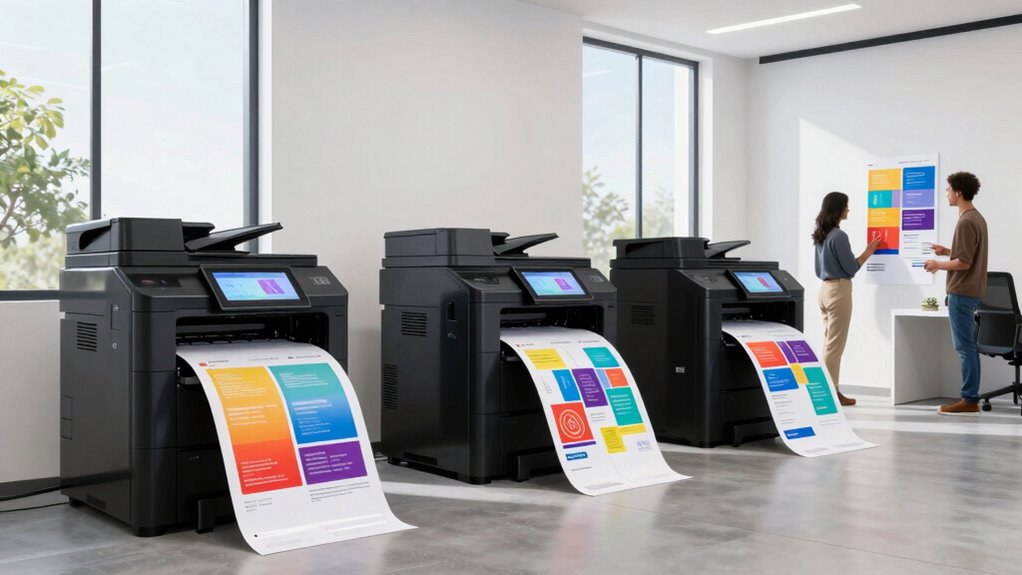
Choosing the right large format printer for UX research teams involves balancing size, versatility, and print quality. For teams focused on quick, reliable poster and visual material production, the HP DesignJet T210 stands out for its compact size and ease of use. If your team requires multifunctionality—printing, scanning, and copying—then the HP DesignJet T830 offers excellent versatility, though at a higher price and complexity. For those needing larger media handling and precise technical output, the HP DesignJet T650 and HP T630 provide robust options, with the T650 offering broader media support. Meanwhile, the Canon imagePROGRAF TM-240 excels in high-resolution, outdoor-ready prints, making it ideal for durable signage. The best choice depends on your team’s space, project scope, and budget, but all these options prioritize quality and usability for UX research environments.

Get business pricing on monitors, keyboards and dev gear
- Business-only prices and quantity discounts
- Tax-exempt purchasing
- Multiple users, one account, clear invoices
Key Takeaways
- Size and space considerations heavily influence the best choice, with compact options ideal for smaller offices.
- Multifunction capabilities add value for teams needing scanning and copying alongside printing.
- Media handling flexibility and maximum media width are critical for larger, technical, or poster projects.
- Print speed and color accuracy directly impact productivity and visual fidelity for research materials.
- Durability and ink quality matter when printing outdoor signage or long-lasting displays.
| HP DesignJet T210 Large Format 24-inch Poster Printer |  | Best Compact Large Format Printer for Small Teams | Media Sizes: Up to 24-inch wide media rolls and 13×19-inch sheets with accessory | Media Handling: Sheet feed, roll feed, automatic cutter | Print Speed: Up to 45 seconds per A1/D page | VIEW ON AMAZON | See Our Full Breakdown |
| HP DesignJet T830 Large Format Multifunction Wireless Plotter Printer – 24″ |  | Best for Versatility and Project Management | Media Sizes: 8.3 to 24-inch sheets; 11 to 24-inch rolls | Media Handling: Sheet feed; roll feed; input tray; media bin; automatic cutter | Print Speed: Up to 26 sec/page on A1/D | VIEW ON AMAZON | See Our Full Breakdown |
| HP DesignJet T650 Large Format 36-inch Plotter Printer |  | Best for Technical Precision and Large Formats | Media Size: Up to 36-inch wide media rolls, 13×19-inch sheets | Media Handling: Sheet feed, roll feed, automatic switch, media bin, horizontal cutter | Print Speed: Up to 25 seconds per A1/D page | VIEW ON AMAZON | See Our Full Breakdown |
| HP DesignJet T630 Large Format 36-inch Plotter Printer |  | Best for Compact, Precise Technical Printing | Media Size: Up to 36-inch wide media | Media Handling: Sheet feed, roll feed, automatic switch | Connectivity: Gigabit Ethernet, Wi-Fi 802.11 b/g/n, Hi-Speed USB 2.0 | VIEW ON AMAZON | See Our Full Breakdown |
| Canon imagePROGRAF TM-240 24-Inch Large Format Printer |  | Best for High-Resolution Outdoor Signage | Maximum Print Size: 24 inches | Print Resolution: 2400 x 1200 dpi | Print Speed: Up to 3.2 ppm | VIEW ON AMAZON | See Our Full Breakdown |
| large format printers for ux research team | Print Speed | Media Handling | Connectivity | Included Ink |
|---|---|---|---|---|
| HP DesignJet T210 Large Format | Up to 45 seconds per A1/D page | Sheet feed, roll feed, automatic cutter | Gigabit Ethernet, Wi-Fi Direct, Wi-Fi 802.11 b/g/n, Hi-Speed USB 2.0 | HP 712 Original Ink cartridges (Black, Cyan, Magenta, Yellow) |
| HP DesignJet T830 Large Format | Up to 26 sec/page on A1/D | Sheet feed; roll feed; input tray; media bin; automatic cutter | Wi-Fi, Gigabit Ethernet | — |
| HP DesignJet T650 Large Format | Up to 25 seconds per A1/D page | Sheet feed, roll feed, automatic switch, media bin, horizontal cutter | — | HP 712 Original Ink cartridges (Black, Cyan, Magenta, Yellow), HP 713 Printhead |
| HP DesignJet T630 Large Format | Up to 25 seconds per A1/D page | Sheet feed, roll feed, automatic switch | Gigabit Ethernet, Wi-Fi 802.11 b/g/n, Hi-Speed USB 2.0 | HP 712 Original Ink cartridges |
| Canon imagePROGRAF TM-240 24-I | Up to 3.2 ppm | — | — | — |
More Details on Our Top Picks
HP DesignJet T210 Large Format 24-inch Poster Printer
The HP DesignJet T210 stands out for its compact size and straightforward operation, making it an excellent fit for small UX research teams with limited space. Its fast print speeds and high-quality color output are ideal for producing posters and visual materials quickly. Compared with larger multifunction models, it sacrifices some media versatility and size capacity, but its ease of setup and management compensate for that. The T210 is perfect for teams prioritizing quick turnaround and simplicity over extensive media support or multifunctionality.
Pros:- Compact size fits easily into small offices
- Fast print speeds for quick turnaround
- High-quality color and line accuracy
- Easy wireless and remote management
Cons:- Limited to 24-inch media width
- Requires optional accessories for sheet printing
- Setup and software can be complex for some users
Best for: Small UX research teams needing quick, high-quality posters in limited space.
Not ideal for: Teams requiring scanning, copying, or handling larger media sizes.
- Media Sizes:Up to 24-inch wide media rolls and 13×19-inch sheets with accessory
- Media Handling:Sheet feed, roll feed, automatic cutter
- Print Speed:Up to 45 seconds per A1/D page
- Connectivity:Gigabit Ethernet, Wi-Fi Direct, Wi-Fi 802.11 b/g/n, Hi-Speed USB 2.0
- Included Ink:HP 712 Original Ink cartridges (Black, Cyan, Magenta, Yellow)
- Media Types:Poster, technical line-drawings, maps, signage, sewing patterns
Our verdict“A top choice for small teams seeking reliable, high-quality poster printing without occupying much space.”
HP DesignJet T830 Large Format Multifunction Wireless Plotter Printer – 24″
The HP DesignJet T830 combines printing, scanning, and copying, making it ideal for UX teams that handle complex documentation. Its integrated scanner allows seamless digitization of sketches and annotations, while wireless connectivity simplifies workflow. Compared with single-function printers, the T830 adds flexibility, though it comes at a higher cost and larger footprint. Its fast speeds and security features cater well to collaborative environments needing efficient document handling across devices.
Pros:- Supports printing, scanning, and copying
- Wireless and mobile printing support
- Fast speeds for large documents
- Compact for a multifunction device
Cons:- Cartridges may face compatibility issues
- Higher price point
- Limited to technical document printing
Best for: Teams needing multifunction capabilities in a compact footprint with remote access.
Not ideal for: Teams focused solely on high-volume poster printing or outdoor signage.
- Media Sizes:8.3 to 24-inch sheets; 11 to 24-inch rolls
- Media Handling:Sheet feed; roll feed; input tray; media bin; automatic cutter
- Print Speed:Up to 26 sec/page on A1/D
- Connectivity:Wi-Fi, Gigabit Ethernet
- Cartridges:HP 728 series
- Warranty:One-year limited warranty
Our verdict“A versatile, space-efficient printer for collaborative teams managing diverse project documentation.”
HP DesignJet T650 Large Format 36-inch Plotter Printer
The HP DesignJet T650 offers a substantial 36-inch media capacity, making it suitable for large technical posters, maps, and renders. Its automatic media switching streamlines workflows, while cost-efficient ink usage helps manage ongoing expenses. Compared with smaller models, it provides broader media support and higher precision, though it requires more space and involves a more involved setup process. This model makes sense for teams prioritizing detailed output and larger media handling.
Pros:- Supports media up to 36 inches wide
- Automatic media switching for efficiency
- High-precision output for technical details
- Cost-efficient ink reduces maintenance costs
Cons:- Large physical size requires ample space
- Expensive for casual or small-scale users
- Setup can be complex for beginners
Best for: UX teams producing large technical posters, maps, or renders that demand high precision.
Not ideal for: Small teams or those with limited space and less complex media needs.
- Media Size:Up to 36-inch wide media rolls, 13×19-inch sheets
- Media Handling:Sheet feed, roll feed, automatic switch, media bin, horizontal cutter
- Print Speed:Up to 25 seconds per A1/D page
- Memory:1GB RAM
- Included Ink:HP 712 Original Ink cartridges (Black, Cyan, Magenta, Yellow), HP 713 Printhead
- Warranty:2-year onsite support
Our verdict“A smart choice for technical teams needing large-format, detailed outputs with efficient workflow features.”
HP DesignJet T630 Large Format 36-inch Plotter Printer
The HP DesignJet T630 balances size and performance, supporting media up to 36 inches wide with automatic sheet and media switching. Its focus on precision and ease of use makes it suitable for architectural and engineering projects where detailed technical output is essential. Compared with the T650, it offers a similar media width but with fewer advanced features, making it a more streamlined but slightly less versatile option. It’s ideal for teams with space constraints needing reliable technical prints.
Pros:- Supports media up to 36 inches wide
- Automatic sheet and media switching
- Wireless connectivity for remote printing
- Reliable for technical documents
Cons:- No extensive media versatility
- Setup and calibration required
- Limited advanced features compared to larger models
Best for: Small to medium teams needing precise technical prints in limited space.
Not ideal for: Large-scale poster or signage projects requiring wider media or advanced workflow features.
- Media Size:Up to 36-inch wide media
- Media Handling:Sheet feed, roll feed, automatic switch
- Connectivity:Gigabit Ethernet, Wi-Fi 802.11 b/g/n, Hi-Speed USB 2.0
- Print Speed:Up to 25 seconds per A1/D page
- Included Ink:HP 712 Original Ink cartridges
- Warranty:Two-year onsite support
Our verdict“A solid, space-efficient choice for technical environments prioritizing precision and ease of use.”
Canon imagePROGRAF TM-240 24-Inch Large Format Printer
The Canon imagePROGRAF TM-240 excels in producing high-resolution, durable prints, especially suited for outdoor signage or professional graphics. Its 5-color water-resistant ink set ensures vibrant, long-lasting results, while automatic media detection and calibration promote consistent quality. Compared with HP’s models, it emphasizes print durability and outdoor resistance but is heavier and bulkier, requiring ample space. This makes it ideal for teams needing outdoor-ready posters or signage with high detail and color fidelity.
Pros:- High-resolution, sharp detail with 2400 dpi
- Water and UV resistant inks for outdoor durability
- Automatic media detection and calibration
- Fast print speeds for large formats
Cons:- Heavy and large, demanding space
- Limited media trays, single tray only
- Pricing and availability may be restrictive
Best for: UX teams producing outdoor signage, durable posters, or high-quality graphics.
Not ideal for: Small offices with space limitations or indoor-only poster needs.
- Maximum Print Size:24 inches
- Print Resolution:2400 x 1200 dpi
- Print Speed:Up to 3.2 ppm
- Number of Ink Colors:5
- Media Types:Banner paper, glossy, high-res paper
- Item Weight:88.2 pounds
Our verdict“A top-tier option for outdoor signage and durable graphics demanding high resolution and color fidelity.”

How We Picked
Our selection process focused on printers designed for professional, high-quality large-format output suitable for UX research teams. We prioritized models that balance size, ease of use, media versatility, and print quality. We compared features like media handling options, connectivity, speed, and software support, emphasizing printers that are practical for small to medium-sized teams with diverse project needs. Cost and complexity were secondary considerations, ensuring recommendations are realistic for typical UX research environments.
| large format printers for ux research team | Media Handling | Print Speed | Connectivity | Included Ink |
|---|---|---|---|---|
| HP DesignJet T210 Large Format | Sheet feed, roll feed, automatic cutter | Up to 45 seconds per A1/D page | Gigabit Ethernet, Wi-Fi Direct, Wi-Fi 802.11 b/g/n, Hi-Speed USB 2.0 | HP 712 Original Ink cartridges (Black, Cyan, Magenta, Yellow) |
| HP DesignJet T830 Large Format | Sheet feed; roll feed; input tray; media bin; automatic cutter | Up to 26 sec/page on A1/D | Wi-Fi, Gigabit Ethernet | — |
| HP DesignJet T650 Large Format | Sheet feed, roll feed, automatic switch, media bin, horizontal cutter | Up to 25 seconds per A1/D page | — | HP 712 Original Ink cartridges (Black, Cyan, Magenta, Yellow), HP 713 Printhead |
| HP DesignJet T630 Large Format | Sheet feed, roll feed, automatic switch | Up to 25 seconds per A1/D page | Gigabit Ethernet, Wi-Fi 802.11 b/g/n, Hi-Speed USB 2.0 | HP 712 Original Ink cartridges |
| Canon imagePROGRAF TM-240 24-I | — | Up to 3.2 ppm | — | — |
Factors to Consider When Choosing Large Format Printers For Ux Research Teams
When selecting a large format printer for UX research teams, key factors include print quality, media versatility, space constraints, and multifunction capabilities. Understanding your typical project size and output type helps narrow down options, whether you prioritize compactness, technical precision, or outdoor durability. Cost considerations also influence the choice, especially when balancing ongoing ink and maintenance expenses against performance features.
Size and Space Considerations
Determine how much room you have available before choosing a model. Compact printers like the HP DesignJet T210 are ideal for small offices, while larger models such as the HP T650 or Canon TM-240 require more space but offer broader media handling and higher resolution. If your workspace is limited, prioritize models with a smaller footprint without sacrificing essential features.
Media Handling and Size
Consider the maximum media width and types you’ll need. For posters and large visual displays, models supporting up to 36 inches are preferable. If your projects involve maps or technical drawings, automatic media switching and roll support streamline workflows. For outdoor signage, water-resistant inks and durable media support become critical.
Functionality and Connectivity
Assess whether you need multifunction features like scanning and copying. Wireless connectivity simplifies remote printing from multiple devices—crucial for collaborative UX teams. Models like the HP DesignJet T830 and T630 excel here, but if you only need high-quality posters, a single-function printer might be more cost-effective.
Cost and Maintenance
Balance upfront costs with ongoing expenses like ink and maintenance. Larger models with broader media support generally cost more initially but can reduce routine costs thanks to efficient ink usage. Consider the durability of inks, especially if outdoor signage is a goal, to avoid frequent replacements and repairs.
Frequently Asked Questions
What should I consider when choosing between a single-function and multifunction large format printer?
Single-function printers excel at high-quality printing and are often more straightforward to operate, making them suitable for teams primarily focused on posters and visual displays. Multifunction printers, however, combine printing, scanning, and copying, offering greater flexibility, especially if your team digitizes sketches or shares documents regularly. The tradeoff is often higher cost and larger size, so choose based on your workflow needs.
How important is media width support for UX research projects?
Media width dictates the maximum size of your output, which directly impacts the scope of your projects. If you frequently produce posters, maps, or technical drawings, models supporting 36-inch media are preferable. For smaller posters or diagrams, 24-inch models suffice, often saving space and cost. Matching media support to your typical project size ensures efficiency and avoids unnecessary expense.
Are wireless features essential for UX research teams?
Wireless connectivity is highly beneficial for UX teams that need to print from multiple devices or collaborate across different locations. It reduces the physical connection constraints and speeds up the workflow. If your team operates in a flexible or shared workspace, models with robust wireless support, like the HP T830 or T630, enhance productivity and convenience.
What is the significance of ink durability and outdoor resistance?
If your team produces signage or posters intended for outdoor display or long-term use, water- and UV-resistant inks become critical. These inks prevent fading, water damage, and deterioration over time, ensuring your visuals remain clear and impactful. For indoor-only projects, standard inks usually suffice, allowing for more affordable options.
How do I balance cost and performance in selecting a large format printer?
Higher-performance models with advanced features like automatic media switching, larger media capacity, and multifunction capabilities typically come with a higher price tag. However, investing in a reliable, versatile printer can reduce ongoing costs and improve workflow efficiency. Smaller or simpler models may save money upfront but could limit functionality or increase maintenance needs over time, so consider your project volume and future needs carefully.
Conclusion
For small UX research teams prioritizing quick, high-quality poster production in limited space, the HP DesignJet T210 offers a compact, reliable solution. Teams needing multifunctionality and versatile media handling should consider the HP DesignJet T830, especially if remote or collaborative work is common. Larger teams or those producing technical or outdoor signage will benefit from models like the HP T650 or Canon imagePROGRAF TM-240, which support bigger media widths and more durable output. Ultimately, the best choice depends on your workspace, project scope, and budget—matching these factors ensures your UX research team can produce impactful, high-quality visual materials efficiently.