
This checklist is for developers, QA teams, and hardware tinkerers who need tools for tracing faults across digital signals, USB connections, circuits, heat, and network cabling. The picks cover several layers of diagnosis, so you can focus on the kind of problem you actually need to investigate. Start with the fault you see, then choose the tool that can observe that part of the system.

Get business pricing on monitors, keyboards and dev gear
- Business-only prices and quantity discounts
- Tax-exempt purchasing
- Multiple users, one account, clear invoices
The sections are organized by tool type: logic analysis, USB protocol checks, oscilloscopes, multimeters, thermal imaging, and cable verification. Each slot explains why the tool matters, what to check before choosing, and where the named pick may fit. Match each tool to a specific diagnostic job instead of treating one device as a universal solution.
Use the look-for bullets as a quick comparison checklist, then review the fit and limitations before deciding. Confirm the product’s supported interfaces, measurement capabilities, and compatibility with your equipment and workflow. Verify the exact model details before buying, especially where the product name is truncated.
USB logic analyzer
A logic analyzer helps make digital activity easier to inspect when software logs do not explain what devices are signaling. It can be useful when debugging timing, communication sequences, or interactions among multiple digital lines. The Saleae Logic Pro 16-Channel Logic Analyzer, Red is the named pick for this slot. Before choosing it, confirm that its channel count, supported signal levels, and software workflow suit the hardware and protocols you expect to inspect. Channel and voltage compatibility should guide the fit.
A common mistake is assuming that a logic analyzer can directly measure analog behavior or tolerate any voltage on a target board. Check the product documentation for input limits, supported capture modes, and whether the software works with your computer. Also consider how you will connect probes without shorting adjacent pins or disrupting the circuit. If you need to inspect analog waveforms, pair the diagnostic plan with an appropriate instrument rather than expecting digital captures to answer every question. Check input limits before connecting, and make sure the probes and leads fit the board’s headers and spacing.
What to look for:
- Confirm the number of channels needed for the signals under test.
- Check supported input voltage levels against the target circuit.
- Verify protocol decoding and capture features for your workflow.
- Confirm computer and operating system compatibility.
- Review probe and connector fit for the board.
Saleae Logic Pro 16-Channel Logic Analyzer, Red
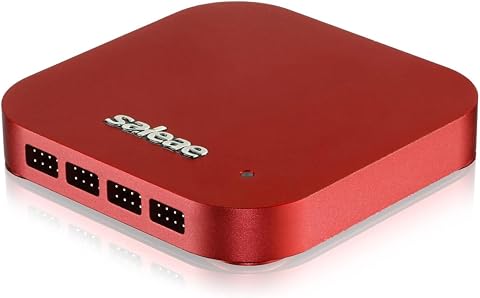
This logic analyzer provides 16 configurable digital and analog inputs, with support for SPI, I2C, and more than 23 additional protocol decoders. It captures digital signals at up to 500 MS/s and analog signals at up to 50 MS/s, and connects to Mac, Windows, and Linux systems via USB 3.0.
Pros:
- 16 configurable digital and analog inputs
- Supports a wide range of protocol decoders
- High digital and analog sampling rates
- Compact aluminum design for portability
Cons:
- Captures depend on PC memory
- Requires a USB 3.0 connection
Best for: Developers tracing several digital signals on compatible hardware
Not ideal for: Work that requires analog waveform measurements
Bottom line: Choose the Logic Pro 16 when its channel count, input limits, and software fit the signals you need to inspect.
USB protocol analyzer
USB-C debugging often involves understanding what a connected device reports or how charging behavior changes across a setup. A USB protocol or charging tester can make relevant connection information visible without relying only on application symptoms. The ChargerLAB Power-Z KM003C USB-C Charging Tester is the pick named for this slot. Confirm the exact functions it supports and the USB-C configurations you need to examine; the product name alone does not establish compatibility with every device or protocol. Match the tester to your USB-C use case.
A frequent buying mistake is treating a charging tester as a complete USB data analyzer or assuming it supports every cable, charger, and device combination. Check documented measurement ranges, supported charging standards, directionality, and whether pass-through operation is appropriate for the equipment under test. Consider connector orientation and whether the tester’s physical form will fit alongside nearby ports or enclosures. Test with compatible equipment and follow the device guidance to avoid interrupting sensitive systems. Check supported standards and pass-through behavior before relying on it for a particular diagnosis.
What to look for:
- Verify the USB-C functions and protocols documented for the model.
- Check measurement ranges against the chargers and devices involved.
- Confirm whether pass-through testing fits the setup.
- Consider port spacing and connector orientation.
- Review compatibility with the cables and equipment you plan to test.
ChargerLAB Power-Z KM003C USB-C Charging Tester
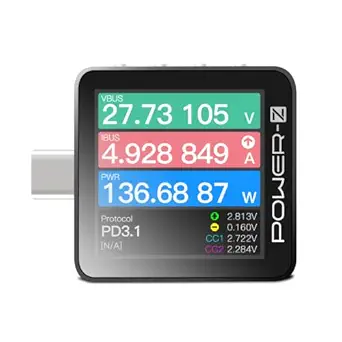
A USB-C tester for measuring voltage, current, capacity, and energy, and for checking E-markers, PDOs, and charging protocols. It supports up to 50 V and 6 A, features a 1.54-inch rotating LCD, and connects to a PC for data analysis.
Pros:
- Supports multiple electrical, capacity, and protocol tests
- Handles up to 50 V and 6 A
- Large rotating display and PC software support
Cons:
- Designed for USB-C testing, limiting compatibility with other connector types
- PC software and manual must be obtained from the official website
Best for: Investigating compatible USB-C charging setups
Not ideal for: Diagnosing unrelated interfaces or unsupported USB behaviors
Bottom line: Pick the KM003C when its documented USB-C features match the charger and device behavior you need to examine.
Portable oscilloscope
An oscilloscope helps reveal how a signal changes over time, which can clarify problems that static readings or software logs leave unresolved. A portable model may suit field work or benches where a full-size setup is inconvenient, but portability does not remove the need to check measurement limits. The Siglent Technologies SHS810X Handheld Oscilloscope, 100 MHz, 2CH, 1 GS is the named pick. Confirm its specifications against the signals you intend to capture. Bandwidth and sample rate must fit the signal.
A common mistake is choosing an oscilloscope by headline specifications alone without checking probe attenuation, input ratings, record length, trigger options, and channel needs. Verify that the included or selected probes support the voltage and frequency ranges involved, and account for grounding and isolation requirements in your setup. Two channels may be enough for comparing a pair of signals but not for a larger simultaneous capture. Review the full model documentation and consider whether the handheld form fits your environment and measurement routine. Probe and input limits matter as much as the scope.
What to look for:
- Compare bandwidth and sample rate with the signals under test.
- Check channel count for simultaneous measurements.
- Verify probe ratings, attenuation, and connector compatibility.
- Review trigger and capture options for the fault pattern.
- Confirm the input and grounding requirements for your setup.
Siglent Technologies SHS810X Handheld Oscilloscope, 100 MHz, 2CH, 1 GSa/s, Multi

The Siglent SHS810X is a portable handheld oscilloscope with a 5.6-inch display, offering 100 MHz bandwidth, dual channels, and a multimeter function. It features intelligent triggers, high sampling rates, and a long-lasting lithium battery for versatile testing and measurement tasks.
Pros:
- Portable and lightweight design for field use
- High sampling rate ensures accurate measurements
- Multimeter functions add versatility
- User-friendly front panel controls
Cons:
- Limited bandwidth for advanced high-frequency testing
- Display resolution may be basic for detailed analysis
- Battery life details are not specified
Best for: Capturing compatible signals away from a fixed bench
Not ideal for: Setups needing more than two simultaneous channels
Bottom line: Choose the SHS810X if its documented channel, bandwidth, and probe capabilities match your measurements.
Digital multimeter
A digital multimeter is a practical first tool for checking electrical conditions such as voltage, continuity, and other supported measurements. A clamp meter can add a way to assess current without placing the meter in series, subject to the model’s documented capabilities and safe-use guidance. The Fluke 117/323 Multimeter and Clamp Meter Combo Kit – Residential & Com is the named pick. Its product name is truncated, so verify the complete kit contents and exact model details before purchase. Confirm the included instruments and functions.
Do not assume that every multimeter supports every measurement or that a clamp meter can read every conductor arrangement. Check measurement categories, ranges, lead ratings, clamp capabilities, and safety requirements against the electrical work you plan to do. A common mistake is selecting a meter for a familiar task without verifying whether its ratings suit the environment. For development and QA work, also check whether probes can reach the test points and whether the tool supports the readings you need. Follow manufacturer instructions and appropriate electrical safety practices. Match the ratings to the circuit and task.
What to look for:
- Confirm the full product name, exact models, and kit contents.
- Check supported measurement types and ranges.
- Verify meter and lead safety ratings for the intended work.
- Review clamp capabilities and conductor requirements.
- Make sure probes fit the test points in your equipment.
Fluke 117/323 Multimeter and Clamp Meter Combo Kit – Residential & Commercial El

The Fluke 117/323 combo kit pairs a true‑RMS digital multimeter with a 400 A clamp meter for comprehensive troubleshooting of AC and DC voltage and current. Both instruments feature low input impedance to eliminate ghost voltage readings and are housed in a durable soft carrying case for easy transport.
Pros:
- True RMS measurement for accurate readings on non‑linear loads
- Low input impedance reduces false ghost voltage readings
- Includes both a multimeter and a 400 A clamp meter plus test leads and case
- Durable soft carrying case simplifies transport and protects equipment
Cons:
- Relatively large and heavy for field use
- Alkaline batteries may require frequent replacement in high‑usage scenarios
Best for: Users needing compatible meter and clamp functions
Not ideal for: Tasks outside the kit’s documented ratings or measurements
Bottom line: Verify the full kit details and ratings before choosing this combo for your electrical checks.
Thermal imaging camera
Thermal imaging can help locate areas of differing surface temperature when a fault may be associated with heat. It can add context to inspections, but it does not by itself identify the electrical or mechanical cause. The named pick is the DJI Matrice 4T Professional Drone with Thermal Imaging, Hybrid Zoom, a, whose product name is truncated. Confirm that this is the intended product and review its full specifications and intended operating requirements before treating it as a fit for developer diagnostics. Verify the exact product and use case.
A common mistake is assuming a thermal view gives a definitive temperature reading for every material or reveals faults hidden from the camera. Check documented thermal capabilities, image and measurement functions, operating constraints, and whether the setup is appropriate for the inspection environment. Since this pick is a drone, also consider whether an aerial platform suits the location and the access you need; it may not be a practical fit for bench-level component checks. Confirm applicable operating requirements for the intended area and follow the manufacturer’s guidance. Consider access, measurement needs, and operating conditions.
What to look for:
- Verify the complete product name and exact model.
- Check documented thermal imaging and measurement functions.
- Assess whether a drone is suitable for the inspection location.
- Confirm operating requirements and environmental constraints.
- Consider whether the target surface and access allow useful imaging.
DJI Matrice 4T Professional Drone with Thermal Imaging, Hybrid Zoom, and RTK Mod

The DJI Matrice 4T is a compact, intelligent multi-sensor drone designed for industrial applications such as electricity inspection, emergency response, and public safety. It features a sophisticated camera system including wide-angle, medium telephoto, and telephoto lenses, alongside a high-resolution infrared thermal camera and laser distance meter.
Pros:
- Versatile multi-sensor payload with wide-angle, telephoto, and thermal imaging capabilities
- High-precision laser distance meter with a measuring range up to 1800 meters
- Compact carbon fiber construction suitable for various industrial applications
- AI-driven flight operations enhance safety and detection reliability
Cons:
- Heavy weight of 15 kg may limit portability compared to consumer drones
- Specialized industrial focus makes it less suitable for casual hobbyist use
Best for: Inspections where a drone platform fits the environment
Not ideal for: Close-up bench diagnosis of individual components
Bottom line: Confirm the full Matrice 4T details and operating fit before selecting it for thermal diagnostics.
Network cable tester
Cable verification can help narrow down whether a network connection problem lies in the cabling or its termination. A tester designed for copper cabling may make checks more direct than swapping cables and hoping the fault disappears. The Fluke Networks MicroScanner2 Copper Cable Verifier with Built-In Intel is the named pick, though its product name is truncated. Verify the complete model name and supported cable types, connectors, and test functions. Confirm the cabling it can verify.
A common mistake is assuming a cable verifier tests every aspect of network performance or supports every cable category and wiring configuration. Review the model documentation for the checks it performs, the connectors it accepts, and any remote or accessory requirements. Consider whether you need basic verification, fault location, or tests beyond the product’s documented scope. Check that its interface and included parts fit your field workflow, and confirm that the cables you commonly handle are supported. Match its test functions to the fault you need to isolate.
What to look for:
- Confirm the complete product name and exact model.
- Check supported copper cable types and connectors.
- Review the documented verification and fault-finding functions.
- Verify whether remote units or accessories are needed.
- Compare supported tests with the network issue you are diagnosing.
Fluke Networks MicroScanner2 Copper Cable Verifier with Built-In IntelliTone Ton

The MicroScanner2 Cable Verifier tests copper cables for length, wiremap, cable ID, and faults. It supports troubleshooting for RJ11, RJ45, coax, and network speeds up to 10/100/1000Base-T, including VoIP applications.
Pros:
- Comprehensive cable testing features
- Displays cable length and faults on one screen
- Supports multiple cable types and network speeds
Cons:
- Limited to copper cable verification
- No mention of wireless testing capabilities
Best for: Checking supported copper network cabling
Not ideal for: Testing cable types or network properties outside its documented scope
Bottom line: Choose the MicroScanner2 when its supported cable types and verification functions match your network checks.
Build your kit in the order your troubleshooting requires: start with a meter for electrical checks or a cable verifier for suspected network wiring, then add a logic analyzer, USB-C tester, or oscilloscope when the fault points to signals or device communication. Consider thermal imaging when heat patterns and the inspection environment make it relevant. Let the recurring fault determine the buying order, and confirm compatibility before expanding the toolkit.
You do not need every instrument to investigate a specific problem well. Begin with the tool that can observe the behavior you are trying to understand, and use its documentation to check fit, limits, and safe operation. A focused checklist makes the next diagnostic step clearer; add tools as your work calls for them.