Developers comparing wireless earbuds are usually choosing between a quieter work bubble and a smoother connection to the devices they already use. The Bose QuietComfort Ultra Earbuds and Apple AirPods Pro 2 both offer active noise cancellation, transparency modes, and wireless calling, but they serve different working habits. Bose is the stronger choice for blocking a noisy office or frequent travel; AirPods Pro 2 make more sense for developers who move between a Mac, iPhone, and other Apple devices and want calls and controls to feel straightforward. Neither pair replaces a dependable desk microphone for every meeting, so the deciding question is how you work away from your desk and which compromises you notice most.

Get business pricing on monitors, keyboards and dev gear
- Business-only prices and quantity discounts
- Tax-exempt purchasing
- Multiple users, one account, clear invoices

Samsung Galaxy Buds 4 Pro (2026) AI True Wireless Bluetooth Earbuds, Black
- ✔ Noise control: Adaptive Active Noise Cancellation 2.0
- ✔ Speaker design: Two-way speakers: tweeter and woofer per earbud
- ✔ Water and dust rating: IP57; case is not water resistant
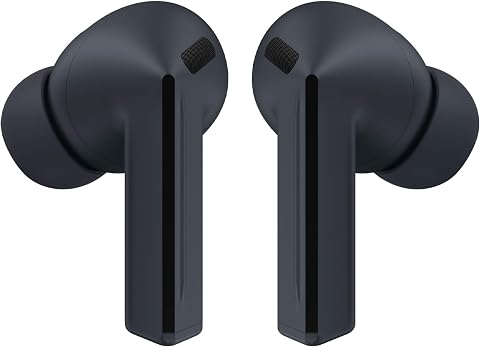
Samsung Galaxy Buds 3 FE (2025) True Wireless Bluetooth Earbuds, Black
- ✔ Noise control: Active Noise Cancellation and Ambient mode
- ✔ Driver: 11 mm dynamic speaker
- ✔ Battery: Up to 8.5 hours ANC off; up to 30 hours with case

JBL Vibe Beam – True Wireless Earbuds – Black
- ✔ Driver: 8 mm dynamic driver
- ✔ Battery: Up to 8 hours earbuds plus 24 hours case
- ✔ Quick charge: 10 minutes provides up to 2 extra hours, per listing
At a Glance
| Criteria | Bose QuietComfort Ultra Earbuds | Apple AirPods Pro 2 | Winner |
|---|---|---|---|
| Noise cancellation | Very strong isolation, particularly useful in louder spaces | Strong ANC with adaptive modes and effective transparency | A |
| Comfort for long sessions | Secure fit, but bulkier buds and case may bother some ears | Compact design with several tip sizes; individual fit still matters | Depends |
| Calls and microphone | Useful for casual calls; results vary with wind and background noise | Convenient voice isolation and Apple call controls | B |
| Device switching | Bluetooth multipoint support can connect two devices | Automatic switching is especially smooth among Apple devices | B |
| Battery and charging | Around six hours per charge with ANC; case adds several charges | Around six hours per charge with ANC; case adds several charges | Tie |
| Controls and work features | Immersive audio and adjustable modes; fewer Apple-specific conveniences | Useful Apple features, including Find My and conversation-aware modes | B |
| Value | Worth the premium when quiet is the top priority | Better value for Apple users who will use its ecosystem features | Depends |
Samsung Galaxy Buds 4 Pro (2026) AI True Wireless Bluetooth Earbuds, Black
For developers who spend long stretches in noisy spaces, adaptive ANC 2.0 makes the Buds4 Pro the strongest focus-oriented option in this group. The two-way speaker design, with a tweeter and woofer in each bud, also gives these a more ambitious audio setup than the single-driver Buds3 FE and JBL Vibe Beam. That difference may matter when we switch between coding playlists, video calls, and detailed listening after work, though it does not guarantee better meeting audio by itself.Samsung lists HD Voice with Galaxy S26 Series, hands-free AI features, and live translation, but several capabilities need compatible Samsung devices or app setup. Developers working mainly on a non-Galaxy laptop should check those requirements before treating the ecosystem features as a reason to buy. The Buds3 FE also offer Galaxy switching and hands-free assistance, so the Pro model earns its lead through adaptive ANC, dual speakers, and IP57 water-and-dust resistance rather than exclusive productivity basics.The tradeoff is that this is the most ecosystem-dependent choice in the roundup. We also do not have a stated battery runtime in the supplied details, so we cannot rank it against the FE or JBL on endurance. Choose it when quieter focus and richer playback outweigh those unknowns; skip it if broad cross-platform handoff or verified runtime is your main requirement.
Pros:
- Adaptive ANC 2.0 is designed to respond to changing surroundings.
- Two-way speakers pair a tweeter with a woofer in each earbud.
- IP57 rating offers more water and dust protection than the other listed models.
- Touch gestures cover calls, volume, and other controls.
Cons:
- Several AI and setup features depend on compatible Galaxy devices.
- The supplied listing does not state a battery runtime.
- Charging case is not water resistant.
Best for: Developers using compatible Galaxy phones who want adaptive noise cancellation, premium audio architecture, and stronger water-and-dust resistance.
Not ideal for: People who primarily work on non-Samsung devices, need a confirmed battery-runtime figure, or want the simplest cross-platform setup.
Bottom line: Choose the Buds4 Pro for Galaxy-centered work where adaptive ANC and the two-way speaker design matter more than platform flexibility or a confirmed runtime.
“Choose the Buds4 Pro for Galaxy-centered work where adaptive ANC and the two-way speaker design matter more than platform flexibility or a confirmed runtime.”
Samsung Galaxy Buds 3 FE (2025) True Wireless Bluetooth Earbuds, Black
The Buds3 FE make the most sense for developers already working across a Galaxy phone, tablet, and supported Galaxy Book PC. Samsung says they can automatically switch among compatible Galaxy devices after setup, which can reduce friction when a coding session gives way to a call on the phone. That is a meaningful advantage over the JBL Vibe Beam, whose supplied description focuses on Bluetooth listening rather than ecosystem handoff.They also cover everyday desk needs with active noise cancellation, ambient mode, an added microphone, and enhanced background-noise reduction for calls. The listed maximum of 8.5 hours with ANC off and up to 30 hours total with the case gives us a more concrete runtime reference than the Buds4 Pro listing, though ANC use affects the earbud figure. A larger 11 mm dynamic speaker emphasizes powerful sound, but this is a single-driver design rather than the Pro model’s separate tweeter and woofer.There are meaningful limits. Automatic switching is for compatible Galaxy hardware, and several features—including Gemini access and live translation—need supported devices, accounts, or apps. Its IPX4 rating is also less protective than the Buds4 Pro’s IP57. Choose the FE for a practical Galaxy work setup; consider the JBL if you care more about its stated case-inclusive battery figure than Samsung integrations, or the Pro if adaptive ANC and ruggedness are priorities.
Pros:
- ANC and ambient mode support focused listening and environmental awareness.
- Enhanced background-noise reduction and an added microphone target clearer calls.
- Samsung describes automatic switching among supported Galaxy devices.
- Up to 8.5 hours playback with ANC off and up to 30 hours total with case are listed.
Cons:
- Automatic switching and several assistant features require compatible Galaxy devices or accounts.
- IPX4 protection is below the Buds4 Pro’s IP57 rating.
- The stated 8.5-hour earbud runtime is with ANC off.
Best for: Galaxy users who move between supported Samsung devices and want a balanced set of ANC, call, and ambient features.
Not ideal for: Developers who use a mix of non-Galaxy devices, need stronger water-and-dust protection, or prioritize a dual-speaker audio design.
Bottom line: Pick the Buds3 FE when Galaxy device switching and solid workday features matter more than the Pro model’s adaptive ANC and higher protection rating.
“Pick the Buds3 FE when Galaxy device switching and solid workday features matter more than the Pro model’s adaptive ANC and higher protection rating.”
JBL Vibe Beam – True Wireless Earbuds – Black
The Vibe Beam is the least ecosystem-dependent pick here: its listed compatibility includes laptops, PCs, phones, and tablets, and its workday appeal centers on basic listening rather than Samsung-specific handoff or AI. JBL claims up to 32 hours total—eight hours in the earbuds plus 24 in the case—and says a 10-minute speed charge adds two hours. Those figures give us a useful endurance benchmark, although actual runtime depends on use.For a developer in a shared workspace, TalkThru and Ambient Aware offer a way to hear people or surroundings without taking the buds out. The closed stick design is described as comfortable and helps exclude external sounds, but it is not active noise cancellation. That distinction matters: unlike both Samsung models, the JBL does not list ANC as a main feature, so it is a weaker choice when blocking office chatter is the main goal.Its 8 mm drivers and Deep Bass tuning suit casual playlists, while VoiceAware lets callers adjust how much of their own voice they hear. Yet the supplied description provides less specific call-noise processing than the Samsung models, and it does not offer their advanced Galaxy features. Choose this pair for uncomplicated Bluetooth use and a clear stated battery figure; move up to the Buds3 FE for ANC and Galaxy switching, or the Buds4 Pro for adaptive noise control and IP57 protection.
Pros:
- Up to 32 hours total listening time is claimed, including the case.
- Speed charging is listed as adding two hours in 10 minutes.
- TalkThru and Ambient Aware support quick conversations and environmental awareness.
- VoiceAware provides control over hearing one’s own voice during calls.
Cons:
- No active noise cancellation is listed; the closed fit provides passive sound exclusion.
- The listing gives less specific call-noise handling than the Samsung models.
- No ecosystem handoff or assistant integration is described.
Best for: Developers seeking simple Bluetooth earbuds with a stated long case-inclusive runtime and quick ambient listening controls.
Not ideal for: People who need active noise cancellation, Samsung device switching, or detailed call-noise reduction claims.
Bottom line: Choose the Vibe Beam for straightforward Bluetooth listening and its stated battery endurance, provided passive isolation is enough for your workspace.
“Choose the Vibe Beam for straightforward Bluetooth listening and its stated battery endurance, provided passive isolation is enough for your workspace.”
As an Amazon Associate we earn from qualifying purchases.
Key Differences
The largest practical difference is how each pair handles a work environment. Bose aims to reduce surrounding sound as much as possible, making it appealing for open offices, shared homes, and travel. AirPods Pro 2 also cancel noise effectively, but add a more flexible set of Apple features around calls, switching, and awareness of nearby conversation. If you spend most of the day at a quiet desk, Bose’s advantage may rarely earn its price premium. If you often code in changing environments, both the sound control and convenient device behavior matter.
For a developer, smooth handoffs can matter as much as audio quality. AirPods Pro 2 are an easy fit for someone who takes a call on an iPhone, returns to a Mac, and wants the earbuds to follow along. Bose offers multipoint Bluetooth, which is useful across devices from different brands, though it is not the same as Apple’s automatic switching. Comfort and call quality are more personal: a secure Bose fit may work better for one listener, while another will prefer the smaller AirPods design. Try the fit if possible, especially for extended coding sessions.
Both are premium earbuds with broadly similar advertised listening time per charge, so battery capacity alone does not settle the decision. The value comes from the features you will use every day. Pay more for Bose when its stronger isolation solves a recurring focus problem. Choose AirPods Pro 2 when Apple integration, quick calls, and a compact case matter more. If you primarily work at a desk and already own a good headset or microphone, neither may justify replacing your current setup.
Detailed Comparison
Noise cancellation (Bose QuietComfort Ultra Earbuds wins — moderate)
Bose wins for developers who need the quietest possible listening environment, such as in a busy coworking space or on a flight. The gap is moderate: AirPods Pro 2 also provide strong ANC, and many users will find them sufficient for office hum or transit. Bose’s edge matters most when unpredictable noise repeatedly interrupts concentration; it matters less in a quiet home office.
Comfort for long sessions (moderate difference)
There is no reliable universal winner because ear shape and tip seal determine whether an earbud stays comfortable. AirPods Pro 2 have a compact profile and multiple tip sizes; Bose aims for a secure fit but has a bulkier design. The difference is moderate for people wearing earbuds for hours and minor for short listening blocks. A comfortable fit also affects the seal and, in turn, noise cancellation.
Calls and microphone (Apple AirPods Pro 2 wins — moderate)
AirPods Pro 2 have the advantage for frequent calls in the Apple ecosystem, with convenient call controls and voice-focused processing. Bose can handle everyday calls, but neither pair should be treated as a guaranteed substitute for a dedicated microphone in a noisy room. The gap is moderate: choose AirPods if you often take quick calls while moving between Apple devices, and use a desk mic when meeting audio quality is a priority.
Device switching (Apple AirPods Pro 2 wins — moderate)
AirPods Pro 2 win for users moving between a Mac, iPhone, and other Apple devices because automatic switching reduces manual connection steps. Bose supports multipoint Bluetooth, which can be more useful when pairing with two devices across different platforms. This is a moderate difference: Apple users benefit from AirPods, while mixed-platform developers may prefer Bose’s broader approach.
Battery and charging (minor difference)
These models are broadly similar in advertised listening time with noise cancellation enabled, with each charging case extending total use. Real results vary with volume, calls, and settings. The difference is minor for a typical workday with case breaks, so check current manufacturer specifications and charging habits rather than choosing on battery claims alone.
Controls and work features (Apple AirPods Pro 2 wins — moderate)
AirPods Pro 2 win for Apple users who value convenient controls, Find My support, and modes that help balance listening with awareness of nearby speech. Bose offers customizable listening modes and immersive audio, which suit people who want to shape their sound experience. The advantage is moderate and depends on workflow: Apple features help with frequent device and call changes, while Bose’s emphasis is on listening control.
Value (moderate difference)
Neither is automatically the better value because discounts and regional pricing change the comparison. AirPods Pro 2 deliver more practical value to developers already invested in Apple devices; Bose earns its premium when its noise cancellation materially improves focus. The difference is moderate: pay extra for a clear daily benefit, not for features that duplicate tools you already have.
Bose QuietComfort Ultra Earbuds: Pros and Cons
Pros:
- Very strong noise cancellation for loud offices and travel
- Multipoint Bluetooth is useful for connecting two different devices
- Customizable modes and immersive audio
Cons:
- Bulkier buds and case may not suit every wearer
- Apple-specific device handoffs are less seamless
- Premium cost is harder to justify in already quiet workspaces
Apple AirPods Pro 2: Pros and Cons
Pros:
- Smooth switching and convenient controls across Apple devices
- Strong ANC alongside useful transparency and awareness features
- Compact design and case
Cons:
- Automatic switching advantages shrink outside the Apple ecosystem
- Fit and long-session comfort still depend on the wearer
- May cost more than necessary if ecosystem features go unused
Who Should Choose What
Choose Bose QuietComfort Ultra Earbuds if:
- You code in a noisy open office, shared home, or while traveling and want the strongest isolation.
- You routinely pair earbuds with two devices from different platforms.
- Immersive listening modes matter more to you than Apple-specific convenience.
Choose Apple AirPods Pro 2 if:
- You use a Mac and iPhone and want calls and listening to move between them with minimal effort.
- You take frequent calls while away from your desk and value quick access to Apple call features.
- A compact case and everyday awareness modes matter more than the last increment of noise blocking.
Skip both if: You mainly work at a quiet desk, need broadcast-quality meeting audio, or prefer an over-ear headset for comfort and dependable microphone performance.
Value for Money
Pay more for Bose only if its stronger noise cancellation addresses a real distraction in your workday. In a loud shared office or on regular flights, fewer interruptions can make the premium worthwhile. For an Apple-centered workflow, AirPods Pro 2 are usually the better value because automatic switching, call controls, and location features add practical benefits beyond listening. Check current sale prices before deciding: if the price gap is large and your workspace is quiet, AirPods or a less expensive pair may be the more sensible purchase.
Final Verdict
For most developers who use Apple hardware, choose AirPods Pro 2: they pair strong noise control with easier switching and practical call features. Choose Bose QuietComfort Ultra Earbuds if your main problem is loud surroundings and better isolation would improve focus every day, or if multipoint pairing across mixed devices fits your setup. The biggest deciding factor is not which pair has more features; it is whether you need Bose’s extra quiet or Apple’s smoother handoffs. If neither advantage would change your workday, skip both and keep using a comfortable headset or earbuds you already own.
Frequently Asked Questions
Which earbuds are better for coding in a noisy office?
Bose QuietComfort Ultra Earbuds are the stronger pick when reducing background noise is the priority. AirPods Pro 2 still offer effective ANC and may be enough for ordinary office noise, so the difference matters most in louder or less predictable spaces.
Are AirPods Pro 2 a good choice with a Windows laptop?
They can connect over Bluetooth, but the smooth switching and Apple-specific features are most useful with Apple devices. For a Windows-focused or mixed-platform setup, compare comfort and multipoint needs closely; Bose supports connections to two devices.
Can either pair replace a headset for developer meetings?
Both can handle everyday calls, but results depend on background noise, fit, and microphone expectations. For frequent important meetings, a dedicated desk microphone or headset is a safer choice for consistent voice quality.
Which pair is more comfortable for all-day wear?
There is no dependable winner for every ear. AirPods Pro 2 are more compact, while Bose emphasizes a secure fit. Try both if possible and test the seal and pressure over a longer session before committing.