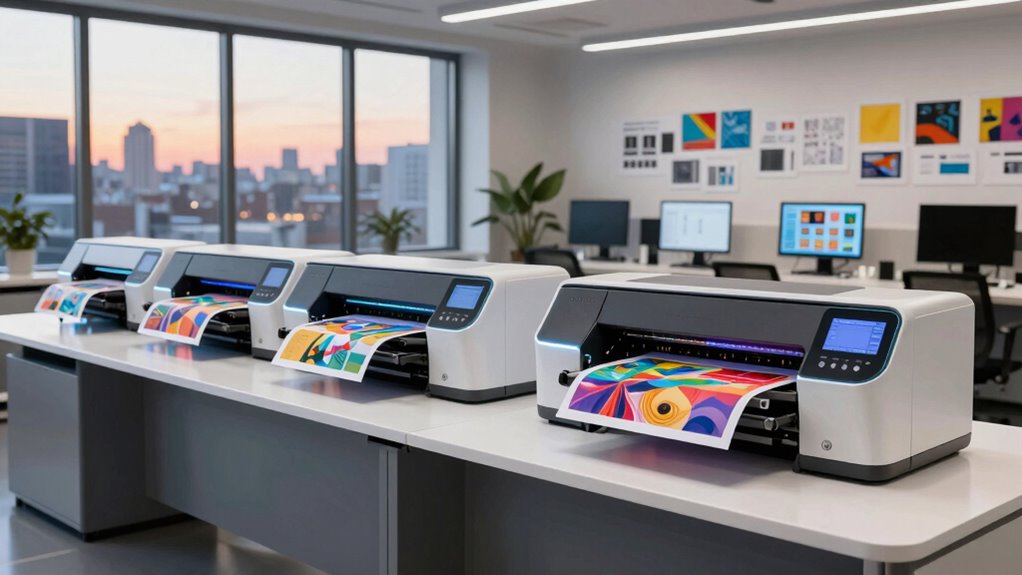

Choosing the right large format printer for a design studio depends on your specific needs—whether it’s high-resolution posters, outdoor signage, or technical plotting. The Canon imagePROGRAF TM-240 stands out for its sharp detail and outdoor durability, making it perfect for signage and professional graphics. The HP DesignJet T650 offers fast turnaround and excellent media versatility, ideal for architects and engineers. Meanwhile, the Epson EcoTank ET-8550 provides a cost-effective, high-capacity solution for creative projects with frequent color printing. Tradeoffs include higher upfront costs, complex setups, and dedicated use cases, so I’ll walk through which model best suits different studio workflows.

Get business pricing on monitors, keyboards and dev gear
- Business-only prices and quantity discounts
- Tax-exempt purchasing
- Multiple users, one account, clear invoices
Key Takeaways
- The Canon imagePROGRAF TM-240 excels in outdoor signage with water- and UV-resistant inks.
- The Epson EcoTank ET-8550 offers high-volume, cost-efficient printing, especially for colorful graphics.
- The HP DesignJet T650 balances speed and media flexibility, ideal for technical drawings.
- The HP DesignJet T210 is a compact choice for poster and CAD printing on a smaller scale.
- Deciding depends on whether priority is high resolution, speed, cost, or media versatility.
| Canon imagePROGRAF TM-240 24-Inch Large Format Printer |  | Best for outdoor signage and high-detail professional graphics | Printer Type: Large Format Printer | Print Size: 24 inches | Resolution: 2400 x 1200 dpi | VIEW ON AMAZON | See Our Full Breakdown |
| Epson EcoTank Photo ET-8550 Wireless Wide-Format All-in-One Tank Printer |  | Best for cost-effective, high-volume creative printing | Printer Type: All-in-One | Connectivity: Wireless | Print Size: Wide-Format | VIEW ON AMAZON | See Our Full Breakdown |
| HP DesignJet T650 Large Format 36-inch Plotter Printer, Includes 2-Year Onsite Warranty Support |  | Best for technical drawings and professional engineering prints | Media Sizes: Up to 36-inch wide media rolls | Media Handling: Sheet feed, roll feed, automatic switch | Connectivity: Gigabit Ethernet, Wi-Fi 802.11 | VIEW ON AMAZON | See Our Full Breakdown |
| HP DesignJet T210 Large Format 24-inch Poster Printer |  | Best for posters, CAD, and blueprints on a smaller scale | Media Size: Up to 24-inch wide media | Maximum Sheet Size: 13 x 19 inches | Print Speed: Up to 45 seconds per page | VIEW ON AMAZON | See Our Full Breakdown |
| HP DesignJet T630 Large Format 36-inch Plotter Printer with Auto Sheet Feeder, Media Bin & Stand |  | Best for technical drawings and maps with automation features | Media Size: Up to 36-inch wide media | Media Handling: Sheet feed, roll feed, auto switch | Connectivity: Gigabit Ethernet, Wi-Fi 802.11 | VIEW ON AMAZON | See Our Full Breakdown |
| large format printers for design studio | Included Ink | Print Speed | Connectivity | Media Handling |
|---|---|---|---|---|
| Canon imagePROGRAF TM-240 24-I | — | up to 3.2 ppm | — | — |
| Epson EcoTank Photo ET-8550 Wi | Up to 2 years of ink in the box | — | Wireless | — |
| HP DesignJet T650 Large Format | HP 712 Original Ink cartridges | Up to 25 seconds per page | Gigabit Ethernet, Wi-Fi 802.11 | Sheet feed, roll feed, automatic switch |
| HP DesignJet T210 Large Format | HP 712 Original Ink cartridges | Up to 45 seconds per page | — | Sheet feed, roll feed |
| HP DesignJet T630 Large Format | HP 712 cartridges | — | Gigabit Ethernet, Wi-Fi 802.11 | Sheet feed, roll feed, auto switch |
More Details on Our Top Picks
Canon imagePROGRAF TM-240 24-Inch Large Format Printer
The Canon imagePROGRAF TM-240 stands out for its combination of high-resolution output and durability, thanks to 6-channel printheads and UV-resistant inks. Compared with the HP T210 or Epson ET-8550, this model is more suited for applications requiring outdoor resilience and large-format precision. The main tradeoff is its higher initial cost and focus on professional or commercial workflows, which might not appeal to smaller studios with simpler needs.
Pros:- High-resolution 2400 x 1200 dpi for sharp detail
- Fast print speeds up to 3.2 ppm
- Water- and UV-resistant inks for outdoor durability
- Automatic media calibration for consistency
Cons:- Primarily designed for professional or commercial use
- High upfront investment
Best for: Design studios needing outdoor signage, posters, or high-detail graphics
Not ideal for: Small studios or those prioritizing budget or casual printing needs
- Printer Type:Large Format Printer
- Print Size:24 inches
- Resolution:2400 x 1200 dpi
- Print Speed:up to 3.2 ppm
- Ink Type:5-color water- and UV-resistant ink
- Nozzles:15,360
Our verdict“A top choice for studios needing durable, high-quality large-format prints with maximum detail.”
Epson EcoTank Photo ET-8550 Wireless Wide-Format All-in-One Tank Printer
The Epson EcoTank ET-8550 offers a compelling blend of affordability and quality, especially with its refillable ink system that reduces waste and ongoing costs. Compared with the Canon TM-240, it’s less suitable for outdoor signage but excels in producing vibrant, high-quality photos and colorful graphics for studio projects. Its larger footprint and complex setup are tradeoffs to consider for smaller studios with limited space or less technical expertise.
Pros:- Cartridge-free, refillable ink bottles cut costs and waste
- High-capacity ink yields up to 6,200 color pages
- Wireless connectivity for flexible placement
Cons:- Setup may be complex for some users
- Larger physical size requires ample space
- Higher upfront cost compared to traditional inkjet printers
Best for: Creative studios focused on cost-efficient, high-volume color printing
Not ideal for: Large outdoor signage or technical plotting that requires precise line accuracy
- Printer Type:All-in-One
- Connectivity:Wireless
- Print Size:Wide-Format
- Ink System:EcoTank, Refillable Ink Bottles
- Page Yield:Up to 6,200 color pages
- Included Ink:Up to 2 years of ink in the box
Our verdict“Best suited for creative environments that prioritize color volume and ongoing cost savings over outdoor durability.”
HP DesignJet T650 Large Format 36-inch Plotter Printer, Includes 2-Year Onsite Warranty Support
The HP DesignJet T650 offers a combination of speed, media flexibility, and ease of workflow, making it ideal for architects and engineers. Compared with the smaller T210 or the outdoor-focused Canon TM-240, this model excels at large, precise technical prints and maps. The main tradeoff involves its focus on technical plotting, which may limit its utility for high-resolution posters or creative graphics that demand richer color fidelity.
Pros:- Fast printing speeds—up to 25 seconds per page
- Supports media up to 36 inches wide
- Cost-efficient ink usage with high-quality output
- Remote management via software and mobile apps
Cons:- Limited to large format printing only
- Setup and configuration can be complex
- Requires compatible media rolls or sheets
Best for: Architects, engineers, and professionals printing technical documents rapidly
Not ideal for: Studio work focused on high-resolution posters or outdoor signage
- Media Sizes:Up to 36-inch wide media rolls
- Media Handling:Sheet feed, roll feed, automatic switch
- Connectivity:Gigabit Ethernet, Wi-Fi 802.11
- Print Speed:Up to 25 seconds per page
- Memory:1 GB
- Included Ink:HP 712 Original Ink cartridges
Our verdict“A reliable, fast, and media-flexible choice for technical and engineering workflows in busy studios.”
HP DesignJet T210 Large Format 24-inch Poster Printer
The HP DesignJet T210 offers a compact, straightforward solution for poster and CAD printing, with up to 24 inches of media width. It includes up to a year of ink, which helps control ongoing costs. Compared to the larger T650 or the Canon TM-240, it’s better for smaller studios or those with limited space but may be slow for high-volume jobs. Its simplicity makes it accessible but limits its versatility for other large-format applications.
Pros:- Includes up to 1 year of ink, reducing immediate costs
- Supports media up to 24 inches wide
- Easy-to-use software and mobile printing options
- Compact size fits small studios
Cons:- Limited to large-format printing only
- Print speed can be slow for high-volume needs
- Optional accessories needed for certain sheet sizes
Best for: Small design studios or professionals needing reliable poster and blueprint printing
Not ideal for: High-volume or outdoor signage projects
- Media Size:Up to 24-inch wide media
- Maximum Sheet Size:13 x 19 inches
- Print Speed:Up to 45 seconds per page
- Memory:500MB
- Included Ink:HP 712 Original Ink cartridges
- Media Handling:Sheet feed, roll feed
Our verdict“A practical, space-saving choice for smaller studios focused on posters and blueprints.”
HP DesignJet T630 Large Format 36-inch Plotter Printer with Auto Sheet Feeder, Media Bin & Stand
The HP DesignJet T630 combines large media support with automated sheet feeding and media management, making it suitable for busy technical environments. Compared with the T650, the T630 offers more automation and easier workflow integration, but it’s more limited in media handling options for creative projects. Its focus on automation and professional printing makes it ideal for engineering and architecture firms needing reliable, consistent output with minimal manual intervention.
Pros:- Supports media up to 36 inches wide
- Automatic sheet feeding and media handling
- Wireless and wired connectivity options
- Includes software for streamlined workflow
Cons:- Primarily designed for professional technical use
- Setup may require some technical knowledge
- Limited media types for non-technical applications
Best for: Architects, engineers, and technical professionals needing automation and high-volume large-format printing
Not ideal for: Casual or creative studio use that demands vibrant colors or outdoor durability
- Media Size:Up to 36-inch wide media
- Media Handling:Sheet feed, roll feed, auto switch
- Connectivity:Gigabit Ethernet, Wi-Fi 802.11
- Media Management:Media bin, horizontal cutter
- Included Ink:HP 712 cartridges
Our verdict“A reliable, automated large-format plotter perfect for high-volume technical printing in professional settings.”

How We Picked
Our selection process focused on printers that are best suited for design studios, emphasizing print quality, media versatility, speed, ease of workflow integration, and overall value. We compared specifications, real-world use cases, and the unique tradeoffs each model offers. Priority was given to devices that can handle a variety of media types and sizes, with options for both professional-grade and more accessible solutions. Cost considerations, ease of setup, and ongoing maintenance were also key factors in creating a balanced lineup.
| large format printers for design studio | Print Speed | Connectivity | Included Ink | Media Handling |
|---|---|---|---|---|
| Canon imagePROGRAF TM-240 24-I | up to 3.2 ppm | — | — | — |
| Epson EcoTank Photo ET-8550 Wi | — | Wireless | Up to 2 years of ink in the box | — |
| HP DesignJet T650 Large Format | Up to 25 seconds per page | Gigabit Ethernet, Wi-Fi 802.11 | HP 712 Original Ink cartridges | Sheet feed, roll feed, automatic switch |
| HP DesignJet T210 Large Format | Up to 45 seconds per page | — | HP 712 Original Ink cartridges | Sheet feed, roll feed |
| HP DesignJet T630 Large Format | — | Gigabit Ethernet, Wi-Fi 802.11 | HP 712 cartridges | Sheet feed, roll feed, auto switch |
Factors to Consider When Choosing Large Format Printers For Design Studios
When selecting a large format printer for a design studio, it’s important to consider the primary type of output you need—whether it’s high-resolution posters, outdoor signage, or technical drawings. Your workflow, budget, and space constraints also influence the best choice. This guide outlines key features to evaluate, including print quality, media versatility, speed, and ease of use, helping you match a printer to your specific studio demands.
Print Quality and Resolution
The clarity and detail of your prints depend heavily on resolution. For posters, photorealistic graphics, or outdoor signage, look for printers offering at least 2400 dpi. For technical drawings and blueprints, high precision and consistent line quality are more critical, so focus on models with excellent media handling and calibration features.
Media Compatibility and Size
Consider how wide the media needs to be and whether the printer supports rolls, sheets, or both. For larger posters and maps, a 36-inch model is ideal, but if space or budget is limited, a 24-inch printer can suffice. Make sure the printer supports your primary media types—vinyl, photo paper, or technical bond—and check for automation features like media feeders.
Speed and Workflow Integration
Fast turnaround times are vital in busy studios. Look for printers with quick print speeds, especially if you handle high-volume jobs. Connectivity options like Wi-Fi, Ethernet, and mobile apps streamline workflows, allowing remote printing and management without cumbersome setup. For technical and architectural workflows, software compatibility and remote management tools are equally important.
Cost of Operation and Maintenance
Initial costs vary widely, but ongoing expenses—ink, media, and maintenance—often make a significant difference. EcoTank systems and large ink cartridges reduce per-page costs, especially for color-heavy projects. Be aware of setup complexity and whether your studio has the technical capacity to maintain more sophisticated machines.
Frequently Asked Questions
What resolution should I look for in a large format printer for design work?
For high-quality posters and detailed graphics, seek out printers with at least 2400 dpi resolution. This ensures sharpness and clarity in your prints. For technical drawings or blueprints, precise media handling and calibration are more critical, so focus on models with those features rather than just resolution.
How important is media versatility in choosing a large format printer?
Media versatility allows you to print on a range of materials, from vinyl and photo paper to technical bonds. If your studio produces diverse outputs, a printer supporting multiple media types and sizes offers greater flexibility. Models with roll and sheet handling, along with automatic media switching, can save time and reduce setup hassles.
Is wireless connectivity essential for a large format printer?
Wireless connectivity adds convenience, enabling remote printing from multiple devices and reducing clutter from cables. It’s especially useful in collaborative studio environments or if space is limited. However, for high-volume, high-precision work, wired connections like Ethernet may offer more stability and speed.
Are larger printers always better for a design studio?
Not necessarily. Larger printers support bigger media and higher volume, but they also require more space and can be more complex to operate. Smaller, 24-inch models may suit small studios or those focusing on posters and blueprints. Your choice should match your typical output size and available workspace.
What are the ongoing costs of large format printers?
Beyond the initial purchase price, ongoing costs include ink, media, and maintenance. Ink systems like EcoTank or large cartridges can reduce per-print expenses. Consider the availability and cost of consumables and whether the printer offers features that minimize waste or simplify upkeep to keep your studio profitable over time.
Fall Picks
fall essentials
As an affiliate, we earn on qualifying purchases.